Months-Long Connectivity Issue -- Looking for Resolution/Escalation

I have had three tech visits in the past few months, all for the same issue, and when attempting to get resolution again, Spectrum requires a fourth tech visit, per Chat Support. I do not think a fourth visit is a good use of Spectrum's or my time.
The issue is 1-2 hourlong periods of repeated timeouts, nearly every single day, often multiple times per day. For example, this past week, every day Monday-Friday from ~9AM-11AM, my connection dropped every minute or so. I work from home, and each time there is a timeout, the work VPN disconnects and takes multiple minutes to reconnect, only to disconnect again due to another timeout.
In those three Spectrum tech visits, they have:
1) Re-ran the line from telephone pole to my home
2) Installed an outdoor "weather box" on the home for environmental protection
3) Clipped off the old outdoor-to-home connectors which were corroded and installed new ones
4) Removed an F-splitter in-home and replaced with a single barrel connector
5) Replaced the modem & router. The router was then replaced again on the third visit
6) Replaced the modem-to-router ethernet cables
7) Likely other things I am forgetting/not aware of
Tech visit #2 said maintenance was scheduled in my area and to wait a week before reporting another issue. After a week, the issue returned. This tech also said they would put a signal monitor on my account and that they'd "know there was an issue before [I would]." I have had no follow-up from Spectrum on this signal monitor, which should have the data to show the issue is still occuring.
Tech visit #3 (on 10/11/26) said they would put in a maintenance request on the node (not sure if it was the "node" exactly—but it would be a maintenance request for the network outside of my home). When I mentioned this to Chat Support, they said (paraphrasing) that there was no such request submitted.
Things I've tried repeatedly with no discernable impact:
- Reset the modem and router both remotely via my Spectrum online account and manually
- Disconnected all but one device from the network
- Connected my PC directly to the modem via ethernet cable
Given the frequency, timing (most noticeably and regularly from 9AM-11AM. Also afternoon/evening/overnight hours), and the work done above, I am doubtful that the issue is with equipment/connections in my home.
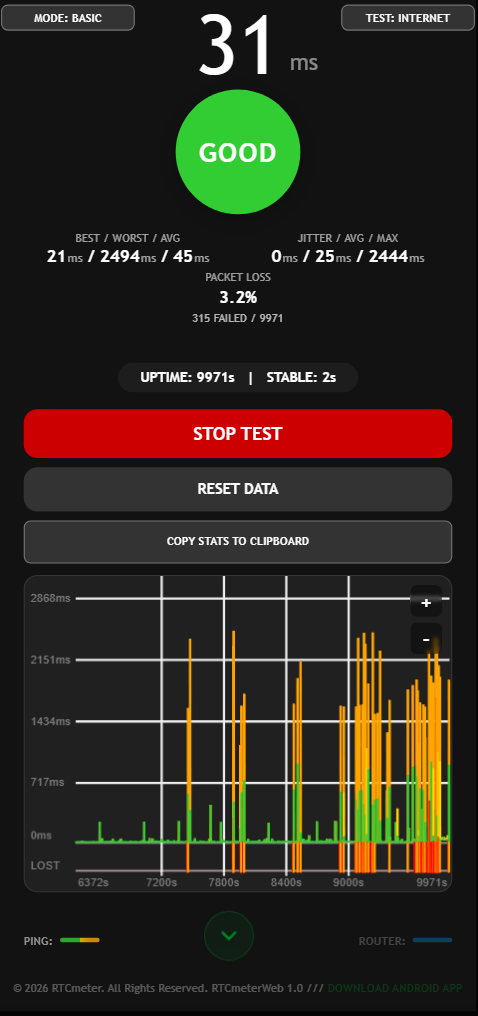
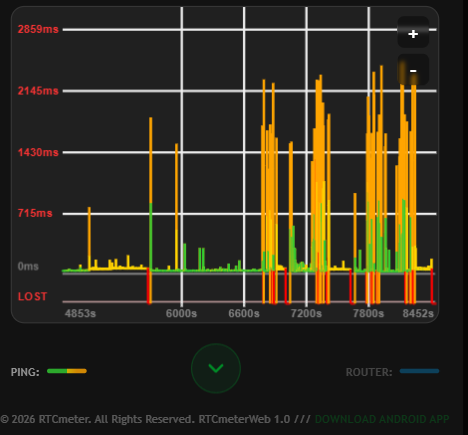
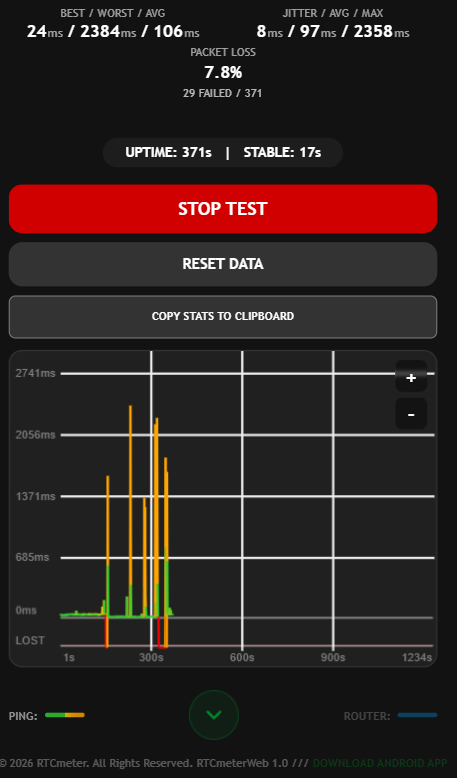
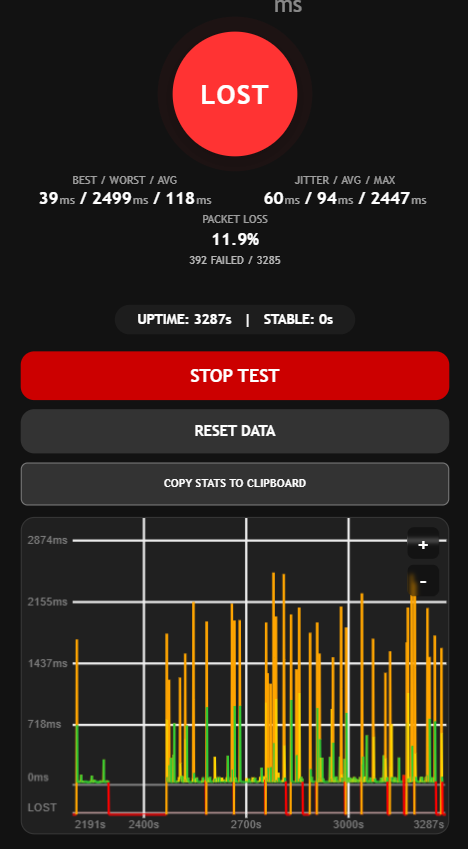
Below are screenshots of timeouts over time, captured via RTCmeter, an in-browser connection monitoring tool. These were taken from my desktop PC which is connected via ethernet cable to my router. No VPN active. Each yellow/red line is a timeout spike. This tool's indications of connection drops has perfectly aligned with observed connection drops on my other devices which are connected via WiFi. These are not the only timeouts I've experience but the ones that I captured screenshots of. It happens much more frequently than what is seen here.
10/11/26 at 11:30AM:
10/19/26 at 11PM:
10/20/26 at 9:23AM:
10/22/26 at 9PM:
10/23/26 at 9:48AM:
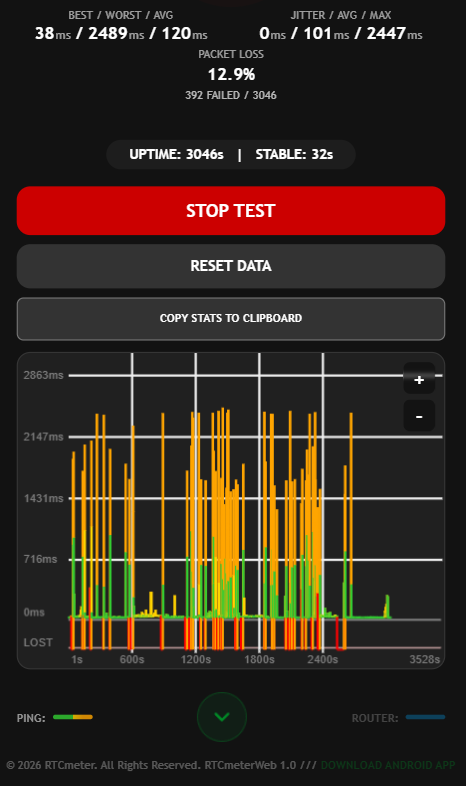
10/23/26 at 10:42AM:
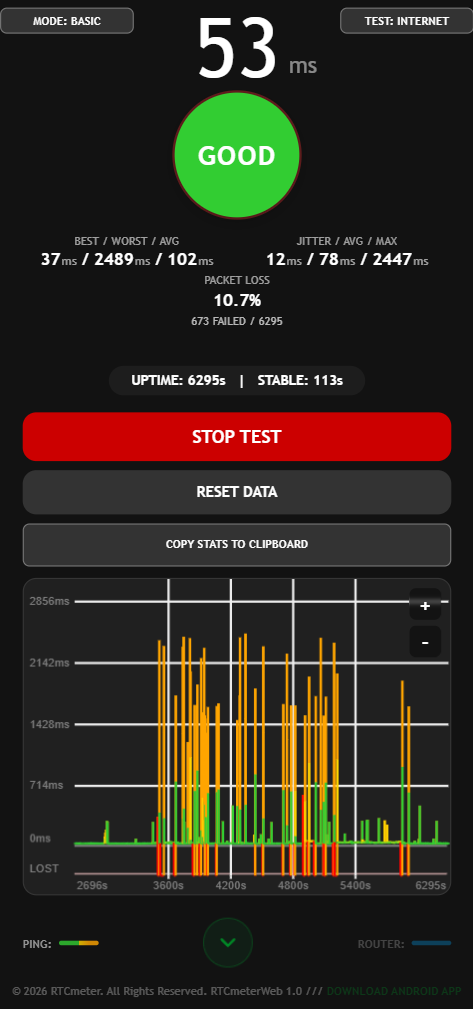
10/25/26 at 12:20AM:
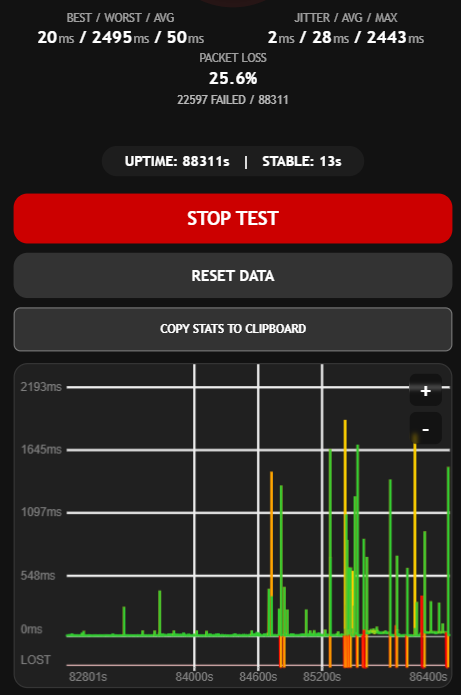
Today, 10/25/2026 as I write this at 11AM:
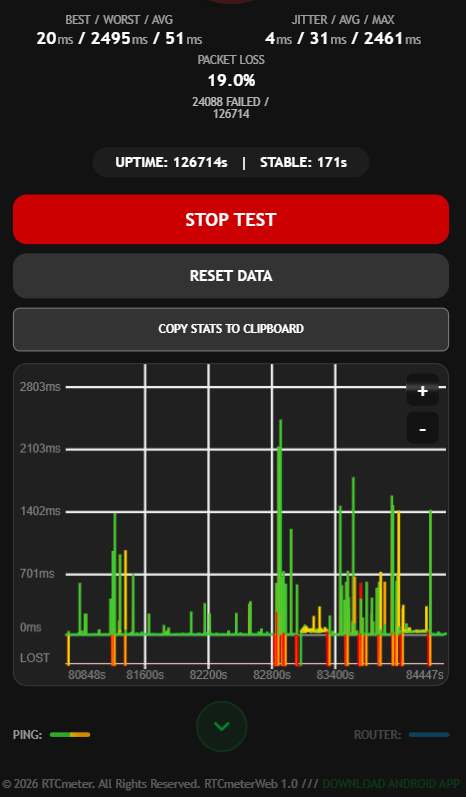
I have been a Spectrum customer for years, going back to at least 2016 when they were still Brighthouse. I have had very few issues with my connection until the past few months. I am requesting:
- Follow-up on what is being done to look into the network/node in my area outside of my home. Tech #3 made it sound like there was disruption in my area, which would explain why all the work mentioned above in my home has not resolved the issue.
- A response as to why this has not been resolved/information on why techs considered the issue resolved when it wasn't
- Credit on my account for the issue
- Next steps that I can try that I haven't already without requiring a tech visit
- Information on what the signal monitor on my account shows
- Resolution of the issue
Appreciate your response.
Comments
-
Hi & welcome!
Unfortunately, the next step would be another tech visit. While you had two scheduled in October, the most recent one was cancelled. The other visits were during mid-summer, two and three months ago. In your area, the coax cable can be impacted by weather, including heat and wind, as well as damage. The only way to assess the situation is with an eyes on tech visit. It is possible that the issue from the summer was resolved and the issue you are reporting now is a new one. While our techs do their best to resolve issues in one visit, there are times when it requires multiple visits to address an issue.
1 -
While I appreciate the response, it did not address most of the specific concerns raised in my original post.
AT&T 1 Gig has recently become available in my area. If these issues continue without a clear path to resolution, I will be evaluating that option.
A few items still need answers:
- Signal monitor — On a prior visit a tech stated a signal monitor would be placed on my account so Spectrum would detect problems before I did. I specifically requested the results of that monitoring in my original post. That request has not been addressed. Please provide a follow-up with whatever data the monitor has captured, or confirm it was never activated.
- Network/maintenance request — On the October 11 visit the tech said a maintenance request would be submitted for the network outside my home (node or equivalent). Chat Support later indicated no such request existed. I still have received no confirmation that one was ever opened. Please provide the status of any open tickets related to my service or the local network, or confirm none were submitted.
- Account credit — I requested a credit for the frequent, multi-hour periods of timeouts that have continued for months and directly impact my ability to work. If a signal monitor is (or was) on the account, Spectrum should already have the data to support this. Please follow up on the credit request.
Regarding the October visits: the most recent one was not cancelled by me. I never agreed to schedule a fourth visit after the prior work failed to resolve the issue.
Attached is a screenshot from approximately 10 AM today. The longer drop corresponds to a modem/router reset I performed for troubleshooting; the timeouts continued immediately after the equipment came back online.
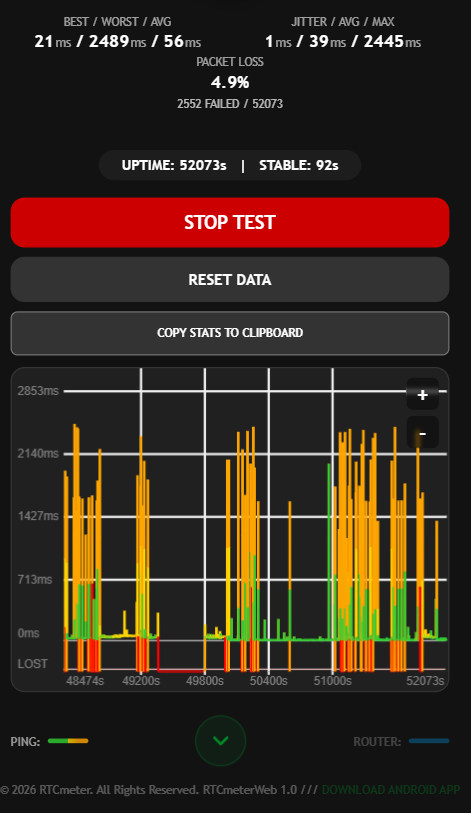
I would appreciate direct answers to the three items above rather than another generic recommendation for a tech visit. Thank you.
0 -
Good evening @Customer70M
Thank you for the additional information. I am not seeing that this was turned over to our maintenance team for further investigation. Once the home visit is scheduled we can definitely forward your concerns over about the information that was provided to you but not listed on the completed order. Once the home visit is scheduled we can definitely review for any credits that may be warranted. We can help you set up the home visit or you can call us at 1-855-707-7328 24 hours a day. If you would like our help in setting this up, please let us know what time of day would work best for you and we can try to accommodate your schedule. -Lyn
2 -
Things got restructured under Spectrum. There are distinctly different teams now, each with very specific roles, and you can't just jump to a specific team (like straight to Tier3 support as we did in the past). Start at the CPE, confirming everything is good at the customer premises (out to the pedestal), then escalate to the next tier that handles from the pedestal back. If there is a known issue on that side that the team is already assigned to deal with, they may wait until that work is done before putting in that request, as it may be related.
Sounds like that is what happened... either a known issue or planned maintenance/upgrades were already assigned that needed to complete first.
Now they can go back and confirm signal and such from the pedestal. It is possile the pedestal may now need to be replaced... this is where they would begin verifying that. (I say this from experience, because it is what happened with our high-split upgrades—wound up without reliable service for almost a week in the process because multiple issues were found along the way, including failing ports on the old pedestal and bad lines).
These upgrades are DRAMATICALLY ramping up potential bandwidth—on the order of like 10x per channel. And with that comes an increase in sensitivity to various forms of interference that will likely require adjustments. It can take time (and possibly multiple attempts) to fine tune things.
Growing pains... kinda grown used to them over the years. Been facing them since the RoadRunner brand (1 mbit downstream days).
1