Ongoing Packet Loss, Loss of Sync, and T3 Timeouts After Line Repair

I'm starting a new thread because I haven't gotten any response to my last several follow-up posts in my original discussion, and the issue is still happening.
Original thread:
https://community.spectrum.net/discussion/179822/repeated-loss-of-sync-and-t3-timeouts-after-line-repair-possible-ongoing-area-disruption/p1
A technician came out on October 3 and found an old filter/attenuator on my line that shouldn't have been there. Removing it improved the signal levels, but it did not fix the intermittent connectivity problem.
I'm still seeing Loss of Sync events and T3 timeouts in my ARRIS S34 modem logs, and I've also been tracking ICMP packet loss separately to see whether those log events line up with actual connectivity problems.
I attached a graph from this afternoon that compares my connection and a neighbor's connection. Around the same time my modem logged multiple Loss of Sync events and T3 timeouts, both connections showed packet loss to multiple external targets. This graph is just from this afternoon, but it's a recurring issue.
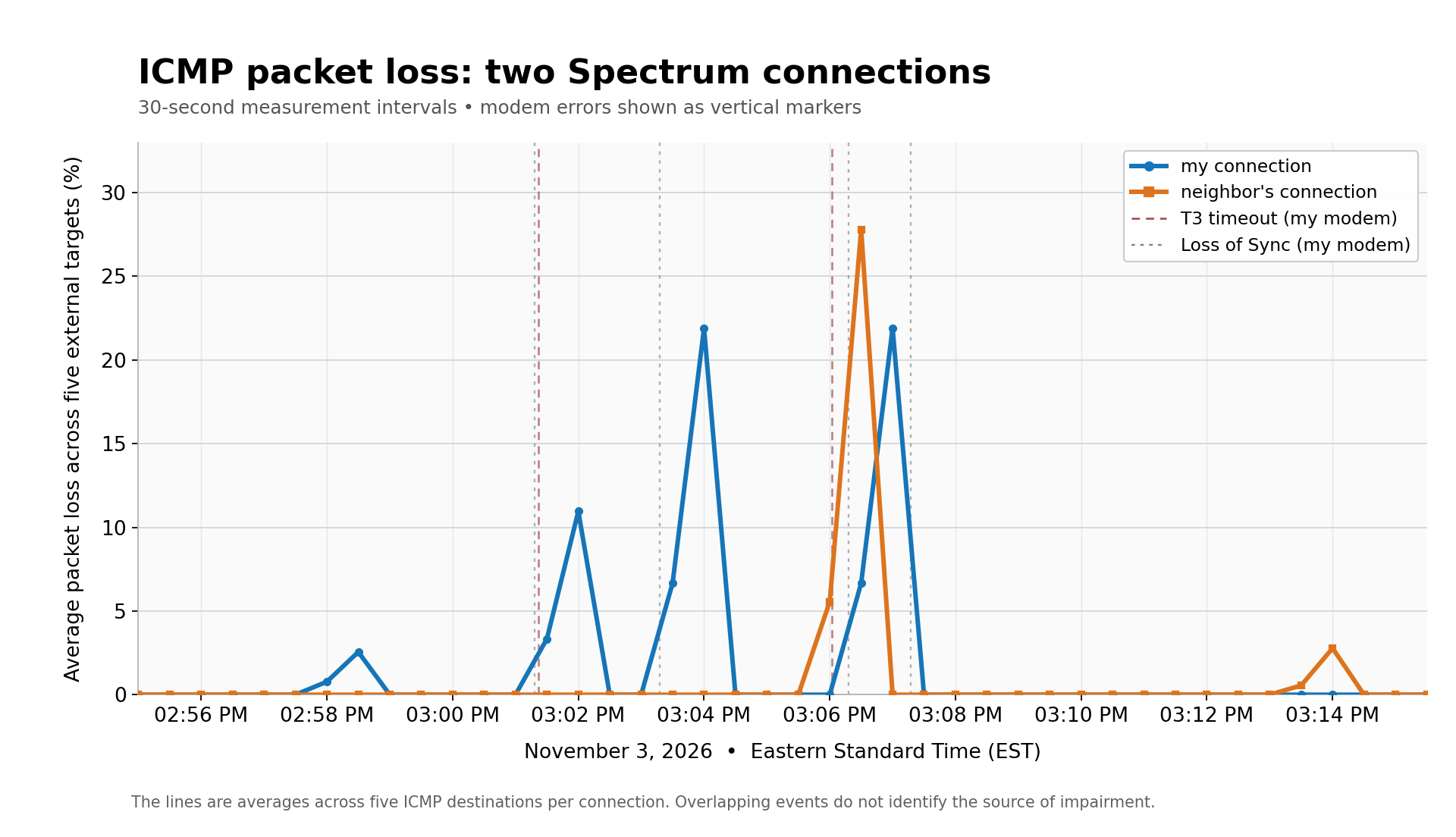
At this point I do have repeated modem errors along with packet loss measurements, and in some cases the packet loss appears to affect both connections at the same time. That makes me concerned there may be an intermittent issue somewhere beyond my house.
What I'm worried about is ending up in the same loop again where someone checks the signal at one moment, says it looks fine, and the actual intermittent problem never gets investigated.
I'm not opposed to another technician visit if that's what needs to happen. I just want to know how to get this looked at as an ongoing intermittent issue, and whether it can be reviewed for a possible outside plant / area problem rather than treated as a one-time inside signal check.
Can a moderator please advise on the best way to get this properly escalated?
Thank you!
-Stephen
Comments
-
ICMP timeouts are not necessarily packet loss. Likewise T3 timeouts are not necessarily full drops either--there is a threshold within a set timeframe for certain errors to trigger the modem to completely rethunk.
Are you seeing actual disconnects, or somethimg more along the lines of just bad queuing/lag related issues?
0 -
Thanks for replying. I understand that occasional modem errors are normal operationally, but:
Yes, the connections drop
I had tenants that were working from here, and their conference calls kept dropping. They complained that they couldn't do their jobs, to the point where I went out and bought a Starlink. That solved the problem for them, but it's not something I want to keep paying for.
These are clusters of events
They happen in bursts and then things are okay for a while:
Time
Modem Events
3:01:18 PM
Loss of Sync
3:01:22 PM
T3 timeout
3:03:18 PM
Loss of Sync
3:06:02 PM
T3 timeout
3:06:18 PM
Loss of Sync
3:07:17 PM
Loss of Sync
An isolated modem error wouldn't be abnormal, but having a bunch of them at once, several times a day, every single day, is not normal. The ICMP monitor is checking five different IPs, so it's not any one remote address having issues, but more importantly the ICMP drops correlate with the modem errors. It's consistent, I see ICMP dropping while the modem fights to synchronize. It also correlated with when my tenants started complaining.
The neighbors have the same problems
I'm seeing the same thing at my neighbors house. They have drops at the same times I do, which makes it less likely to be a problem with my house or equipment in particular. I replaced my modem anyway just to rule it out, which didn't help.
0 -
Just saying... if you are havng a physical loss of connection like that, THAT is what needs to be reported. ICMP and T3 timeouts are very common and happen all the time without really disrupting beyond perceived slow down or hitching.
When it drops and what line conditions are when it happens--low or noisy downstream, or high and noisy upsteeam? Something like that gives them direction. Call it in WHEN it is happening if you cannot see that info-THEY CAN.
0