Didn't find what you were looking for?
We have advanced search options to make it easier to locate posts, questions and answers on this community.
More information can be found at Advanced Search Options
If you are looking for something specific, please check if someone else has already asked or answered the same question.
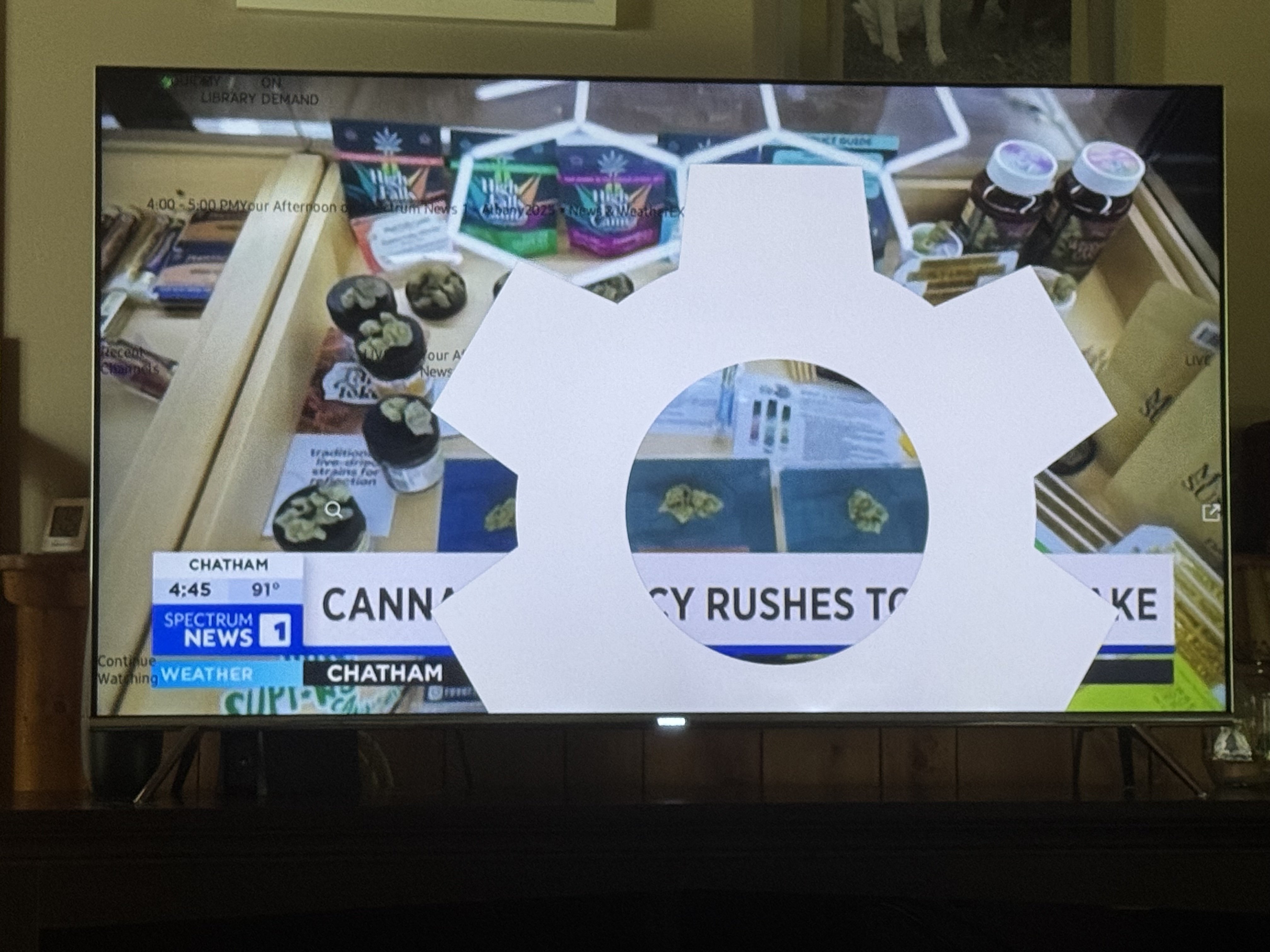
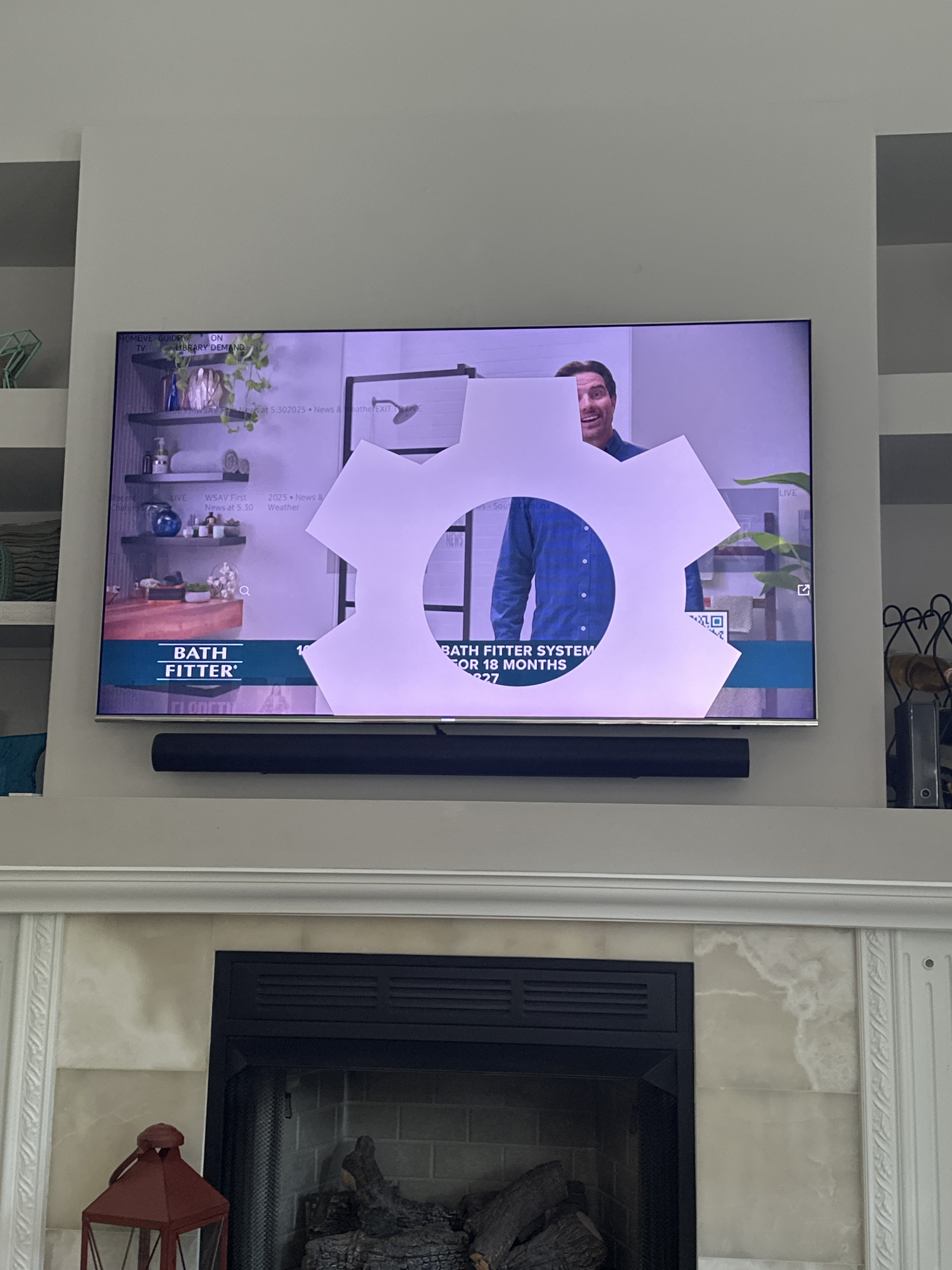
Why am I seeing a large gear icon using the Spectrum TV app on an older Samsung TV?

when starting the Spectrum app on my Samsung TV, I get what appears to be a very large (almost full screen” setting icon and cannot get guide to work. Everything is so large. All the other apps appear to working fine
Comments
-
Hello @capt_lunker;
Welcome to the Community Forums. This display is not typical of the Spectrum TV app. This maybe a display problem on the TV. I would recommend you restart the TV. You can usually restart the TV by holding the power button on the TV remote for a few seconds. It will load a restart option. You can also unplug the power to the TV for a minute since this will also force a restart. If this fails to solve it then I would recommend you remove the app from the TV and install it again.
0 -
my parents have this same issue as well as all the channel logos are huge! Powered off the cable modem and tv and changed every tv setting. All other apps are fine, it’s just spectrum, so explain how this is a display problem?
0 -
I'm sorry to hear your parents are experiencing the same issue. Have you uninstalled and reinstalled the app yet?
0 -
yes and even deleted it and added it back
0 -
What type of TV are they using? Does it happen on all devices?
Are you using their account to register here, or a separate account?
0 -
I deleted your previous comment as it contained sensitive account information and this is a public forum. If you sign in on the same TV with your parents' account, do you experience the same issue?
0 -
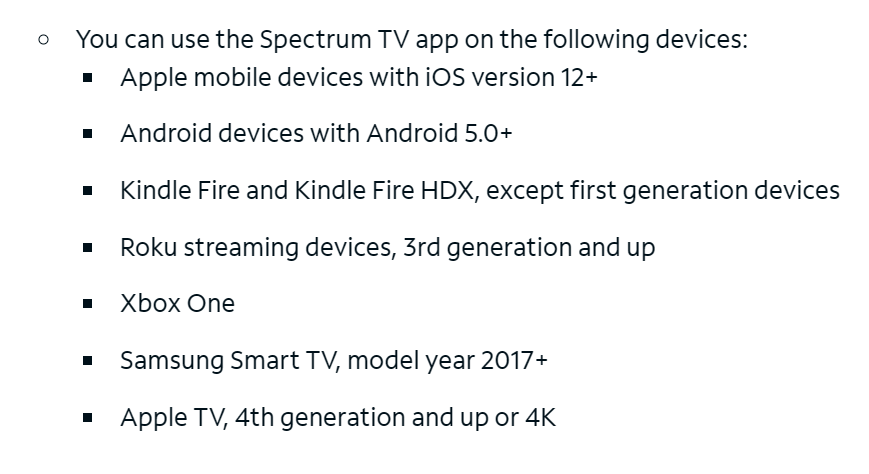
You mentioned it is an "older" Samsung TV. Please be advised that the Spectrum TV app is only supported on Samsung TV's that are model year 2017 or newer. If the issue is only happening on the Samsung and not on the other TV, then it is likely a device issue and not an app issue. One possible workaround would be to use a separate device like a Roku or a Xumo to launch the app on the older Samsung TV.
More information is available at the link below.
Spectrum TV App and SpectrumTV.com Troubleshooting
 0
0 -
I am having the same issues with the large setting icon on my tv - it was working fine and now can’t view TV menu etc. please help! Tech was already at the house and they said they have never seen this before. This has nothing to do with TV type etc. it was working fine and now it appears.
0 -
 1
1 -
What type of tv are you using? Do you have a model #?
0 -
so after speaking with the techs at spectrum, they no longer support the app on 2016 and newer Samsung TVs and there are no easy fixes.
I went out today and got a Roku at Walmart and it works fine now1 -
@Cmtaylor425 my Samsung I’m thinking is a 2015 or 2016 and the app is only good for 2017 and newer. So there’s no longer support for the app. The techs seem to think it’s an aspect ratio setting in the TV but the spectrum app is the only one that’s affected
0 -
We understand that 2017 and older models are referenced to App compatibility, however our TV has been connected to the App since April 2024. 3 other TVs also Samsung but never had any issues on any until on or about July 28/29. This appears to be the same time everyone else started having issues. I can’t understand how everyone who had Samsung 2017 or older start having issues on the same date and time. That sounds more like an adjustment to the Spectrum App! Our app worked perfectly fine. I think Spectrum needs to provide us with a work around solution even if it has to be Xumo!!
Whatever the change was to the App it totally zoomed the home screen distortion creating the inability to use the guide and channel selections. Other than that, the App works fine and our reception and picture are perfect.
We are happy with Spectrum service so please try to help!!
2 -
I'm sorry @Cmtaylor425, unfortunately there's nothing more that can be done.
I understand it worked previously even when it wasn't technically compatible, but that's because we don't just disable the app in that situation. It still might work for some time, but app updates are designed for and all testing is done with currently compatible devices. There will inevitably be a point where there is a conflict between the new app version and your older TV software it wasn't meant to be run on which will result in unintended effects.
The solution is to get a new device which is still compatible. You don't have to get a whole new TV, just something that will connect to one of its HDMI ports such as a Xumo or Roku.
2 -
Post has been closed. The issue is compatibility with the device.
The solution is to get a new device which is still compatible.
1