Didn't find what you were looking for?
We have advanced search options to make it easier to locate posts, questions and answers on this community.
More information can be found at Advanced Search Options
If you are looking for something specific, please check if someone else has already asked or answered the same question.
Is there a way to turn off the closed caption on peacock? I have already checked setting.

Comments
-
Welcome @DogMomma4
On what device are you watching Peacock? Usually there will either be a activate button (CC) in the lower-right corner of the screen that can be toggled on/off if there is nothing in settings.
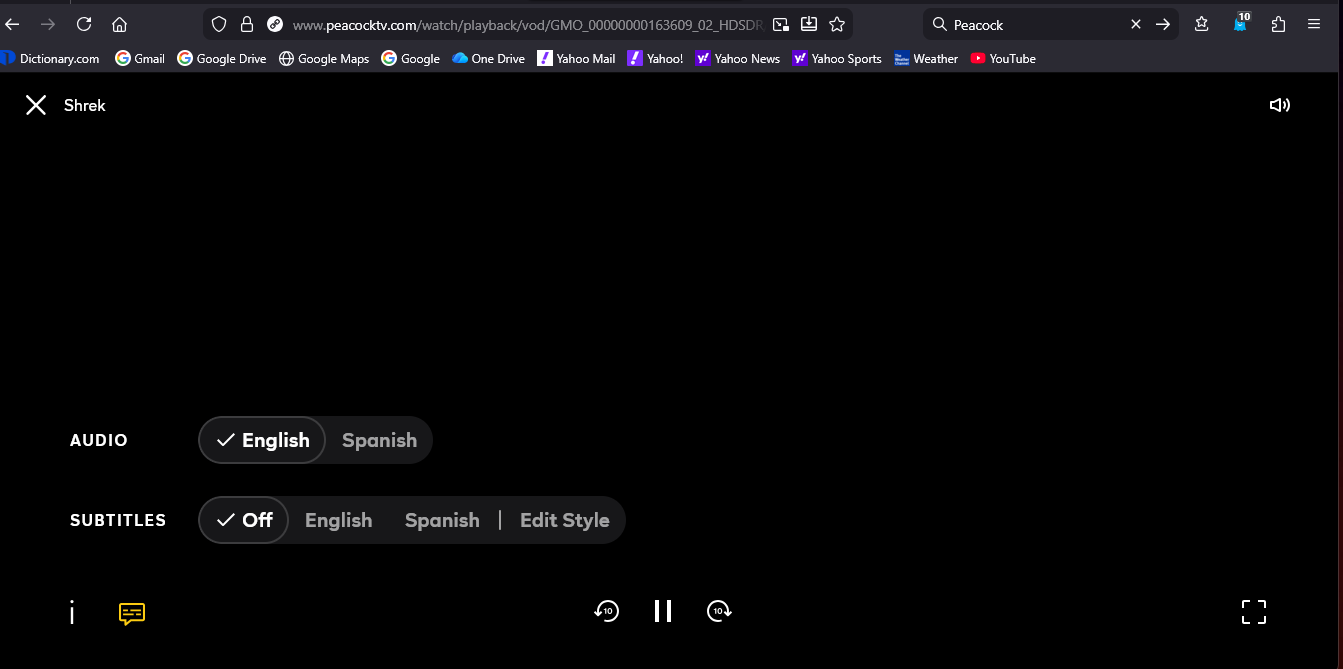
I just checked and on Peacock's website on the lower left of the screen, there is a little caption icon. Click on that and than the captions menu opens with options. (Screenshot added.)
Satch
1 -
Hello @DogMomma4,
Welcome to our community page and thank you for your question. We apologize for any inconvenience this has caused. As an avid closed caption user, I can understand the frustrations of them not being easily accessible. The device being used does make a difference and Satch is correct, the option should be available in the lower corner of the screen. When able, please confirm the device(s) being used, so we can advise you accordingly. We are here for you 24/7
1 -
I see you have multiple Xumo devices in use. To add to the above, aside from subtitles being in the app settings, there is also an option to enable or disable captions within the Xumo settings menu. We have heard of an issue with Peacock displaying captions even with them turned off on Xumo devices. If you have captions disabled both in the Xumo and Peacock app settings, it's likely that issue affects you as it appears to be an issue with the Peacock app itself.
1

