Didn't find what you were looking for?
We have advanced search options to make it easier to locate posts, questions and answers on this community.
More information can be found at Advanced Search Options
If you are looking for something specific, please check if someone else has already asked or answered the same question.
So. Much. Spam.

With the email upgrade, I lost ALL of my spam filters, which were accumulated over many months. Those filters had largely kept my in box blissfully spam-free. Now I'm back to being inundated with spam every day. I have been creating new filters and blocking keywords (prostate, affordable windows, knee relief, etc. etc.), but I see that I am now only allowed 50 filters maximum. What happens after that? I should be able to add as many spam filters as I need, especially because it's all getting through Spectrum's filters. I do mark them all as spam before I delete them. But a lot of the same ones keep on coming. Anything I can do to slow this tide down? This is NOT an improvement but a huge aggravation.
Comments
-
Hello @Westside;
I can understand the concern about spam. Reporting the spam on our webmail is very helpful to stop spam messages. It is sent to our security team to review. This helps add to our spam filters, Keyword filters do not always help. Spammers take actions to bypass these kinds of filters. The security team will research the original source of the emails that will help block them.
0 -
Thanks. I do report each one as spam. But I'm getting so much more these days that I can't help but feel that it's because my spam filters WERE working. Would it be possible for there to be more than 50 filters? I don't understand why that number is now limited. It really was helping, before the upgrade!
0 -
You do not have to report every message but the more you report will help our security team to track the source of the spammers.
0 -
Sorry to keep posting, Edward, but that wasn't my question. I already do report every message. My question is: why is there a limit of 50 spam filters and can that be changed? I have 10 new spam messages just this morning!
0 -
@Westside
You are not able to change the filter rule limit, however each filter rule you create can have up to 5 conditions, so each rule can have 5 keywords to filter. You can select the "any conditions either/or" option so any one of the conditions will trigger the rule. You can set them to delete the message completely, or just move to a folder. Just to check, under the spam management option, is either the spam folder or trash option selected?0 -
Thanks, Mo. So if I am understanding you correctly, one filter that I set could filter out any of these five keywords (which I have just created five separate filters for): LIfeVac, TruGreen, DirectMeds, Leafguard, and CarShield?
and yes, when I set my filters, I am sending each of the offending emails to spam.
0 -
@Westside
Yes, each filter rule, which you get 50 of, can be set up with 5 conditions each to filter under that same rule, essentially letting you set up 250 words to filter to folders, as long as you select the "any conditions either/or" option rather than the one where you have to meet all conditions to filter.
The next option down from the filtering and blocking is also related specifically to spam and how it's handled, letting you set it to delete, move to spam, keep in the inbox, or keep in the inbox adding SPAM to the subject line. Just wanted to make sure that isn't set to the inbox for items that are automatically identified as spam.0 -
Thanks for that great advice, I appreciate it!
0 -
This is what I do now is using the filtering method. I already have 42 filters in place with 5 conditions each. I would probably hit the limit for the total filters I can have this year if spam emails are not filtered by Spectrum from known spam domains. I'm already using domain keywords to filter out these spam emails, but I noticed the domain names are likely bogus as well.
0 -
Appreciate that info too. I just wish the upgrade hadn't wiped out all of the spam filters I had set. I also wish so much spam didn't get through Spectrum's filters!
But onward: I will start adding 5 keywords per filter.
0 -
Hello again! Per the suggestion above, I have added MANY keywords to my spam filters as the spam shows up in my in box (I now have over 300 spam words), and so much spam still keeps getting through, containing keywords that are supposedly blocked! I am getting 5 or 6 spam emails a day to my in box, in addition to those that are being caught and going right to spam. The filters clearly are not working well because they are not catching many of the emails (Omaha steaks! Toenail fungus! Tractor supply! Gut resent! Affordable military discounts!) that contain words that I have blocked. (And yes, I report every single spam message as spam.) Why don't these spam filters work? Before things got "updated," the filters were working great and I hardly ever got any spam. Am I the only one having this problem?
0 -
Hello @Westside;
I do apologize that the filters are not working. The spam senders will do many things to prevent filters from working. They will often mis-spell the words or including it as an image. At this time there is no way to filter messages based on an image of text. If you can provide a screenshot of some of the messages then we can see why it may not be working. I still recommend you report each message as spam that is not being filtered. This will go to our Security team to research and do auto filtering of the messages.
0 -
Thanks for the quick response, Edward. In these cases it's not a question of misspelled words or using the words as images, because the words are in the subject line of the emails. I've attached a few examples. These spam emails have all arrived since June 5. Words I had already added to my spam filters before those emails arrived include brain, health, neurologists, evil, protein, free, natural, memory, discovery, auto, insurance, Audien, hearing, cancel, surgery, doctor, knee, neuro, cognitive, decline, Harvard, Lowe's, Omaha, steaks, veteran, savings, Costco, T-Mobile, Sam's Club, Igloo, cooler, and many others. All of the emails in the two attached screenshots contain at least one of those keywords. But the filter is not filtering those emails into spam. (No need to remind me to report each message as spam - I do that every time. It doesn't seem to make a difference.) Can you shed any light on why the spam filters seem to be working much worse than they did before?
0 -
Thank you. I reviewed the filters you have setup. It appears you are attempting to filter the from address. The only way to filter them is to filter an exact email address. The display name for the email address can't be filtered. You would have a better results for filtering if you filter the subject or body of the message.
1 -
I had that problem long ago…
Filtering is limited, but I got MailWasher Pro, see
I have it before my email Client (I use Thunderbird) and it gets the email off of the Spectrum and GMAIL server for me and lets me see the emails before I bring them into the email client.
You can create FILTERS, Friends list, and even a Black list. It will mark the email easily for you to see, and you can even mark it for delete on Mail Washer.
It looks like this, and this is for my 3 accounts, 2 on Spectrum and 1 on GMAIL:
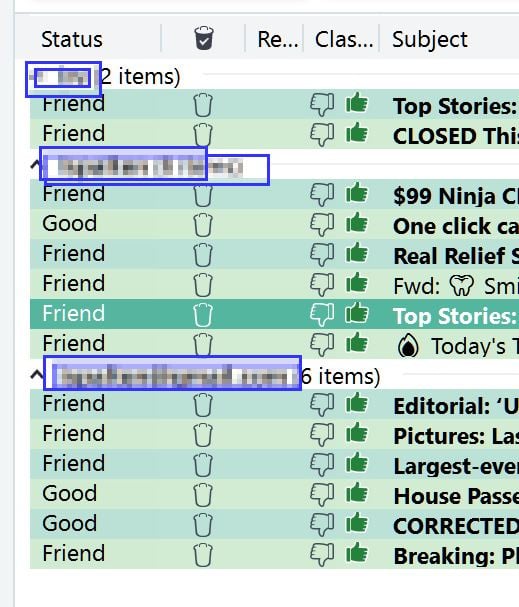
They do have built-in Spam Filters and on their forum are more you can get.
I rarely will get an unwanted emails into my mail client.
0 -
What Edward said!
P.S.: Funny how your discussion about spam got spammed since then.
🔗 ↳ Everything you need for just $49 ↳ […] 🔍👀⁉️
🔗 🔍 👀 ‼️
0 -
hello again - now that I know, I will no longer use "From" words in my spam filters. Thank you for that info! I will say, however, that spam containing words from the subject line and body of the emails (not the From line) is still getting through, daily.
Also, why doesn't Spectrum include more information about how to set up the spam filters, on the page where you are meant to do that, called Filters and Blocked Addresses? I shouldn't have to go to its forums to get that basic information, right? I learned about adding five words per rule, and not using words in the From field, from here, not from Spectrum's spam folder page. Here is the only information provided on that page:
"Sort incoming email messages into assigned folders. Change your rule’s priority by moving it up or down. You can also press the spacebar to toggle drag and drop mode and select a rule, then use arrow keys to move the selected rule."
0 -
Addendum - here's an example. I just got an email with the subject line of Harvard Researcher Reveals the Simple Recipe That's Saving Americans from Knee Surgery. In my filters I have saved the words Harvard, researcher, recipe, saving, knee, and surgery, all individually. But still that email got through! And I don't want to open up the emails to get text from them because that lets the spammers know it's a live email address.
0 -
You have the filters set to search the from address. This will only affect the actual email address and will not affect the words in the display name. You need to redo the filters for the subject or body.
0 -
You are right! It defaults to the From field when you set up a new filter, so I didn't know to change it. I will go back and change all those filters and hopefully that will do the trick!
0 -
Reporting back. Today I got 5 spam emails. Keywords contained in the subject lines (not the From address) for all 5 emails were already stored in my spam filters. But the spam still got through.
0 -
- Are you using "All Conditions" or are you using "Any Conditions" for the filtering "matching option"
- I believe messages systematically categorized as spam before they hit your mailbox will accord your "Spam Management" settings
0


