Can no longer schedule recording from the app

I access the Spectrum App on both an iPhone and an iPad. In the past, I have been able to use both devices to schedule recordings on my home Spectrum DVR. I can no longer do that. I am able to begin the process but when I get to the final step and hit the “confirm” button, it simply exits the screen and no recording gets scheduled. It used to produce a banner message indicating that a recording had been scheduled. This ability is important to me and I would like it restored.
Comments
-
Hey @Roserudy, welcome to our community! Sorry for the trouble scheduling your recording, I understand how convenient it is to be able to manage those from your phone. Have you tried manually rebooting the DVR by removing its power cord for 30 seconds?
0 -
I have. It had no effect on my ability to remotely schedule a recording.
0 -
Thank you. Is setting the app recording not working on both the iphone and the ipad? About how long has this been happening?
0 -
It is not working on either. It has been happening for at least a month.
0 -
Do you have cloud DVR service as well? Can you also log out of the app on both devices and then log back in?
0 -
We do not have cloud DVR service. I have logged out of the app on both devices and logged back in. Still can’t schedule a recording through the app.
Also, just to be perfectly clear. I can schedule recordings through our DVR with no issues. I also used to do it through the app fairly often. This inability to do so is relatively new.
0 -
I’ve also deleted the app and reinstalled it on both the iPad and iPhone. Still no difference. The apps can “connect” to our DVR as our list of past and scheduled recordings come up within the apps.
0 -
Can you try this from watch.spectrum.net ? Just so we can verify that this is also happening on the website.
0 -
Thanks. I've sent some refresh signals to the cable box. The modem looks like it has also been online for 12 days. Can you restart the modem when you have a chance and then try scheduling a recording again from the app?
0 -
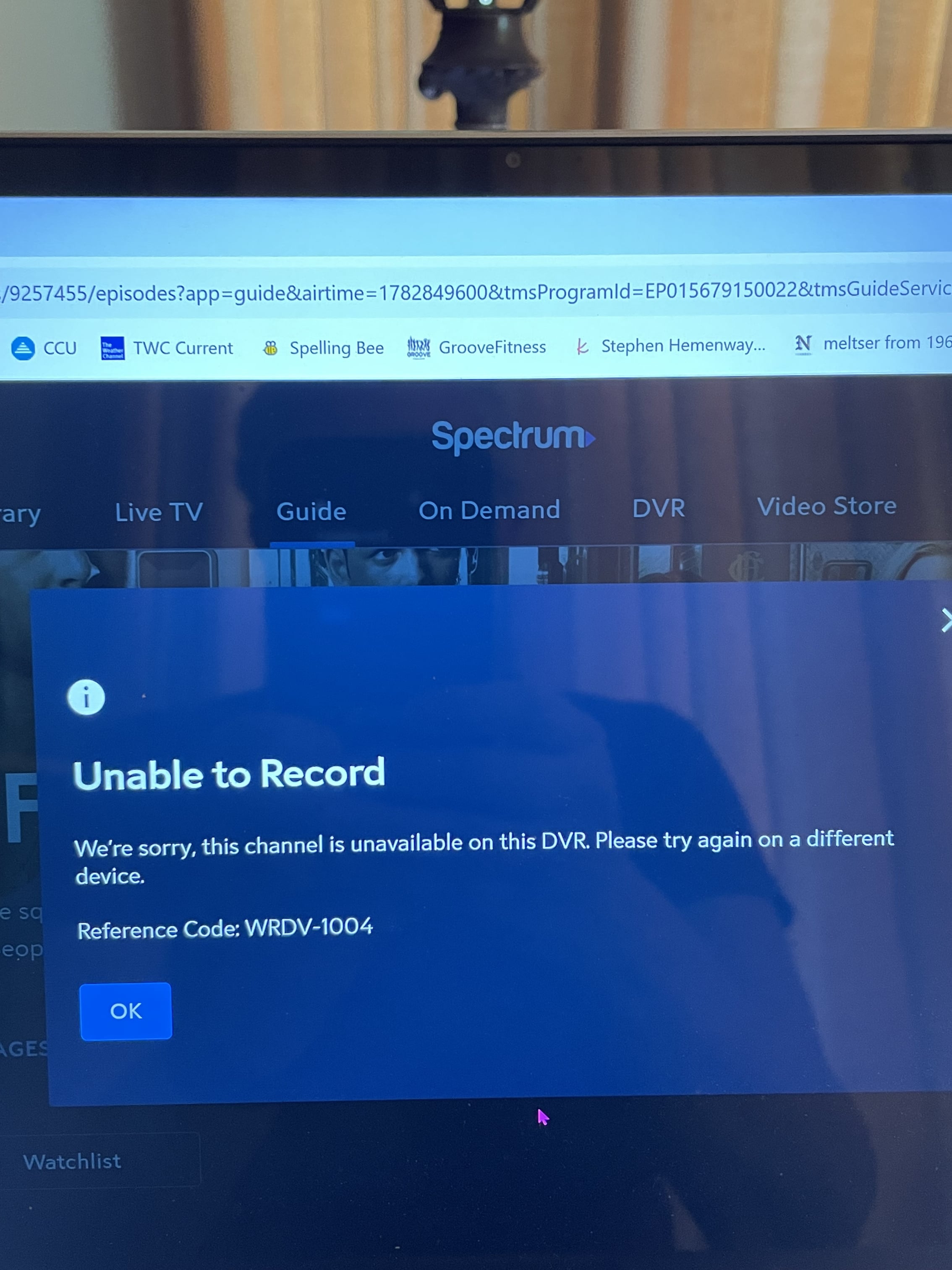
I have family members who need the internet now so have not been able to reboot the modem yet. Interestingly though, when I tried to schedule a recording from watch.spectrum.net, this error code popped up (I was on a channel we receive with no issues and one which I can schedule from via the DVR).
 0
0 -
Thanks - that error code indicates an issue communicating through the modem. Once you are able to restart the modem, please test it again and let us know if you are still see an issue.
0 -
We have rebooted the modem. No change through both watch.spectrum.net (same error message) and the iPad app.
0 -
Thanks. Did you also restart the cable box after the modem was restarted?
0 -
No…. But I will after we finish watching Serena Williams at Wimbledon!
0 -
I have now rebooted the modem (again) and immediately after it came back on-line, I rebooted the cable box. Still no change.
0 -
Thank you for completing the resets, are you able to log into our App and go to settings, then devices to see if your box is listed there? -Lyn
0 -
Yes, it is listed there. As I’ve already explained (there has to be a more efficient way of dealing with this than talking to multiple people), the app lists our device, shows our stored recordings and scheduled recordings, allows me to cancel scheduled recordings, etc. What it won’t do is allow me to completely schedule a recording from the app.
0 -
I'm sorry @Roserudy, who is available to respond will vary depending on day/time but we can all see this whole thread. I believe the issue may lie with the DVR, it is an older model many of our tools do not work with. I recommend exchanging it at a Spectrum store or we can schedule an appointment with a technician.
1 -
We have dozens of shows recorded on it so will have to decide what is more important to us - keeping them or restoring the ability to record remotely. Thank you for your help.
0 -
I understand, you're welcome!
0