Very slow access top IMAP email

Spectrum email via IMAP is intermittently very slow or fails to connect, while Spectrum Webmail is instantaneous.
Affected server:
mobile.charter.net- IP:
47.43.18.12 - TCP port:
993
Observed behavior:
- Repeated TCP connection attempts to
47.43.18.12:993intermittently fail or take 15–26 seconds. - Packet capture shows SYN retransmissions at approximately 1, 3, 7, and 15 seconds before a SYN-ACK is finally returned.
- In some tests, about 30–40% of connection attempts failed completely after ~26 seconds.
- The problem occurs from more than one device on the same LAN.
- Rebooting the TP-Link ER605 router made no meaningful difference.
- DNS resolution is fast and consistently returns
47.43.18.12. - Spectrum Webmail opens the same messages instantly.
Control tests from the same PC/network:
outlook.office365.com:993— 10/10 successful connectionssmtp.gmail.com:465— 10/10 successful connections1.1.1.1:443— 10/10 successful connections
This appears to be a problem with the Spectrum network path to 47.43.18.12 or with the Spectrum IMAP front end itself, not an email-client configuration or authentication issue.
Please escalate to Spectrum network/email engineering rather than treating this as a normal mail-client setup problem.
====================================================
Based on the packet behavior we captured, my best educated guess is that Spectrum has a broken or overloaded front-end device in front of the IMAP service — likely a load balancer, firewall, TCP proxy, or some similar ingress component — rather than a problem with the IMAP application itself.
The important clue is the SYN behavior. In the bad connection, your PC sent SYNs at about 0, 1, 3, 7, and 15 seconds before finally receiving a SYN-ACK. That means the failure occurs before TLS and before IMAP.
That pattern is consistent with a few specific failure modes:
- Overloaded or unhealthy IMAP load balancer / TCP proxy. Some new TCP connection attempts simply aren't serviced, while others go through immediately.
- Firewall or SYN-protection malfunction. A stateful firewall or SYN-cookie mechanism may be intermittently dropping legitimate connection attempts.
- Bad member in a server pool. If
47.43.18.12fronts several backend nodes, some connection attempts may hash to a dead or unhealthy backend while others hit a good one. - Spectrum-internal routing / ECMP problem. Different flows can take different internal paths based on source/destination ports. One path may be impaired, which would explain why some connections work in 50 ms and others need several retransmissions.
- Less likely: rate limiting on IMAP connection creation. Your test pattern doesn't look like deliberate rate limiting, but a misconfigured DoS-protection system could produce something similar.
What makes the front-end/load-balancer theory especially plausible is that the server advertises itself as an older InterMail system, and Spectrum has already had recent IMAP-side incidents where webmail worked while external IMAP clients failed. In June, Spectrum moderators explicitly escalated a mobile.charter.net problem to engineering, and after an update said it had been tied to another ongoing email issue and “may have been a little more than just a certificate.”
I would not guess that the actual mailbox storage or IMAP daemon is overloaded. If that were the main problem, I would expect TCP to establish normally and the delay to occur after login or during SELECT, FETCH, etc. Your capture shows packets disappearing at the TCP handshake stage.
The most likely architecture is something roughly like:
Internet
   |
Spectrum edge network
   |
Firewall / DDoS protection
   |
Load balancer / TCP proxy
   |
InterMail IMAP servers
My bet is on the firewall/load-balancer layer or one unhealthy path/member behind it.
The fact that this appears to have recurred over time suggests Spectrum may have a brittle or aging external-mail-access infrastructure rather than a single transient outage. Their June incident affected multiple client types and required an engineering-side change.
If Spectrum engineering actually looks at your case, the most useful thing for them is the exact signature:
SYNs to
47.43.18.12:993are intermittently unanswered for 1/3/7/15-second retransmission intervals, while other TCP/993 destinations are clean.
That points them immediately toward their edge/load-balancer/firewall statistics, not user mail settings.
Best Answers
-
Workaround found for my Charter IMAP/SMTP connection failures
Today I tested an alternate Charter hostname
mail.charter.netfrom my Spectrum home connection. For me:mobile.charter.net:993continued to show intermittent failures/timeouts.mail.charter.net:993passed repeated TCP/TLS tests and Thunderbird immediately downloaded new mail.mobile.charter.net:587failed my SMTP tests.mail.charter.net:587passed TCP/TLS tests and Thunderbird can send normally when configured with STARTTLS.
My currently working Thunderbird settings are:
- Incoming IMAP server:
mail.charter.net - Incoming port:
993 - Incoming connection security:
SSL/TLS - Outgoing SMTP server:
mail.charter.net - Outgoing port:
587 - Outgoing connection security:
STARTTLS - Authentication: normal password, using the full email address as username
I am sharing this as my current workaround, not claiming it is official or permanent. Before changing a working configuration, record your existing server names/ports/security options so you can restore them if needed.
Could a Spectrum moderator confirm whether
mail.charter.netis an approved/current hostname for legacy Charter email, and whether there is an active issue with themobile.charter.netIMAP/SMTP endpoints?Thanks
2

Answers
-
I am having the same problem with Thunderbird on all of our computers. Just started yesterday.
1 -
My email will not sync to Gmail on any of my Android devices. Just started yesterday at around 5:07pm PT. We also had an 8 hour outage on Friday from 8am to 4pm PT due to cut fiber.
1 -
Mine was very slow but now not working. I chatted with Spectrum to check to see if there was an issue and they said I would have to contact someone at Outlook. I cannot access emails on my phone (Android SamsungS25+), my tablet (also android), or Thunderbird. I uninstalled on my phone, restarted the phone and reinstalled only to have it fail. Occasionally, an email will get through but I cannot read it. I then tried to forward the email from charter/spectrum to another email but they don't allow that anymore. Trying to find out if there is even an issue that is affecting more than just myself has been a challenge. Any help/guidance/confirmation from here would be very appreciated.
0 -
Please see from above;
Hi @TallBob! There is currently a known issue with Microsoft-based email clients, which our engineers are already working to resolve as soon as possible.
0 -
Email is working with Thunderbird now. Woo Hoo!
0 -
This content has been removed.
-
I am now able to access the server(s) 100% of the time. The previous time-outs I saw seem to have stopped. Thank you!
1 -
I have been having this same problem on both Thunderbird (Windows) and Gmail (Android) clients. It is an intermittent issue. Sometimes if fails to connect to server, and other times it connects but then times out without fully downloading emails. I increased timeout parameters on Thunderbird, but that didn't help much, if at all. Spectrum tech support is saying there are no server issues and it must be a client issue, but that doesn't make sense since it is happening on 2 different clients that either both work or both don't (intermittently). It has been really bad for the past 2-3 weeks. As others stated I can access on webmail, but that is not a viable long-term solution. We really need help on this.
0 -
I'm having the same problem with Thunderbird email app on Chromebook. Help!
0 -
Hi…I am also having this problem, using Apple mail on my iPhone and iPad (iOS 26+). If I delete the Spectrum account and add it back, mail works fine for a day or two. Then goes back to a long “connecting “ time and an even longer “checking for mail” time…Grant
0 -
I am seeing the same issue again on Thunderbird and Outlook and several devices, as of September 5 after it had been mostly working since the August 25 recovery. Webmail remains responsive, but IMAPS to
mobile.charter.net/47.43.18.12:993again shows intermittent 20–50 ms successes mixed with multi-second delays and 10-second failures. I have run tests similar to TallBob and agree with his educated guess.A local packet capture shows SYN/TLS retransmissions and occasional resets before any authentication or mailbox operation. This is occurring on more than one client. I also have clean control results to unrelated IMAPS endpoints from the same wired connection.
Can Spectrum confirm whether the prior engineering incident remains open or has recurred, and have engineering review the IMAPS network/front-end path for this endpoint? @William_M, @James_M
0 -
This issue occurred for me initially back in the August 24th time frame and was resolved around the 30th, but I find this morning that it is occurring again with my Microsoft Outlook clients on both Samsung S24, and Windows. At least on my Samsung switching to Samsung E-Mail allows me to connect my phone, but I have to use WebMail on my Windows computers and I really can't stand Web based E-Mail clients. I may try the mail.charter.net fix. above and see how long that will work otherwise I may have to move to another E-Mail provider. I have been using Charter for my E-Mail for many years and it was always very solid. Lately I have been very unsatisfied. Increasing Cost poorer service.
1 -
@wintersrt - 100% agree - I'm in same boat. Having my charter.net email tied to hundreds of accounts over the years is literally the only thing that's kept me from leaving years ago. After 3+ months of these issues, I've finally undertaken the nightmare of migrating everything over to gmail, so I can ditch this popsicle stand once and for all. It's obvious Spectrum doesn't really want to invest in fixing this.
0 -
Running Thunderbird 153.3.0esr (aarch64) on a MacBook Pro Tahoe 26.6.2. For the last several weeks I've also been experiencing excruciatingly slow connection. As if to underscore this point, in the middle of typing this comment, I experienced this below diagnostic. Thunderbird has been on in the background for the past 5-10 minutes attempting to log in.
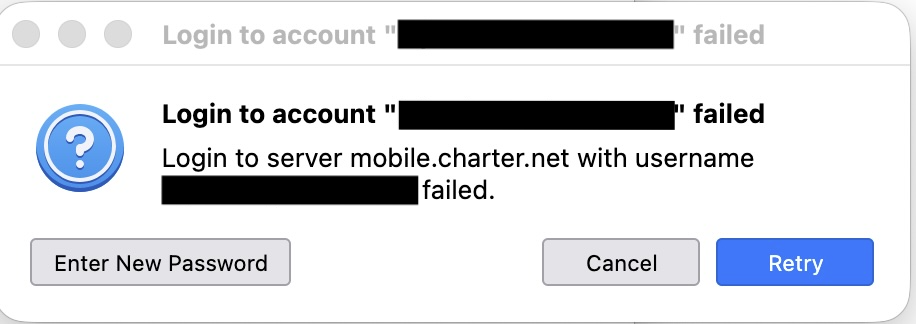
I have re-entered all login credentials a couple times even though nothing has changed in that regard in the past year+ and the client has functioned just fine. This lag has developed over only the last few weeks. I have received this msg several times over the past week and in spite of this message it is typically followed up by the downloading of email messages so the login issue appears not to actually be the problem. Yesterday, in fact I tried to send an email when my client again flashed this diagnostic. Frustrated, I opened my browser to check webmail and not only had the email sent, but webmail showed I had already received a reply while my client was still displaying the original message.
0 -
To add to my comment above, my iPhone email appears to work just fine.
0 -
0
-
One further piece of info: In the Thunderbird server settings there is an option to "Test Connection to Server", currently the default "mobile.charter.net" ,Port 993, connection security SSL/TLS. Doing that just now resulted in "an error occurred connecting to mobile.charter.net". The same error occurred when I adjusted the port to the settings jfree23 suggested above. As of right now, 8:48pm, the most recent email received was timestamped 7:22pm, even though Webmail showed an email stamped 8:14pm. That 8:14 email showed up while I was composing this msg. So my client is connected, but the email deliveries are still significantly delayed.
0 -
@jfree23 < Kudos!. I was able to confirm your result that mail.spectrum.net seems to be work correctly…
And it downloaded all my "trash" from 9/1 to today!
From this evidence I also recommend using Server mail.spectrum.net for Thunderbird (and others).
powershell.exe -NoProfile -ExecutionPolicy Bypass -File .\Spectrum-IMAP-Diagnostics-v2.ps1 -Rounds 20 -TimeoutMs 30000
Starting at 2026-10-12T04:01:21.4303935Z, 20 rounds, 30000 ms/stage timeout.
Results: C:\cygwin64\home\rws\rexx\IMAP-Test-20261012-000121
Round 1 | mobile.charter.net | FAIL | TCP | DNS= 57 TCP= TLS= IMAP= | Exception calling "EndConnect" with "1" argument(s): "A connection attempt failed because the connected party did not properly respond after a period of time, or established connection failed because connected host has failed to respond 47.43.18.12:993"
Round 1 | mail.charter.net | PASS | Complete | DNS= 17 TCP= 65 TLS= 205 IMAP= 38 | * OK IMAP4 server (InterMail vM.9.01.00.037.1.3 201-2473-137-104-118) ready Mon, 12 Oct 2026 04:01:44 +0000 (UTC)
Round 1 | outlook.office365.com | PASS | Complete | DNS= 55 TCP= 121 TLS= 108 IMAP= 80 | * OK Microsoft Exchange IMAP4 service ready. 88ac0612-53db-4f54-ba77-d720b436b7f8 (tcpproxy/15.21.0496.000 BACKENDAUTHENTICATE) [RABTAFMAUAAyADIAMQBDAEEAMAAwADE
Round 2 | mobile.charter.net | PASS | Complete | DNS= 1 TCP= 79 TLS= 733 IMAP= 28 | * OK IMAP4 server (InterMail vM.9.01.00.037.1.3 201-2473-137-104-118) ready Mon, 12 Oct 2026 04:01:47 +0000 (UTC)
Round 2 | mail.charter.net | PASS | Complete | DNS= 2 TCP= 1091 TLS= 141 IMAP= 24 | * OK IMAP4 server (InterMail vM.9.01.00.037.1.3 201-2473-137-104-118) ready Mon, 12 Oct 2026 04:01:49 +0000 (UTC)
Round 2 | outlook.office365.com | PASS | Complete | DNS= 59 TCP= 75 TLS= 396 IMAP= 121 | * OK Microsoft Exchange IMAP4 service ready. 1ab25844-9785-44e8-bea8-64832bfae57e (tcpproxy/15.21.0472.005 BACKENDAUTHENTICATE) [UwBBADkAUABSADEAMwBDAEEAMAAxADY
Round 3 | mobile.charter.net | FAIL | TCP | DNS= 2 TCP= TLS= IMAP= | Exception calling "EndConnect" with "1" argument(s): "A connection attempt failed because the connected party did not properly respond after a period of time, or established connection failed because connected host has failed to respond 47.43.18.12:993"
Round 3 | mail.charter.net | PASS | Complete | DNS= 1 TCP= 1081 TLS= 142 IMAP= 27 | * OK IMAP4 server (InterMail vM.9.01.00.037.1.3 201-2473-137-104-118) ready Mon, 12 Oct 2026 04:02:15 +0000 (UTC)
Round 3 | outlook.office365.com | PASS | Complete | DNS= 57 TCP= 79 TLS= 89 IMAP= 139 | * OK Microsoft Exchange IMAP4 service ready. ab5d9fd1-58b6-4c8f-a643-66b6337edf8a (tcpproxy/15.21.0472.005 BACKENDAUTHENTICATE) [UwBBADEAUABSADAAMwBDAEEAMAAwADI
Round 4 | mobile.charter.net | FAIL | TCP | DNS= 2 TCP= TLS= IMAP= | Exception calling "EndConnect" with "1" argument(s): "A connection attempt failed because the connected party did not properly respond after a period of time, or established connection failed because connected host has failed to respond 47.43.18.12:993"
Round 4 | mail.charter.net | PASS | Complete | DNS= 22 TCP= 87 TLS= 339 IMAP= 27 | * OK IMAP4 server (InterMail vM.9.01.00.037.1.3 201-2473-137-104-118) ready Mon, 12 Oct 2026 04:02:40 +0000 (UTC)
Round 4 | outlook.office365.com | PASS | Complete | DNS= 80 TCP= 94 TLS= 93 IMAP= 134 | * OK Microsoft Exchange IMAP4 service ready. 0d1886ff-2fe0-4423-97ef-f618b2f95e89 (tcpproxy/15.21.0496.000 BACKENDAUTHENTICATE) [RABTADcAUABSADAAMwBDAEEAMAAyADU0 -
From ChatGPT:
Update October 12, 2026 - Recurrence of intermittent IMAP TCP
connection failuresI originally reported intermittent TCP connection failures to mobile.charter.net:993 on August 23. The problem appeared to have been resolved by August 25, but I am now experiencing similar failures again.
I conducted another series of diagnostic tests from my Windows computer using PowerShell. The tests independently measure DNS resolution, TCP connection establishment, TLS negotiation, and the initial IMAP server greeting.
Preliminary results - October 12, 2026
Server TCP/IP Address Successful connections
mobile.charter.net:993 47.43.18.12 1 of 4 (25%)
mail.charter.net:993 47.43.18.8 4 of 4 (100%)
outlook.office365.com:993 Microsoft endpoint 4 of 4 (100%)For mobile.charter.net, three attempts failed during TCP connection establishment, before TLS negotiation or IMAP authentication.
The Windows error was:
Exception calling "EndConnect" with "1" argument(s): "A connection attempt failed because the connected party did not properly respond after a period of time, or established connection failed because connected host has failed to respond 47.43.18.12:993"
The one successful connection to mobile.charter.net completed TCP establishment in 79 ms, TLS negotiation in 733 ms, and the IMAP greeting in 28 ms.
The alternate server, mail.charter.net:993, successfully completed TCP, TLS, and IMAP greeting exchanges in all four tests, although two TCP connections took approximately 1.1 seconds.
Both Charter endpoints identified themselves as running: InterMail vM.9.01.00.037.1.3
Additional SMTP testing
I separately tested 20 consecutive TCP connections to mail.charter.net:587 at 47.43.18.8.
Results: Successful connections: 20 of 20
Typical TCP connection time: approximately 67 ms Maximum connection time: 272 ms TCP failures: 0I also identified and corrected a Thunderbird SMTP configuration mismatch involving SSL/TLS versus STARTTLS on port 587. A subsequent email sent to myself was successfully received.
That SMTP configuration issue appears separate from the intermittent IMAP TCP failures.
Technical observations
The IMAP failures are occurring before TLS negotiation and authentication. Therefore, these particular failures cannot be attributed to incorrect passwords, mailbox configuration, or Thunderbird's IMAP processing.
The problem closely rese mbles the TCP connection failures I documented in August.
I suspect a problem involving the network infrastructure serving 47.43.18.12:993, possibly a load balancer, firewall, TCP proxy, or routing issue.
The fact that mail.charter.net performs substantially better than mobile.charter.net is particularly interesting. Both appear to be running the same InterMail software but are reached through different IP addresses.
Request to Spectrum engineering:
Could the engineering team investigate:
TCP connection failures and SYN/SYN-ACK handling for 47.43.18.12:993.
Load-balancer and firewall connection-drop statistics.
Differences in the network paths or front-end configurations between 47.43.18.12 and 47.43.18.8.
Possible intermittent routing, connection-limit, or load-balancer health issues.
The testing suggests a recurring TCP connectivity problem affecting the mobile.charter.net IMAP service.
1 -
This content has been removed.