Didn't find what you were looking for?
We have advanced search options to make it easier to locate posts, questions and answers on this community.
More information can be found at Advanced Search Options
If you are looking for something specific, please check if someone else has already asked or answered the same question.
Persistent 100–120 ms Spikes at Spectrum Node (Hop 2) — Williamsburg 11211

TL;DR: clean LAN; spikes begin at Spectrum hop 2 (CMTS/gateway), reproducible 24/7 and even when idle; games stutter/disconnect during bursts. need escalation to network engineering for the CMTS/segment serving 72.231.24.1 (syn-072-231-024-001.res.spectrum.com).
What I’m seeing
- Baseline latency 10–15 ms → immediately healthy.
- Hop 2 (Spectrum CMTS) shows 100–120 ms spikes (sometimes higher).
- After the burst clears, later hops normalize; points to congestion/jitter right at the node, not remote servers.
- Packet loss is near-zero; the pain is jitter/latency bursts.
How I verified (multiple days)
- PingPlotter/EMCO (12 hr & 24 hr) to Cloudflare/Google → baseline good; spikes start at hop 2.
- Windows packet/trace (netsh ETL) → queuing/congestion consistent with CMTS bursts.
- Manual pings:
- ping 162.158.61.22 -n 200 → Max 525 ms, Avg ~20 ms, zero loss, bursts only.
PathPing to 162.158.61.22 (Cloudflare NYC edge):
1 192.168.1.1
2 72.231.24.1 (syn-072-231-024-001.res.spectrum.com)
3 68.173.202.144 (lag-56.nydbny7001h.netops.charter.com)
4 68.173.198.104 (lag-111.nyclnyrg01r.netops.charter.com)
5 107.14.19.24 (lag-29-10.nwrknjmd67w-bcr00.netops.charter.com)
6 66.109.6.27 (lag-12.nycmny837aw-bcr00.netops.charter.com)
7 66.109.9.5 (lag-1.pr2.nyc20.netops.charter.com)
8 162.158.61.22 (Cloudflare edge)
Bursts align with gameplay stutter/rubber-banding and occasional disconnects.
Environment controls (already tried)
- Wired Ethernet only; one PC active during tests.
- IPv6 off; DNS = 1.1.1.1 / 8.8.8.8.
- Router/PC reboots; Spectrum Security Shield off.
- Issue persists with/without gaming VPN optimizers (ExitLag), and even while idle.
Evidence (Screenshots + Logs)
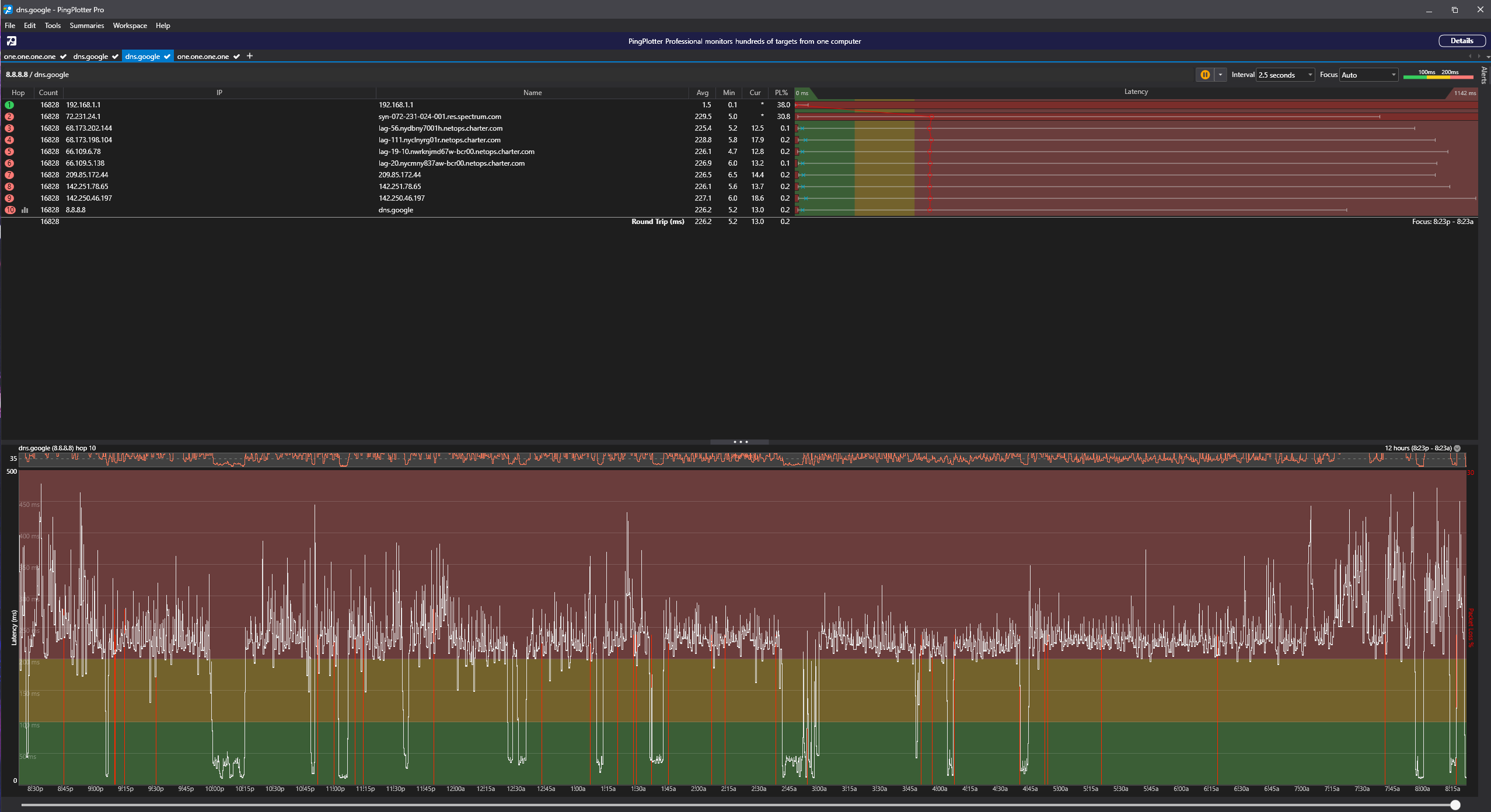
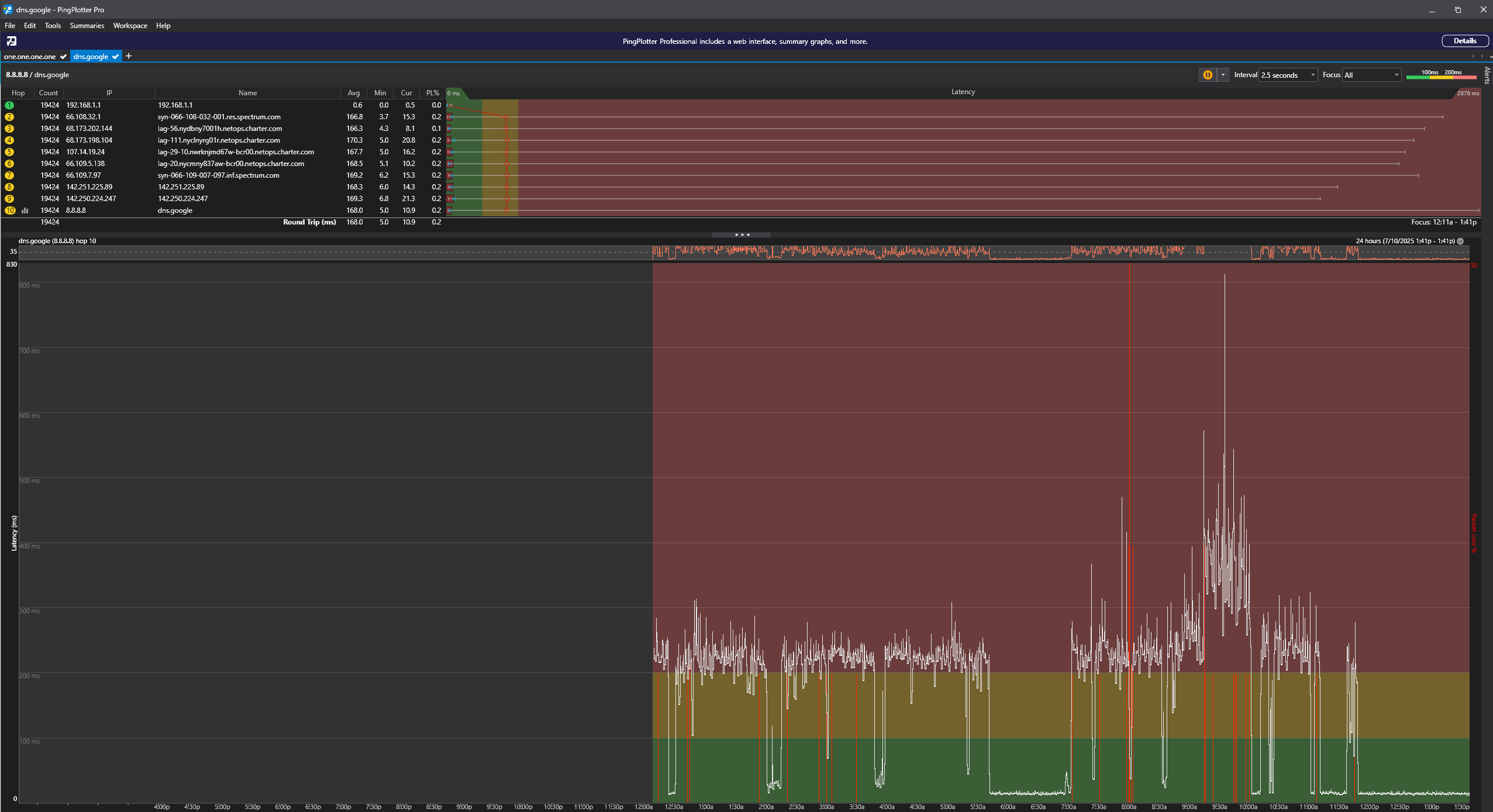
Below are three captures showing the persistent latency spikes beginning at hop 2 (Spectrum node) across multiple DNS paths.
Screenshots
- Hop2Spike_12hr_GoogleDNS.png - 12-hour capture showing consistent hop-2 bursts.
- Hop2Spike_24hr_GoogleDNS.png - 24-hour view showing daily spike patterns, worse in evenings.
- Hop2Spike_CloudflareDNS.png - Cloudflare path confirming the issue is Spectrum-side (spikes begin at hop 2).
Logs
Included in the attached .zip file: detailed PingPlotter exports (12hr/24hr/Cloudflare) plus a concise log bundle for Spectrum engineers.
If engineering needs the full ETL/PCAP set, I can provide a private link (files are large).
Request for Spectrum Staff
Could you please escalate to network engineering to check the CMTS/segment serving 72.231.24.1 for:
- Upstream utilization & scheduler/queue depth during 8–11 pm ET (spikes also occur off-peak).
- Uncorrectables/SNR on the node; DOCSIS profile changes or partial service events.
- Interconnect/peering health on the NYC core toward Cloudflare/Valve during the spike windows.
If necessary, I can provide exact timestamps, longer captures, or run any directed tests.
For neighbors (11211 / Williamsburg)
If you’re seeing rubber-banding or spiky ping evenings, please reply with a short PingPlotter or ping 1.1.1.1 -t graph and your first Spectrum hop. more data points will help prioritize the fix.
Thanks in advance for taking a look.
Location: Williamsburg, 11211
First Spectrum hop: 72.231.24.1 (syn-072-231-024-001.res.spectrum.com)

Comments
-
Hey @beautifulbooze, welcome to our community!
I definitely see the large ping spike but it could be starting anywhere between hop 1 (your router) and hop 2, which could include the port on your router, ethernet cable, modem, coaxial cables, tap outside, and anything else on the way to the node. The next step would be to schedule an appointment with a technician who can run further tests to trace the issue back to its source. Please let us know if you would like us to schedule one for you.0 -
I have had someone out a month ago. They gave me a new router, cable etc… and said good luck. As the issue is intermittent and not consistent, the internet ran fine when they were here and it seemed like they assumed there was no issue. I have been dealing with this for far too long.
0 -
I understand, unfortunately it's not uncommon for intermittent issues to take multiple appointments. If the problem isn't happening when the technician is there they can only make an educated guess as to the most likely cause, but we can always work towards a solution through process of elimination with some persistence.
The only other troubleshooting I could recommend is bypassing your router by connecting one device straight to the modem (with a different ethernet cable than the one currently connecting your modem to the router), reboot the modem, and check if the issue persists. You could also try exchanging the modem at a Spectrum store, but that's something our technician can do if you would like to schedule another appointment.0 -
Hi William,
Thanks again for engaging with this.
As I've mentioned we’ve already had one technician come out. They ran a simple diagnostic, swapped my router and the Ethernet cable (PC to router), and left. At that time, the issue wasn’t present, which is typical of intermittent problems.
That’s why I’m puzzled: requesting 3–5 more truck rolls simply to repeat diagnostics that show the same clean results feels inefficient. Especially when my extensive independent data clearly shows the issue begins at your hop 2 (CMTS/gateway node), not inside my home or on my network.
Would it not make sense to first run a 12–24 hour node health test or check for latency bursts remotely on your equipment before scheduling another in-person visit?
I’d rather free up everyone’s time; mine to work uninterrupted, and Spectrum’s tech resources to focus where they’re conclusively needed. Once your internal data confirms or rules out issues on your side.
I’m happy to assist further or provide timestamps, but given what I’ve already submitted, escalation to engineering for remote node diagnostics before any more tech visits seems like the most logical next step.
Thanks for your persistence and help in getting this resolved.
0 -
@beautifulbooze I've addressed that you already had a technician. I didn't say anything about 3-5 more, 1 may not be enough for an intermittent issue like this but I agree 4-6 would be excessive. Repeat appointments for the same reason are automatically escalated so it's extremely rare to get that far even for the most elusive issues.
Your data DOES NOT show that the problem begins at hop 2. It begins between hop 1 and 2. Let me give you an example; If you pinged just the router and saw a spike it wouldn't automatically mean the router is the cause of the issue. It would be something between your device and the router. It could be an issue with the device you tested with, a bad ethernet cable/WiFi problem, or problem with the router. A spike on hop 2 could be an issue with the node, but it's just as likely to be an issue with the connection from the router to the modem, the modem itself, the coaxial cable to your wall, the outlet, the wiring in your walls, the demarc box outside, the fittings there, the coaxial cable through your yard, the tap, the cable from there, the amplifiers down those cables, or anything else all the way up to and including the node.
I have run health checks on both your modem and node and do not see any issues remotely. We also monitor for increases to the volume of calls and appointments being scheduled. Even if I did see an issue, it would not tell me the exact location, cause, or what needs to be done to fix it, the next step would still be to schedule an appointment with a technician to come do further testing, I would just have additional information to provide them. Please let us know if you would like us to schedule one for you.1 -
Hey, I just came for the same problem in upper east side, 10028.
I have ping spikes very randomly. It doesn't matter if my internet is 100% idle at 2AM at night. I see spikes sometimes every 10 minutes and sometimes every a few minutes. However, any live ping test will show spikes to 80-150 range from a steady 10-25 ping level.
The things I tried so far;
- A tech came out and replaced all outlets, as well as cables and such. He also killed all dead ends. When he was done, he confirmed everything is brand new and he doesn't see any problem from a signal perspective. My DL speed jumped up to 1200mbs from 800-900 range.
- I have 5-6 Ethernet cable and all same results. I even got a high-end Ethernet cable recently but not change.
- Replaced EN2251 modem with a EU2251 didn't help.
- I tried connecting directly to the modem skipping the router, same results.
- I tried a laptop connected with an usbc, very similar results.
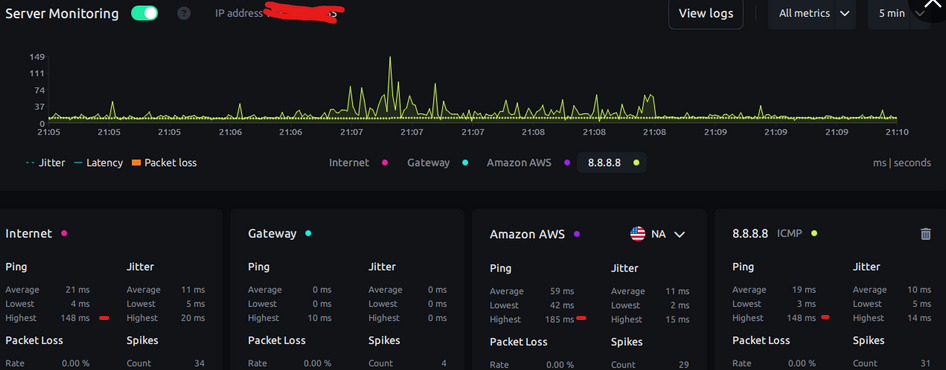
This impacts my online calls (temp red mic issues) as well as high pace gaming.
I am assessing switching to fiber service at this point.
Any help appreciated.
0