Didn't find what you were looking for?


We have advanced search options to make it easier to locate posts, questions and answers on this community.
More information can be found at Advanced Search Options
If you are looking for something specific, please check if someone else has already asked or answered the same question.

I'm unable to activate Peacock+

johneye1
johneye1 Posts: 7 Spectator
edited November 11 in Individual TV Network Apps

I've tried to activate Peacock+ using laptop, iPad and iPhone. I've followed the directions in Spectrum. I get sent to a website bp.fortumo.eu and an error message: "Something went wrong. Sorry, there was an error. Please, try again later." Has any one else encountered this and resolved it? Online chat with Spectrum support was useless.

Answers

  • Edward_T
    Edward_T Posts: 375 ✅ Verified Employee Moderator

    Hello @johneye1;

    Welcome to the Community Forums. I do apologize that you have not been able to activate Peacock services. The error message you received appears to be a browser related issue. I would recommend you try doing this on a different browser to see if it helps. If this does not help, can you provide us details on where in the process you were when you received the error?

  • johneye1
    johneye1 Posts: 7 Spectator

    I have tried with Chrome, Edge and Firefox. Same result with all 3. I can reach the page to select Peacock+ or Peacock Premium+. I select Peacock+ and click 'Get Started.' I get sent to a page with rotating circles that stops at 'bpfortumo.eu/error/ with the error message:

    Something went wrong

    Sorry, there was an error.

    Please, try again later.

  • Satch
    Satch Posts: 6,157 Contributor
    edited October 9

    Welcome!

    Remember Peacock through Spectrum requires a Spectrum TV subscription to any Spectrum Select package. New accounts or swapped equipment may take 48 hours to activate online access.

    Note that there is no Peacock+ , It's just Peacock. Could this be taking you to a wrong site?

    You will need to do the following:

    1.) Go to Spectrum.net

    https://www.spectrum.net/

    2.) Log in with your user name and password like you do at the forum here.

    3.) Select the TV/streaming tab

    4.) Select Peacock by scrolling down the page and clicking on it

    5.) Select "Log in with Provider" (Spectrum)

    6.) Enter the same user name and password you use for your Spectrum account at the forum.

    (The username and password needs to be the same user name and password you use to access the Community Forums.)

    7.) Bookmark the site or add to your devices' Homebar for easy access.

    Satch

  • johneye1
    johneye1 Posts: 7 Spectator
    1. Complete
    2. Complete
    3. Complete
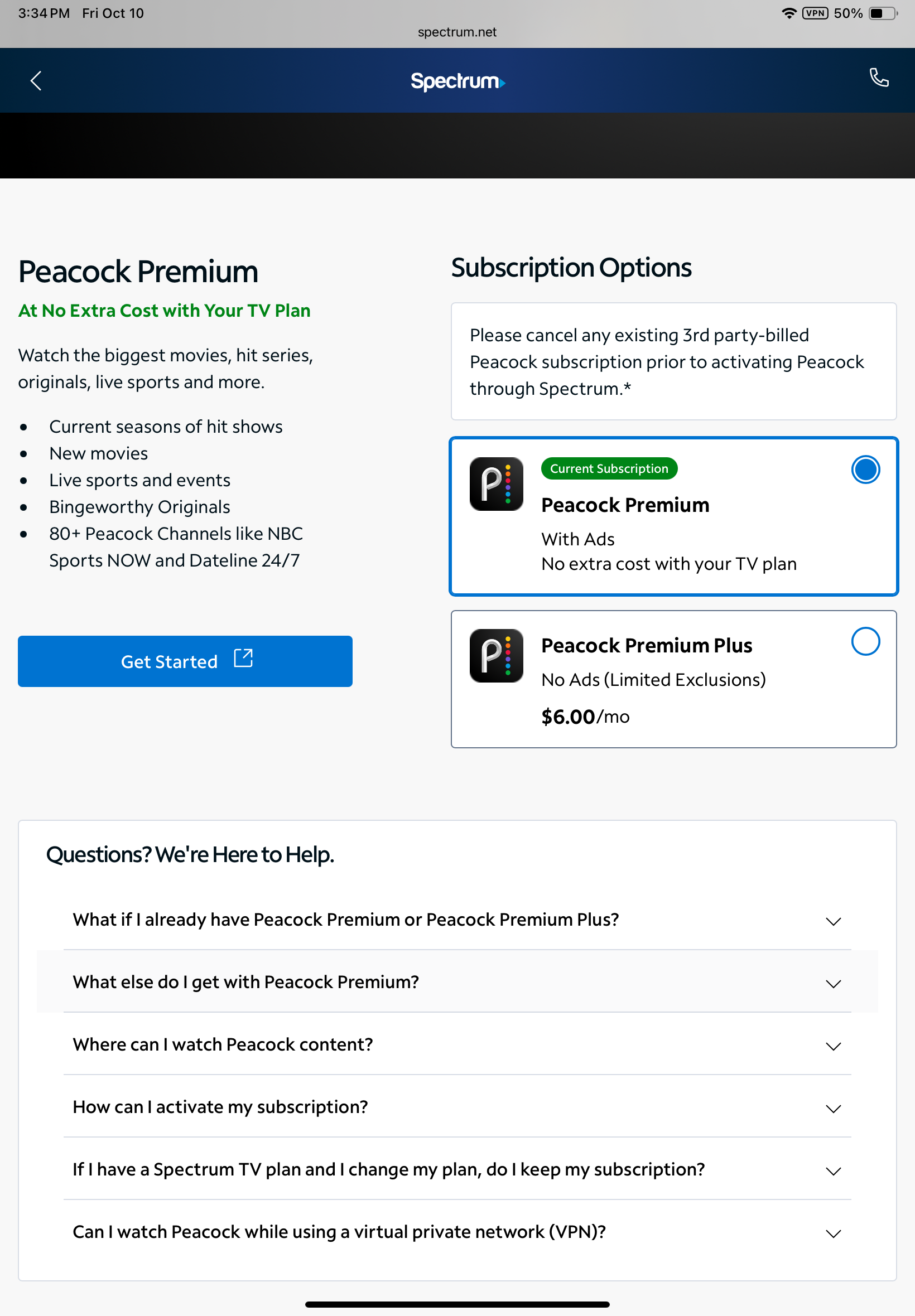
    4. Complete. This takes me to a page within Spectrum to select Peacock Premium or Peacock Premium Plus. I select Peacock Premium and click “Get Started.” This takes me to a webpage at bp.fortumo.eu with the error message: “Something went wrong. Sorry, there was an error. Please, try again later.” I never get to step 5 or beyond.
  • Satch
    Satch Posts: 6,157 Contributor

    I think I know your problem @johneye1

    Don't click "Get Started." That sets you up with a regular Peacock account with sign in information through them, not Spectrum. Instead, click "sign in." and for your email address, that is your Spectrum username and email that you use for the forum. In the email box type your user name and email just like you do to get into the forums. (See Figure 4.) Your password is the same password that you use to get to the Spectrum Community Forums. When you go through Spectrum there is no "Get Started" for Peacock.

    I added some screenshots:

    Peacock log in through Spectrum.png Peacock log in through Spectrum 2.png Peacock log in through Spectrum 3.png Peacock log in through Spectrum  4.png

    Satch

  • johneye1
    johneye1 Posts: 7 Spectator

    There is no “Sign In” option on the screen.

    IMG_0179.png
  • HT_Greenfield
    HT_Greenfield Posts: 1,170 Contributor
    edited October 11

    @johneye1 : If you hit Can I watch Peacock while using a virtual private network (VPN)? downwards of the page you shared a screenshot of, it says you can't. Try the Get Started hyperlink right there without the VPN.

  • johneye1
    johneye1 Posts: 7 Spectator

    Nope. Same error result without VPN.

  • Jilliana_M
    Jilliana_M Posts: 226 ✅ Verified Employee Moderator

    Hey there @johneye1! We are sorry to hear that you are still experiencing this issue. I was not able to replicate this issue in our system, so we do think this may be an individual issue. When you have time, I encourage you to reach out to Peacock customer support to see if there is anything on their end that is preventing your ability to sign in.

  • HT_Greenfield
    HT_Greenfield Posts: 1,170 Contributor
    edited October 11

    At this point, i'd delete the spectrum.net, fortumo.eu, and peacocktv.com web data from the browser cache and start over without any VPN at play. Otherwise, in case it's already been activated, i'd try signing directly into 🔗 https://www.peacocktv.com/start and see what happens.

    Edit: What Jilliana said! ☘️

  • johneye1
    johneye1 Posts: 7 Spectator

    I have cleared cache from MS Edge browser. I was able to succesfully activate Fox 1 and Vix in this session. I have previously activated AMC+ and Disney + bundIe. However, I get the same error message from bp.fortimo.eu when I try to activate Peacock.

  • Satch
    Satch Posts: 6,157 Contributor

    @johneye1

    Have you ever had a third party Peacock Subscription in the past on any of your devices? I came across this link from Peacock. You might have seen the information below, but I am posting it here if you have not:

    Could there be some pesky malware that has gotten on your system? I would recommend running a PC system scan with free Malware Bytes just to see what it finds. You can ignore the premium stuff and don't install the browser guard things even if prompted. Just run a scan, and have it clean up what it finds. It won't interfere with your existing AV software and it is a good fast On Demand scanner:

    If these steps still don't get you anywhere, I would reach out to Peacock Customer Care as suggested by the moderators saying that you are trying to sign in through Spectrum, have a pre-requistite Spectrum TV Select or TV Ultimate Plan, and can not sign in through Spectrum. Mention that Spectrum said to contract them.

    Satch

  • johneye1
    johneye1 Posts: 7 Spectator
    edited October 12

    I have had a previous Peacock subscription, but under a different username/email. I canceled that plan in August. I get the error message from my iPhone and iPad browsers, as well (Safari, Chrome, Foxfire and Norton) so I don’t see how malware on my PC Edge browser would be the culprit.

  • Satch
    Satch Posts: 6,157 Contributor
    edited October 12

    @johneye1 ,

    Try my above recommendations and if you talk to Peacock Customer Care, let us know what they say. Make sure that you mention to Peacock that you had a previous plan with them that you cancelled back in August and now you want to go through Spectrum and have a qualifying TV package.

    I am suspecting data from that old account is somehow still on your devices, or possible malware.

    Update- On your browsers, if you log in through Private Browsing, do you get the same bp.fortimo.eu error message?

    Satch

This discussion has been closed.