BF6 Lagging Upstream Network. What can i do?

I ran a tracert and saw some latency at 96.34.0.185 which is a node upstream in the charter network. I ran a ping test while playing and saw some undesirable results. I tried calling spectrum and they insist on sending a tech even though the issue is not local to me. The IP address is the 9th hop in my tracert, and is upstream in their network. What are my options here?
Ping statistics for 96.34.0.185:
Packets: Sent = 226, Received = 226, Lost = 0 (0% loss),
Approximate round trip times in milli-seconds:
Minimum = 33ms, Maximum = 310ms, Average = 51ms
Best Answer
-
Hey there @billy409!
Thank you for bringing this to our attention. We apologize for the lag you are currently experiencing while gaming and would be more than happy to help address this issue.
I was able to access the account using the email used for registration and taking a look at the connection, I am not showing any cause or concerns. The signals are in range, you are receiving provisioned speeds, and the router is showing an excellent connection for the number of devices currently connected. While I understand that a high ping result may be a cause for concern, those results are quite normal. Especially if you are pinging a website in which millions of other players are accessing at the same time. From what I can confirm, this definitely seems like a site lag, due to the number of gamers connecting, more than a service issue. However, please know we are here for you 24/7, and if we can assist you further, please let us know.
1

Answers
-
@Jilliana_M thank you for the reply.
The latency only appears at that particular node within the charter network. There is no latency within my local connection, or at EA’s server. The ip address I provided is spectrum equipment. The level of latency might be acceptable for everyday internet usage but unfortunately it makes the game unplayable.
"ip": "96.34.0.185",
"city": "Spartanburg","region": "South Carolina",
"country": "US",
"org": "AS20115 Charter Communications"
0 -
Can you provide the full trace route that you were running that indicates the issue? I would like to review it to see where the issue may be.
0 -
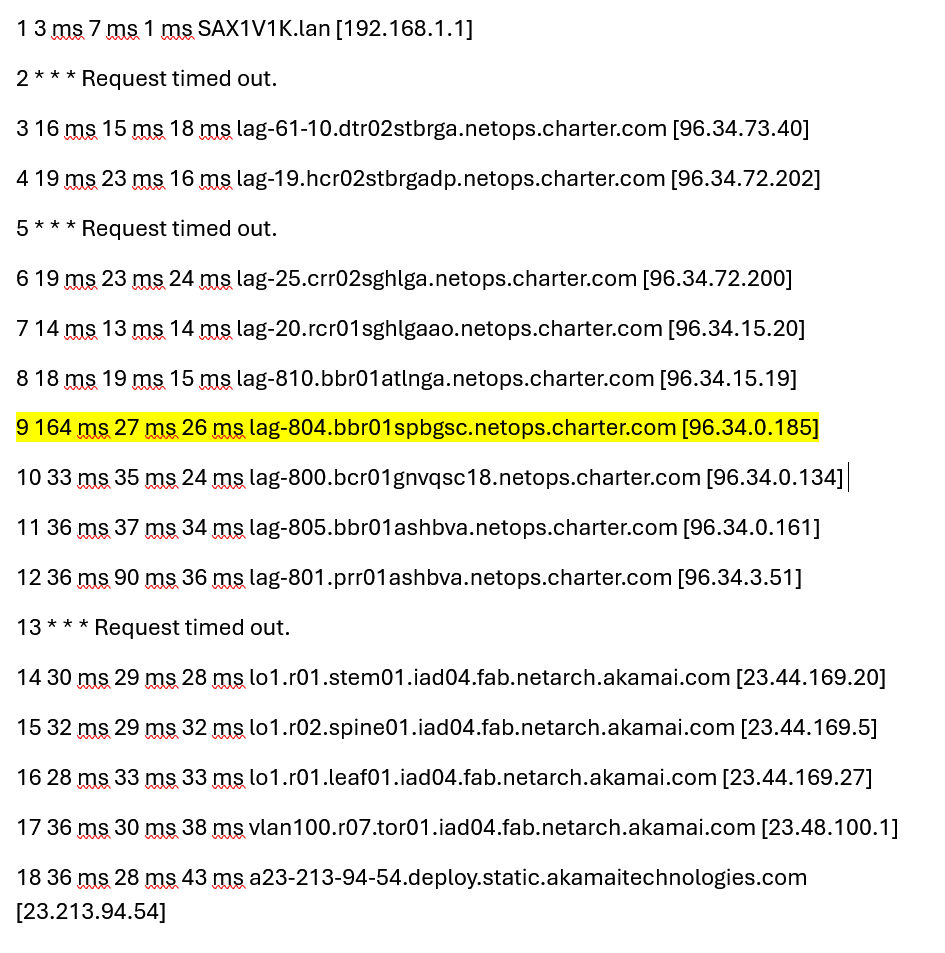
@Edward_T here are the tracert results. I highlighted the troubled IP. Note the RTT of 164ms on hop 9. I also ran a continuous ping on 96.34.0.185 and it had an average RTT of 74ms and peaked at 319ms.
Anything above 70ms is going to be noticeable lag in-game, and above 150ms+ is virtually unplayable.
Ping statistics for 96.34.0.185: Packets: Sent = 57, Received = 57, Lost = 0 (0% loss),Approximate round trip times in milli-seconds: Minimum = 33ms, Maximum = 319ms, Average = 74ms
 0
0 -
Thank you for the trace route. I reviewed it and there is not an issue with that server. Most of our servers have a security feature that can limit a ping or trace to it. It will either block it or slow it down. This is to prevent DDOS attacks. If the server was truly a problem then you would see similar results on each server after that individual server. The results after are normal so that indicates that the security feature has been enabled. I checked your modem again and I am not seeing any obvious problems. We could get a technician out to rule out issues with our equipment but the issue you are experiencing could also be an issue with the server you are connecting with.
0 -
@Edward_T @Jilliana_M I really do appreciate the support here.
I ran sustained ICMP tests per hop while playing. Spectrum backbone nodes show intermittent latency spikes and elevated averages:
• 96.34.15.19 – max 202 ms, avg 48 ms
• 96.34.0.185 – max 148 ms, avg 44 ms
Neighboring hops and downstream Akamai nodes are stable by comparison (avgs mid-30s to 40s). Please escalate to network engineering to check utilization, buffer/queue depth, and error counters on these interfaces (LAGs) and adjust routing if necessary. This is causing high Transport Network (TN) latency in online games. I have included all network hops that had above 60ms peaks and highlighted the two backbone routers that have the largest latency spikes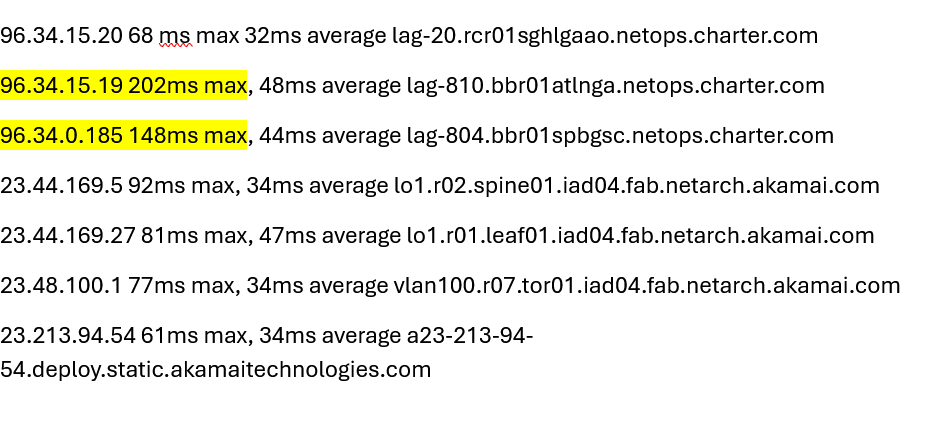 0
0 -
I do apologize but a continuous ping to our devices will not show a good result. Our devices are programmed to stop responding or slow down the response from a device that is causing an increase activity. So your results would not indicate an issue. You need to do a full trace route and see what the results are after the affected hop to see if there is an issue. It is more likely an issue closer to home. We would need to schedule a technician to come out to investigate your home to see if there is an issue near your home.
0 -
Hi @Edward_T I ran a tracert while in-game. Lot's of jitter on hops 5&6. Pretty sure it's more of a regional node than close to home. If you feel you must send a tech out, fine. I just think it's a waste of time when all of these data suggests broader upstream issues.
as for the continuous pings, the spikes were when i experienced in-game lag. Generally when there are several people on the screen at one time.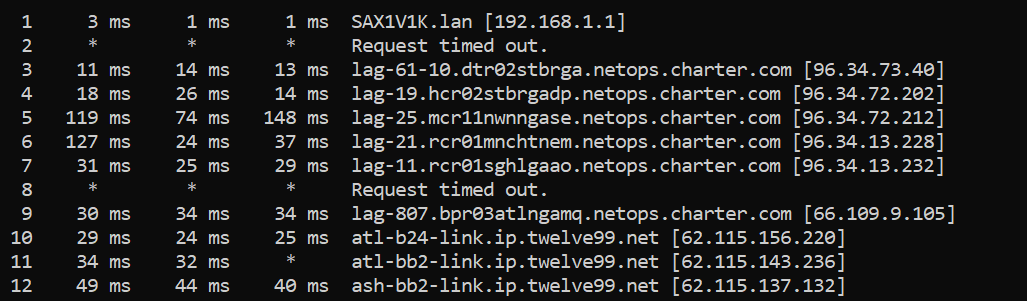 0
0 -
@billy409 : No offense but are you kidding me? The routers will respond when they feel like it. In the meantime they are forward-relaying the echo requests, and i do mean cumulatively, at least as fast as the endpoint is responding. There's literally no other possibility. Over and out. ☘️
0 -
@billy409
I would refer you to the following post concerning your ping and traceroute tests. While the routers are sending a delayed response to your test as it's not prioritized traffic, the subsequent hops do not reflect any added latency to reflect an issue occurring.0 -
@HT_Greenfield not sure what you are getting so worked up about.
I get what you’re saying about routers not always replying to ICMP, and if it was just one hop showing weird numbers I’d totally agree with you. The thing is, in this case the spikes don’t stop there the high latency and jitter keep going through the rest of the route and show up at the final destination too, which means it’s not just routers ignoring pings.If it were only ICMP deprioritization, later hops would go back to normal, but they don’t. That usually points to actual congestion or queuing inside the network. It also lines up exactly with the TN spikes and lag I see in-game so it’s definitely impacting real traffic and not just traceroute results.
0 -
@billy409 From the traceroutes you've provided the high ping does not persist through to all hops afterward including the destination server, so it does not actually represent an issue. The highest I'm seeing is 61ms which is acceptable, and the rest are 30-40s which is good. If results to the destination server are healthy, nothing before that matters. Traffic has to go through each subsequent hop to get to the next one, so it would not actually be possible for it to take 30ms to get to hop 7 if it took 130ms just to get to hop 6, this is a clear sign if ICMP deprioritization which can happen on multiple hops throughout a traceroute.
0