Didn't find what you were looking for?
We have advanced search options to make it easier to locate posts, questions and answers on this community.
More information can be found at Advanced Search Options
If you are looking for something specific, please check if someone else has already asked or answered the same question.
This content may be outdated or inaccurate
All posts are closed and commenting has been disabled
If you have a question or comment, please start a new post (registration is required)
Leave the Archive
Email password change

I Received an email saying to change my Email password before Nov 11th. Is this legit?
Best Answer
-
To help clarify for everyone, each email account will be tied to it's own Spectrum ID/account login. The passwords for the email and the identities will need to be the same since email will be accessed by logging into spectrum.net with the Spectrum ID associated with the email account rather than the current webmail site. The only need for a password change is if there's a conflict between the email password and the Spectrum ID password or issue with it meeting requirements. The password can only be changed via spectrum.net, the prior selfcare option would not be available to manage email passwords separately.
For reference, I've included the password requirements if you were notified a change was needed.
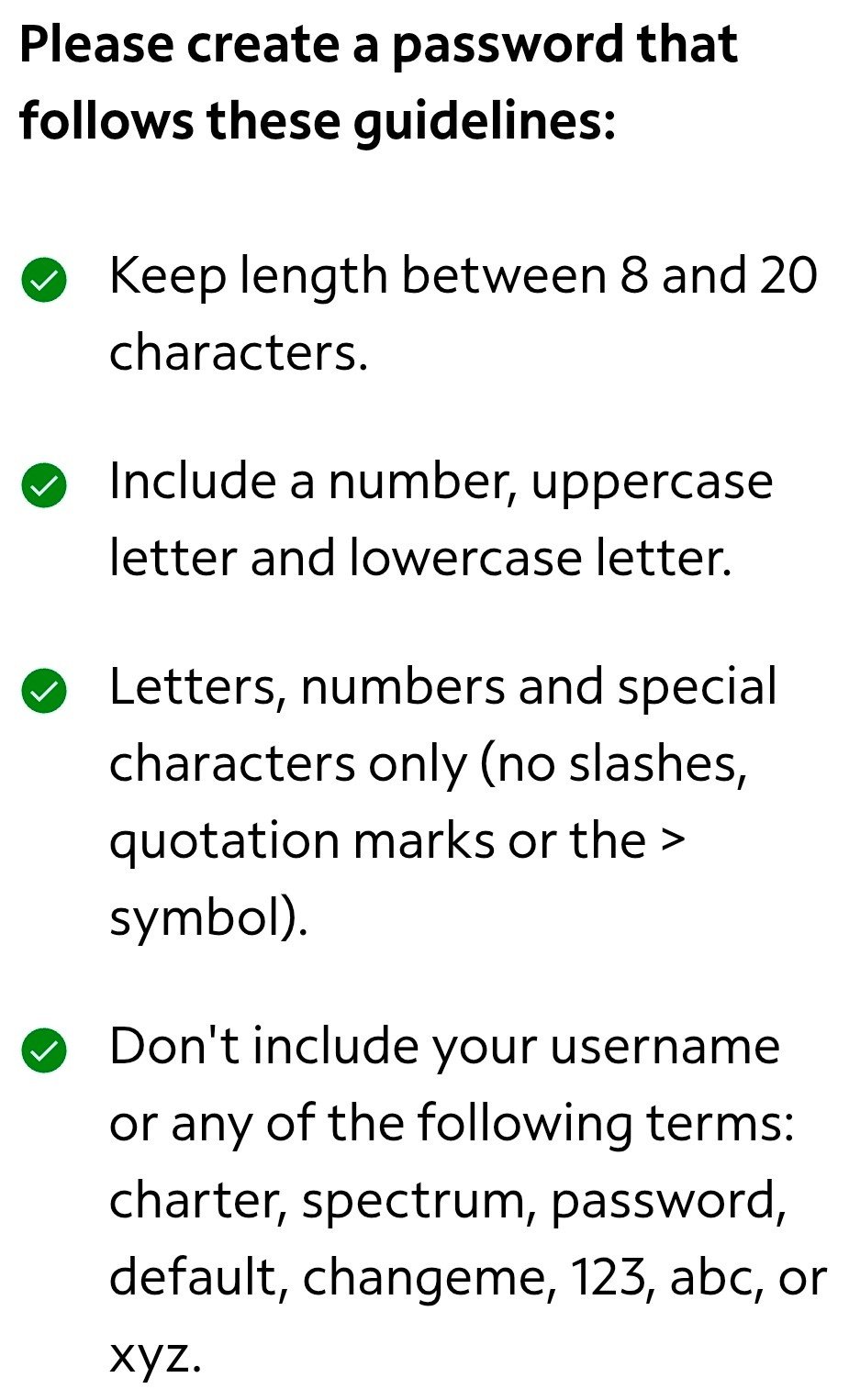 0
0

Answers
-
Hello @GordonDupont24;
I can understand your concern about the password update email that you received. I can confirm that your account was sent a notification about your password. We are updating our email systems and your current password may not comply with password rules that we are currently using. I would recommend you follow the instructions in the email.
0 -
Thank you
0 -
I changed it
0 -
Not a problem. If you need any further assistance then please reach back out to us.
0 -
I got similar email with this instruction, but when I log in there does not exist such a navigation option.
3. To check your email please select “Check Email” in the left-hand navigation.
So i have no idea how to do what is needed.
0 -
I have the same issue. Nowhere to change or reset password and have multiple email accounts. I am logging into my spectrum.net account to try and do it
0 -
RE: alert emails to change passwords by Nov. 11 2025
Edward_T said: "current password may not comply with password rules rules that we are currently using"
Where are these new password rules? I don't want to make changes that will not comply.
0 -
Hello @Cushlomockree;
You can visit the following site for suggestions on what the password should be. Our site will also tell you when setting a password if it is not acceptible.
Hello @kimleslieshafer;
The exact location may vary depending on the browser you are using. In most cases you will see Check Email on the lower left side after you log into www.spectrum.net.
Hello @Repitall;
Once you are in the Check Email section, you can click on Settings and you will see a password section where you can change it.
0 -
When I follow the above instructions i.e. "Check Email", it's asking if I want to create a mailbox with the account user name (which isn't my rr.com email). Can't get past that screen to get to changing the password for the rr.com email. I don't want/need to update the password for our Spectrum account (which has multiple rr.com emails attached to it). If I try to change on webmail, it loops me back to the same page. Frustrating to get a week's notice! Been using this rr.com email for 25+ years. It's not easy changing since so many sites are linked to that email.
0 -
Hello,
I also received this email, and I am trying to understand why I have to change it. My current password is 10 letters/numbers, and since it is 12 I have to change it? Or is there some other reason for this?
As a Mozilla Thunderbird user I have had many troubles with email on my rr.com account over the years, and i have many, many contacts with my email address in my business that I can't afford to lose. Is Spectrum trying to dump rr.com accounts, or move them onto Spectrum accounts with a new address?
For now I have a stable system, I do not have the time or patience to send out hundreds of emails saying 'my new email address is ….."
Thanks for an answer
0 -
Sorry,
In the above post I mistyped. I meant to say "My current password is 10 letters/numbers, and since it is not 12 letters/numbers/characters I have to change it?'
0 -
I should also add that my rr.com email password is already 13 characters with letters & numbers. Not sure why I have to change it.
0 -
The problem we are having is that the forgot email choice or the the change email password does give the option to change the master RR email account and the sub accounts. Makes no sense to not to able to access the accounts. No need to change the spectrum.net sign password.
so The question is…how do I change the password for the master rr.com email password and any sub account passwords without changing the spectrum.net password?
0 -
The following link will provide instruction on how to retain your Spectrum email address:
0 -
Just tried Melissa G's instructions above. Now I'm completely locked out of webmail, etc. Took about 1/2 hour with chat support to resolve.
1 -
Will our current email remain in place? (@twc.com) I have several accounts, including my on-line college classes tired tothat email.
Thanks!
Jim
0 -
@j_vanluven001
Email attached to an active account isn't being removed. Your account shows 3 twc.com emails linked to the account, each with their own Spectrum ID to login.1 -
I have 1 managing account and 4 sub-accounts. Mail clients on Windows are POP3/SMTP.
Incoming: pop-server.stny.rr.com
Outgoing: mail.twc.com
I changed the passwords of the managing and sub-account on my machine. All I did was change the server passwords in the settings of the mail client.
I can receive but not send emails (password rejected).
I tried changing my wife's (sub-account) password on her machine. She can't receive or send emails.
The only way we can get access is though via a browser at
Is there a way to go back to the old passwords !!!!!!!!!?
We have many email addresses, and all go into the client's inbox. Kind of a nightmare.
0 -
I've read the above comments and replies and still am not clear on the scope.
I have a Master Account ID aaaaa@wi.rr.com. The password is 15 characters.
I also have 5 EMail sub-accounts bbbbb@wi.rr.com, etc. Only one account has a password 12 characters or more.Will I only have to change the passwords for the 4 sub-accounts that are not compliant with new standard?
Either way, this seems like a fiasco waiting to happen, as like some customers above, I use other other email clients to handle my email:
- Outlook 365 Windows Desktop Version.
- Apple Mail on my iPhone.When I've updated passwords in the past, there have always been problems getting all of the pieces to work together. As such I want to change as few passwords as possible.
1 -
@Cushlomockree,
Email now has to be attached to it's own Spectrum ID, which is used to log into spectrum.net. For your account, this already appears to be the case. The Spectrum ID will be how you access email vs. logging into the webmail site, clicking the "check email" option on the left margin after logging into the associated account at spectrum.net. The password for the email needs to match the one for the Spectrum ID. If it doesn't, you should see an incorrect password message. You can reset the Spectrum ID password at spectrum.net, which also updates it for email.1