Didn't find what you were looking for?
We have advanced search options to make it easier to locate posts, questions and answers on this community.
More information can be found at Advanced Search Options
If you are looking for something specific, please check if someone else has already asked or answered the same question.
Help with latency issues! (Ping spikes, lag, connectivity drops!)

Hello,
I've been a Spectrum customer for years and recently started experiencing consistent and significant issues that are impacting my ability to work from home (video calls) and play video games (AoE II - not an intensive load to my understanding). This has been going on for over a month and happens at all times (not peak hour related).
During video calls, Microsoft Teams tells me that I have a poor network quality and during gameplay (which worked for years without issue), there is consistent and significant lag and stutters in the game play experience. A technician came out yesterday, tested all my lines (which were fine) and replaced my modem. He was great but there have been no improvements to the network experience. (+As additional background, I have bought and attempted to correct these issues with new Netgear Orbi and TP-Link router systems, tested through hardwire ethernet to the router and to the modem, etc. etc. - nothing works to correct this issue).
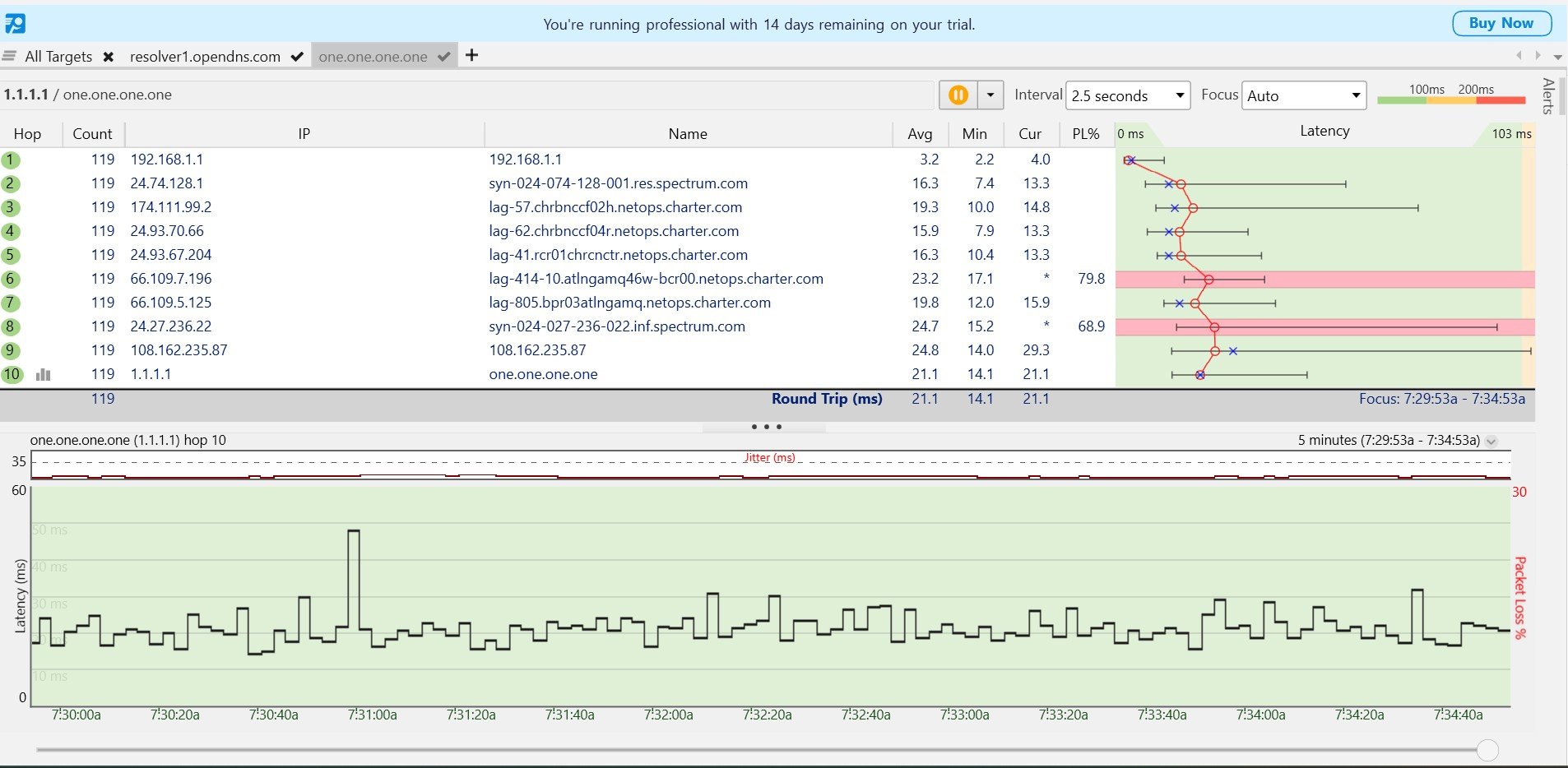
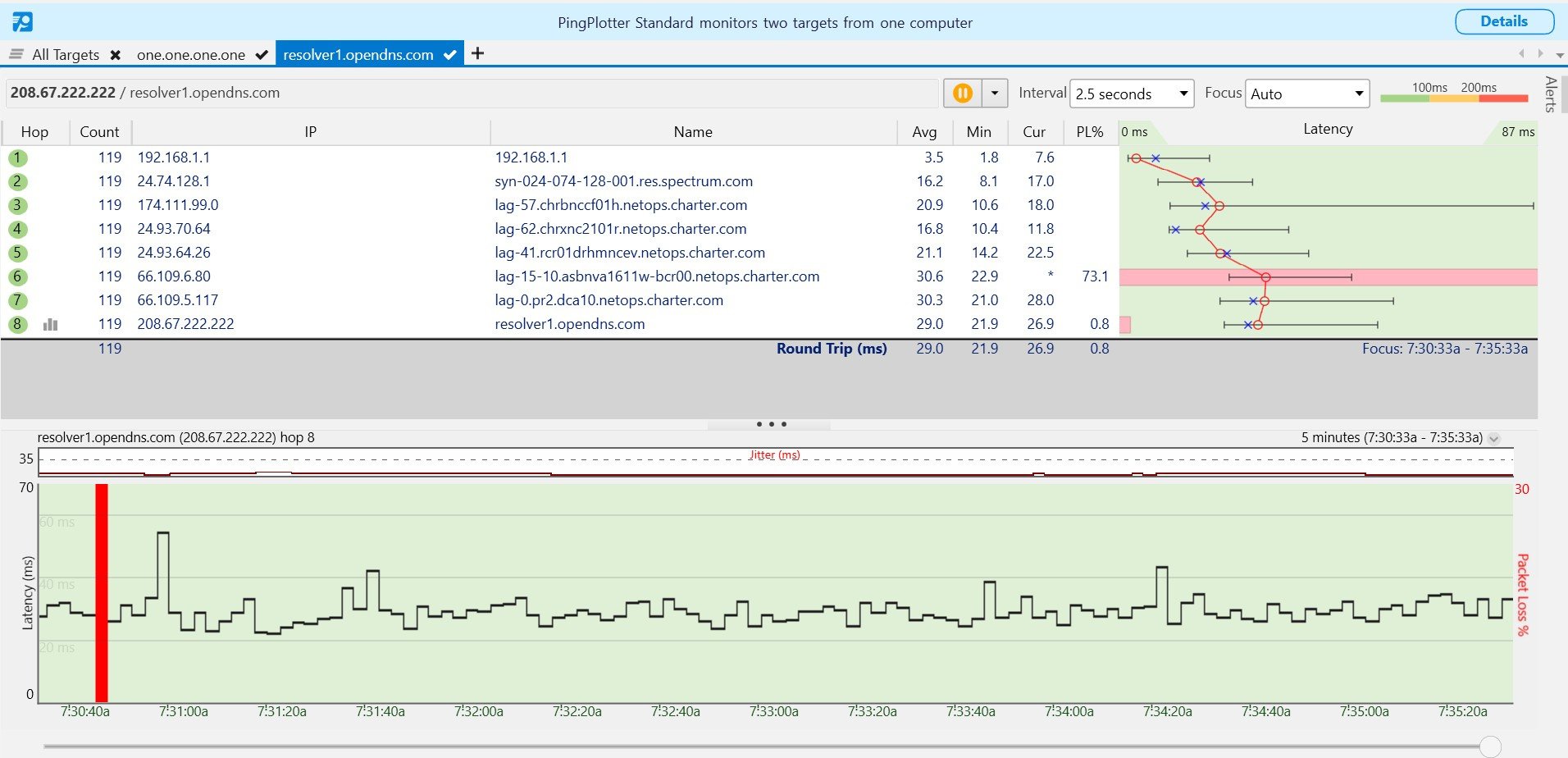
I've done some reading and have leveraged AI to help me understand the results of PingPlotter tests to Cloudflare and OpenDNS - which according to ChatGPT reflect that:
"This test reinforces the conclusion from the first test: The primary issue appears to lie with your ISP, Spectrum. The significant packet loss at Hop 7 (57.1%) and the latency spikes further down the line show that there are issues within their network or routing infrastructure. These factors are likely causing the latency problems you're experiencing.
You should contact Spectrum and report these packet loss issues, particularly mentioning Hop 7 where packet loss is high, as it could be affecting your overall connection quality."
Can someone help me understand the issue at hand and advise me on next steps to take to resolve? I often work from home as do others in my family, so a resolution is imperative. Thank you to any/all who can assist!
Answers
-
Hi @CLT_SmartHome2025, welcome to our community!
I don't see any significant issues with your traceroutes. In your first example you are making it to the destination server in 21ms with 0% packet loss, and in your second example 29ms though the 0.8% could be significant. If the earlier hops were actually causing problems, you would see the same issue repeated on every hop after including the destination server. They are just deprioritizing ping responses. See more on interpreting traceroutes.
That being said, your struggle to video call or play online games is a still a real problem that needs to be fixed. I understand you tested while connected straight to the modem, but was that a traceroute or did you try playing/video calling? What kind of ping are you showing when in game? What does your speed and ping show at speedtest.net?1 -
Hello William - thanks for your response! So I have done multiple forms of tests and will say at the outset that my speed and ping results from all my testing are typically strong (great speed results and low pings from the 'summary' of results).
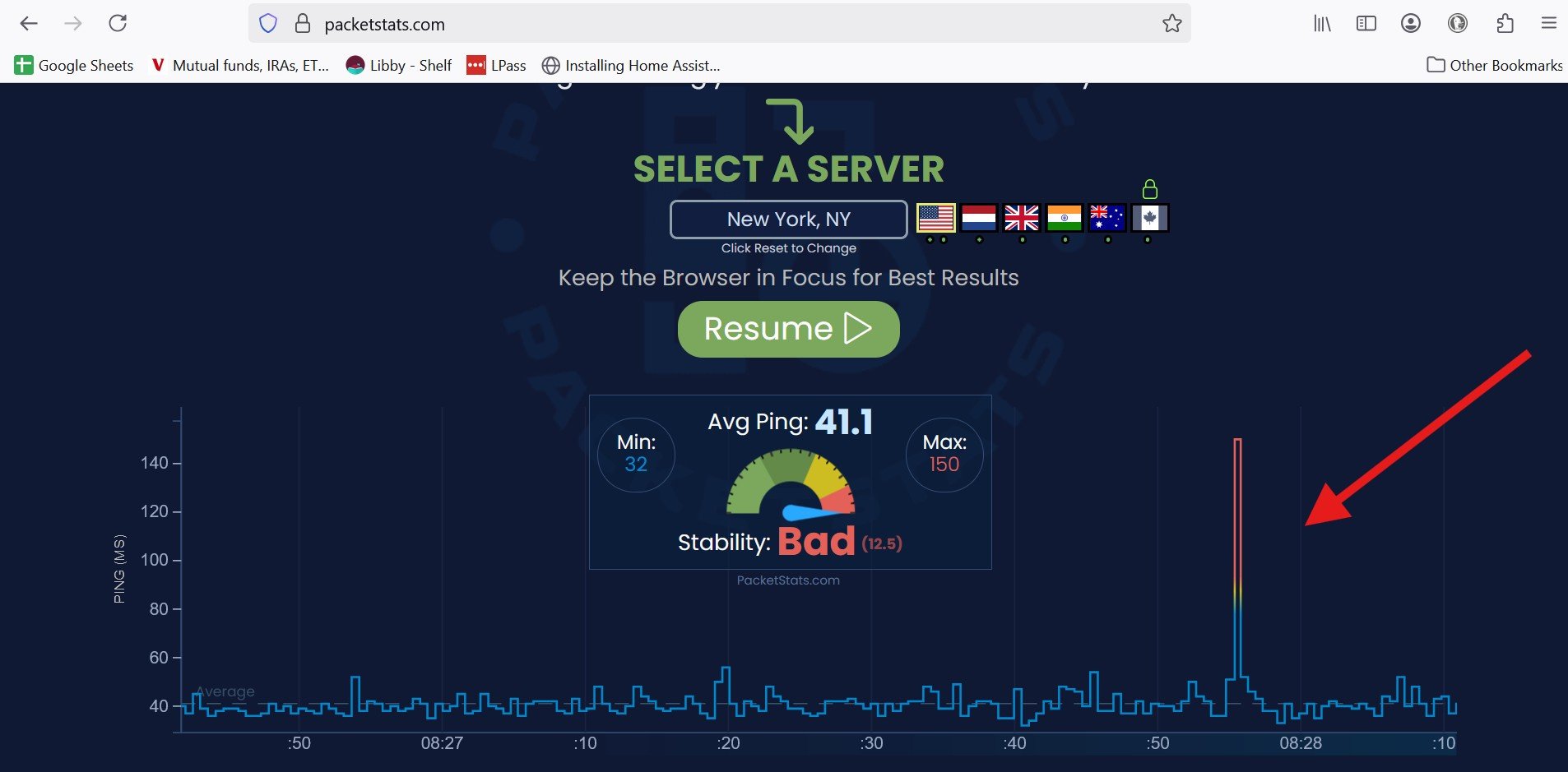
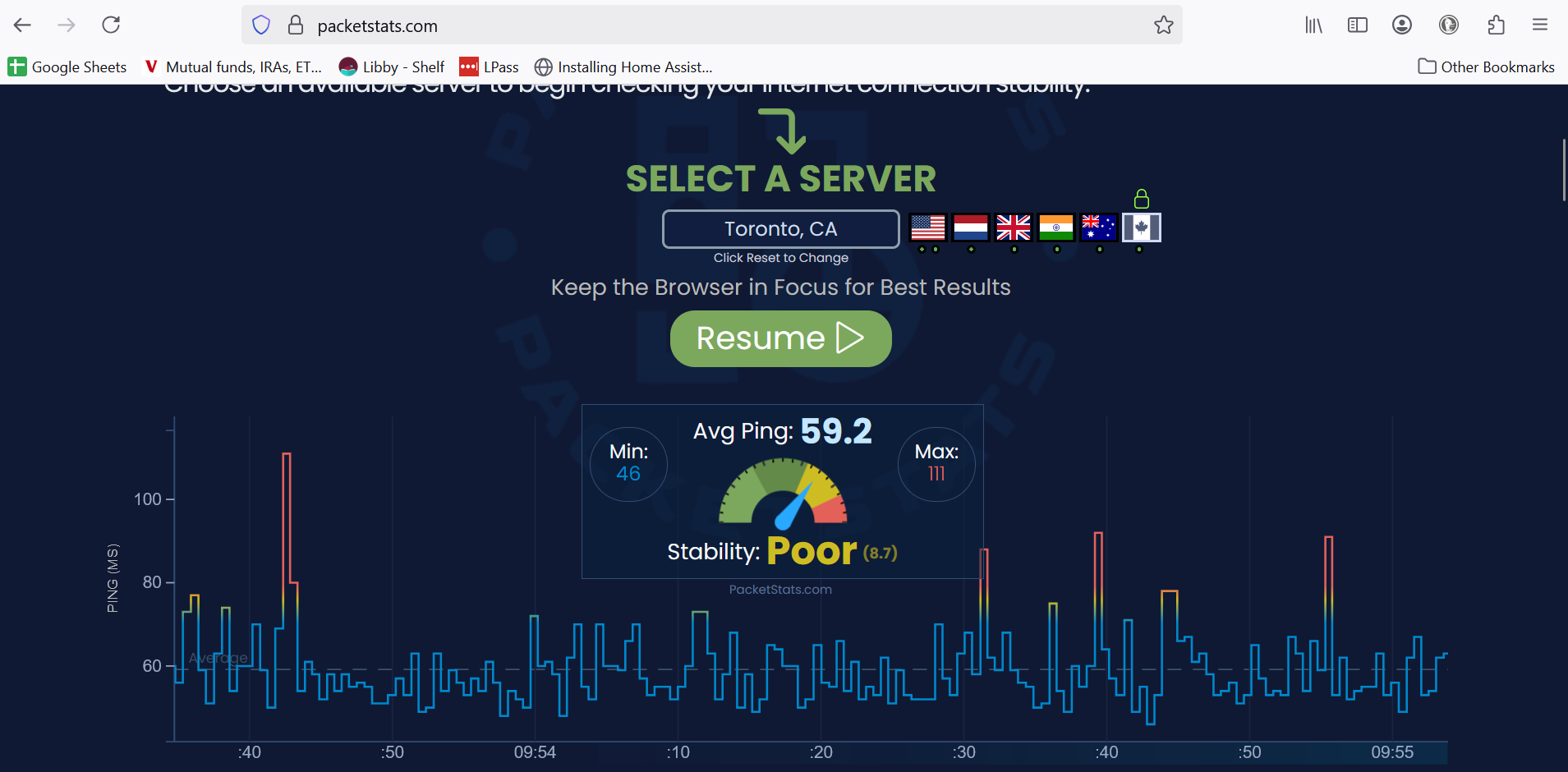
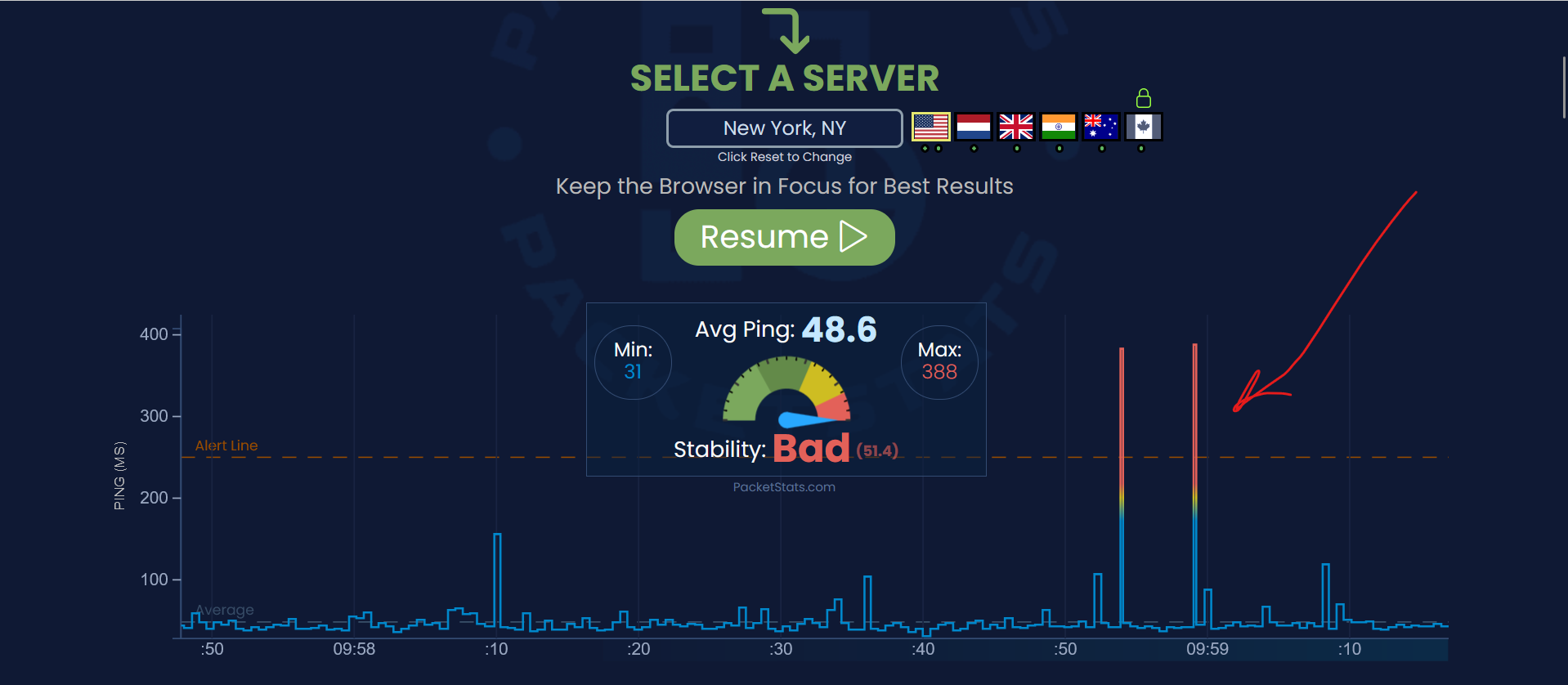
However, the lag and issue to my understanding corresponds with periodic 'ping spikes' - which in each scenario I've been identifying via websites like packetstats.com and yes, based on my visual experience in gameplay. For example, while playing Age of Empires, the gameplay will work fine for a minute or so, and then stop, stutter, and speed up to 'catch up' to a delay in data. That overall experience has remained consistent - though there is some minor level of improvement when connected physically to the router / modem - but nothing that achieves what I previously experienced for the past 5 years (gameplay that is uninterrupted and fully executed on a Wi-Fi connection).
Interestingly, as I test this morning to respond to your message - I observe better results than I've seen in awhile (though see below for an example of a ping spike). The technician that came to my house noted that he would be following up with 'maintenance' and suggested there may be some possibility of an issue with a neighbor or with a 'node'. Can you see if any such effort is in the system for review/follow-up or if any progress has been made? Thanks!
 0
0 -
 0
0 -
 0
0 -
Good evening @CLT_SmartHome2025
It looks like the server that you are testing from is rather large distance from your home which can skew the numbers. Generally, for more accurate reading the server would need to be closer to you. I understand that you checked a wired connection but are you doing this with the router still connected or are you directly connected to our modem? -Lyn
1 -
End to end numbers are fine... as far as ICMP ECHO testing goes against popular public DNS servers goes.
Need to be running tests catered more towards the specific services you are having issues with. Could very well be an issue with return pathing, which won't be shown with the basic ICMP tests you are running.
1 -
Thank you for the responses!
Lyn - I've tested everything. This evening I've spent the last several hours connected directly to the modem - to try and assess the issue. I confirmed the game I enjoy playing, Age of Empires II loaded through Steam, continues to experience periodic stuttering (would fit appropriately with a 'ping spike') - something I did not experience until recently. I've tried to troubleshoot all aspects that I can identify via internet research - my network, my PC, game settings, etc. and continue to come up empty. I would also add that the other software where I've experienced issues is ALSO a Microsoft service - Microsoft Teams. Not sure if that's a coincidence, but I'd be glad to do or test anything you might suggest to gain further clarity.
RAIST5050 - I've run various PingPlotter tests to IP addresses identified during gameplay and/or Microsoft.com. Results don't appear to suggest a local issue - and I suppose it's hard to know whether the IP addresses that are identified and losing packets have some kind of setting to not respond. Do you have any suggestions or references I could utilize to get further insight? As of now, my two (2) main issues are Age of Empires on Steam (AoE is owned by Microsoft) and Microsoft Teams for video calls.
0 -
The problem is you are relying on ICMP ECHO testing to finger a problem it cannot detect. The role of all those hops is to forward packets, not respond to them. That is why regardless of what you are seeing in the middle, the last hop numbers are still strong.
That is what matters... the endpoint stats.
Despite whatever congestion related issues may be occurring in the middle, things are still forwarding to the endpoint in spec.
There may be some other processing issues in play that are not going to show up with where you are looking. Could need a looking glass from the server end back to you because there may be a return path issue. Could be something going on with the Windows environment (it has been having all manner of issues for about a year now when it comes to games and/or gaming hardware, especially when Nvidia has been involved). Not to mention Intel 13/14th gen CPU's, AMD X3D CPU's, certain motherboard chipsets, certain RAM configuration problems... the list can go on.
0