Didn't find what you were looking for?
We have advanced search options to make it easier to locate posts, questions and answers on this community.
More information can be found at Advanced Search Options
If you are looking for something specific, please check if someone else has already asked or answered the same question.
Periodic Ping spikes (nearly for a year) - 10028

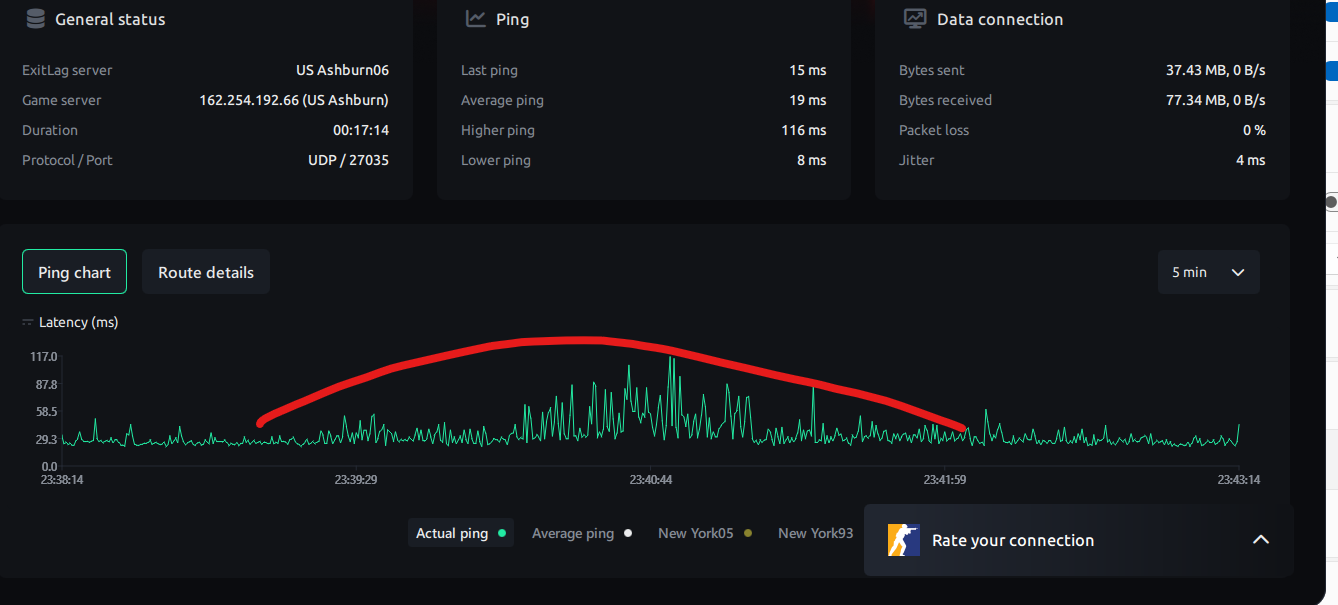
I have ping spikes very randomly. It doesn't matter even if my internet is 100% idle at 2AM at night. I see spikes periodically, sometimes every 10 minutes and sometimes every a few minutes. Any live ping test will show spikes to 80-150 range from a steady 10-25 ping level.
The things I tried so far;
- A tech came out and replaced all outlets, as well as cables and such. He also killed all dead ends. When he was done, he confirmed everything is brand new and he doesn't see any problem from a signal perspective. My DL speed jumped up to 1200mbs from 800-900 range. He tested for a few minutes though which may not show those spikes anyway.
- I have 5-6 Ethernet cable and all same results. I even got a high-end Ethernet cable recently but not change.
- Replaced EN2251 modem with a EU2251 didn't help.
- I tried connecting directly to the modem skipping the router, same results.
- I tried a laptop connected with an usbc, very similar results.
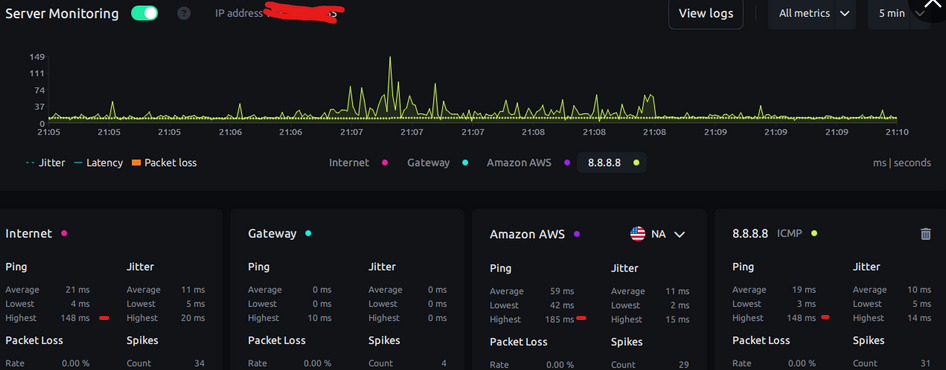
**the screen shot shows 8.8.8.8 pinging but I simultaneously ping various IPs in different directions and spike impacts all results independent from the destination server location.
This issue impacts my online calls (temp red mic issues) as well as high pace gaming.
How can we pinpoint where the problem is? Can it be in my building or a congestion in a node that are totally out of my control?
Should I invest in a high end modem and see if it makes different? I read EN2251 could be the issue due to its Puma chip but EU2251 didn't make any improvement.
Should Tech come out again and do a longer test, like 10+ minutes to be able to catch this?
Thanks
Answers
-
Good afternoon @onurc
Welcome to back to our Community Forums! Sorry to hear that you're experiencing issues with our internet service, I'm happy to help! I did take a look at the equipment diagnostics and the modem and router appear to be healthy. The signals are within range and no evident timeouts. Are you noticing a change in the modem and/or router lights when you experience spikes?
0 -
Hi, thanks for looking into it.
I am not near the equipment but I would expect them to be normal since there are power and online indicator on the modem and I am not losing my internet connection, just the ping spike (including when I directly connect my ethernet cable from modem to my desktop, bypassing router).
Is it possible to run a test for about 10mins and see when those spikes occur? I am guessing you would be able to see (if technically possible) a signal noise or something since my gateway ping is steady 0ms, so it must be between somewhere from my modem to the destination.
0 -
I can certainly set up a device watch for an hour or so. It would be easier if you were with the equipment, that way you'd be able to tell us what you see on your end during that time. However, we can watch on our end and let you know how that goes. If you have any other concerns or inquiries in the meantime, feel free to let us know. Otherwise, we'll check back in an hour.
0 -
Thank you. I will be back at home around 2PM EST so I should be able to help with any follow up question.
0 -
I received the results from the device watch. When pinging your modem directly, the upstream and downstream signal to noise ratio remained steady. This was the case with the transmit and return signals as well. The highest ping spike recorded was 23.93ms that happened at 1:30p. We saw another spike at 1:40, that ping was 16.17ms. These spikes are well within range for working service. Have you made it home? Does the connection seem to be steady for you?
0 -
This content has been removed.
-
Thanks. Were these the results for one hour. I wouldn't even call anything under 40-50ms a spike. It goes to 80-150ms range sometimes very frequently like every 5minutes to 15 minutes. Does this mean there might be a problem with my modem?
0 -
This is tracert test reading by chatgpt
- Hop 1 —
<1 ms- Your router/gateway. Stable and fine. ✅
- Hop 2 —
syn-184-153-032-001.res.spectrum.com [184.153.32.1]- This is your ISP’s CMTS (Spectrum node).
- Notice the latency swing: 12 ms → 67 ms → 27 ms.
- That kind of inconsistency at the first hop after your modem is a red flag.
- Suggests local node congestion or Puma 7 modem jitter.
- Hop 3–7 (Spectrum backbone)
- Several Spectrum core routers (
charter.com). - You see variation here too (18 ms → 83 ms → 75 ms, then 57 ms → 13 ms → 32 ms).
- This means the jitter propagates inside Spectrum’s network, not just when leaving for Google.
- Several Spectrum core routers (
- Hops 8–11 (Google’s network)
- Latency stabilizes (most in the teens/20s).
- Occasional spike (71 ms), but much less chaotic than earlier hops.
*Not, I am not sure why it thought my EU2251 modem is PUMA7 chip. I thought it wouldn't be the case.
0 - Hop 1 —
-
IIRC, EN and ES models were the Intel Puma's, with EU and ET being the Broadcom chipsets (Broadcom being preferred, and ET of those two).
Keep in mind though, these are EMTA modems, so there may be a little wonkiness in packet management. Can be a bit finicky balancing the QoS between voice, best effort, and any other high priority traffic, especially on a shared node infrastructure.
0 -
I am using the COAX only for internet not for a landline or TV. That's why I ordered a coaxal connection to remove splitter. I want to test if higher signal can help with this. Do you still think EMTA modem would cause that spike even only used for internet?
Even a simple ping test to 8.8.8.8 shows spikes to 80-120ms+ range beginning from hop2. Today particularly this occurring almost every 2-3 minutes and sometimes it lasts a few seconds, sometimes longer. Same results when pinging to various directions.
This is not just MTR or ping test but impacts my calls with red mic for work or gaming with delays.
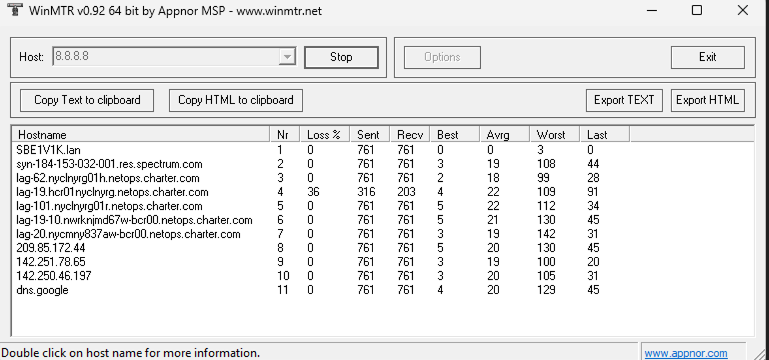
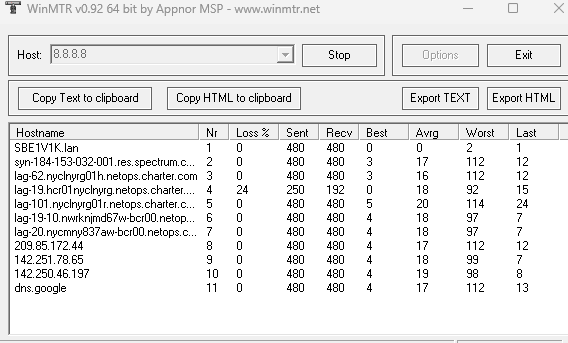 0
0 -
ICMP ECHO is really only good for a very top-level diagnostic—mostly just a test for echo kind of thing. It is one of (if not THE) lowest priority in the stack on a lot of devices—one of the first things to get queued under higher loads. Sometimes that may be all you are seeing—congestion spikes.
The coax is your "pipe"--everything goes through it in small chunks while granted a timeslice for transmission... if something doesn't get through in one window, it may get queued for the next one. During times of heavy load, some of those queues may get longer and show up on something like an MTR as lost packets, but they actually got delivered on a delay longer than the report tracked.
Notice both those reports show 100% delivery at the endpoint... the packets forwarded with some delays (forwarding is one of the router's primary jobs), but the ICMP ECHO replies (an extremely low priority task) were sometimes delayed to the point of timing out.
What is more important is the stats for the endpoint. Any wonkiness in between onn such a report may give hints at were congestion may be skewing consistency at the endpoint... but the stats at the endpoint may not necessarily be bad, depending if the application has lag compensation or other features built into the transmission protocol in play.
3 -
Thanks. The ping test results are aligned with my online gaming issues or red mic or robotic sound issues in the calls. While many users may not notice this, it impacts my internet service experience badly.
This is a typical ping tracker to 8.8.8.8 and I ran it while gaming tonight. These spikes are pretty much aligned with the in-game response times. That's why, if ICMP not being prioritized it the problem, so the other things that are technically important for me :)
I had a tech today and he removed a splitter from my connection that was shared with another unit. I thought it would fix, and honestly I saw some improvements (or I thought so) but I still get the same results. The ping spike to 99 in the screen shot below, is easily 140ms+ to a medium range server.
At this point I believe, it is either the modem isn't able to process efficiently (I connect ethernet directly to the modem bypassing the router but same results) or this is simply a congestion at SPECTRUM node and I have 0 control over it.
I will go for a modem probably tomorrow and will hope it works. Otherwise, I will consider fiber optic in my area which will be an extra cost for me.
 0
0 -
@onurc : As RAIST inferred: No endpoint timeouts, endpoint RTT's > 75 = few and far between and never > 150, endpoint RTT averages = impeccable. So how do you ascribe the "red mic" thing to anything but a local issue? Did you capture some packets with e.g. Wireshark and find any latent or missing QoS data ACK's and/or retransmissions that are unequivocally correlated to the "red mic" or what?
🔗
Alt. ref.: 🔗 https://expertbeacon.com/why-does-my-mic-on-roblox-have-a-red-triangle/
1 -
Red Mic shows up in an internal conference call software. It occurs when the connection is weekend. I understand that might be due to router and wifi signals but I am seeing the spike even I am hardwired to the modem directly with a desktop or a laptop.
Regardless of which ping test tool I use, I see the same ping spike patterns. The tech showed up a few days ago and he connected my unit's coax to a completely separate line (can't tell the name but some units share a splitter) and after checking the signals for a few minutes, he said all looking solid.
I just launched three different games in steam, just to ensure this is not a game server issue and regardless of the title, all games also show a similar ping spikes. I wouldn't mind ping fluctuation from 10ms to 40-50ms but following patterns are definitely not showing a stable connection, ranging up to 150ms.
I will have to buy my modem tomorrow and will check signals when those spike occur. I don't understand why I can't access to that simple information.
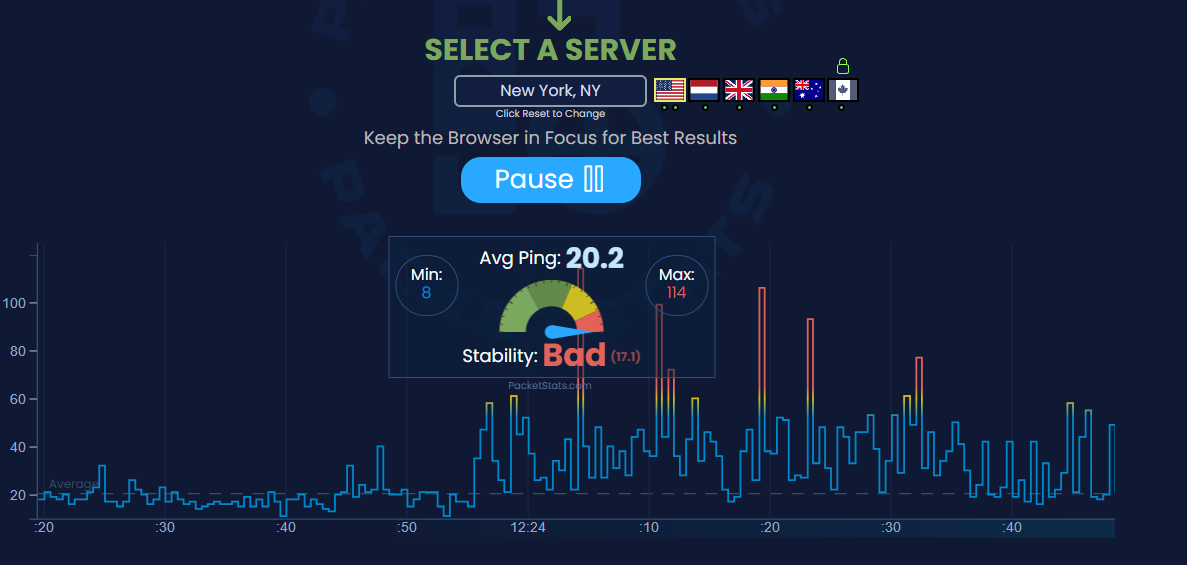
 0
0 -
I'd look at what's going on with the QoS data itself with Wireshark with the machine connected directly to the modem (router bypassed) with all of the server monitoring stuff temporarily disabled but that's just me. I'm an unfrozen caveman. Over and out! ☘️
1 -
This happens very frequently even when I am directly connected to the modem. The ping spikes are aligned with the performance of a game or a call, meaning they are real ping spikes.
I don't know how to access to QOS if there is one in spectrum default modems.
My only option is to buy a modem and start tracking signal strength and such. I believe the problem is with Spectrum local node or something in between that is totally out of my control.
it looks like I will need to pay for a fiber optic despite I have a free 1gig coax available :) Very sad.
0 -
Localized QoS would <typically> be more flexible in a standalone router, though there may be decent options in modem/router combos as well. Windoze tries to do it's own form of congestion control as well, but can come up pretty lacking at times.
HFC systems have a lot of shared pipes, so depend heavily on buffering and concatenation schemes to keep things moving. So there can be a LOT of stop and go gating at times.
VOIP traffic gets reencapsulated… effectively a VPN Tunnel. Sounds like it may be third-party. If it is not getting prioritized well (via QoS), packets could simply be getting delayed by the queuing that is taking place.
Same thing could be happening with game traffic.
More and more games are using UDP instead of TCP... which can be much more sensitive to packet queueing. And if the developer is not flagging packets as a higher priority content type in the headers, it can compound the issue further. We actually experienced that very problem with FFXIV 2.0 ARR traffic when it launched over a decade ago. SE worked with ISP's in Europe where it was first confirmed to be a problem.
As @HT_Greenfield was saying, may need to see what is going on with the packets to get a better feel for what may be causing hiccups. Just looking at the ICMP ECHO details is not really sending up any kind of "red flag"... maybe "yellow" at best.
0