Didn't find what you were looking for?
We have advanced search options to make it easier to locate posts, questions and answers on this community.
More information can be found at Advanced Search Options
If you are looking for something specific, please check if someone else has already asked or answered the same question.
A note regarding upgrades and Network Evolution:
Customers will be notified by their preferred communication method (email or text) when upgrades are available in their area
We expect 100% of our service area to be completed by end of next year
Website (plushlaser.com) wrongly blocked by Security Shield, unblock form is also erroring out

Hi there - my business website, , is being blocked by Security Shield on my Spectrum home connection. I've confirmed it's specifically Spectrum's network causing this: the site loads fine on cellular data and other networks, and changing my device's DNS settings didn't help (which makes sense since I understand Security Shield filters upstream of that).
This is a legitimate small business site (a laser hair removal and skincare studio), hosted on Webflow with an active, valid SSL certificate. Google Search Console shows zero security issues, and domain ownership is verified with both Google and Microsoft 365. I believe this is a false positive, possibly tied to a low-reliability third-party scanner flag from early 2025, which I've already disputed directly with that vendor.
I tried submitting a review through the official unblock form (spectrum.net/support/forms/verify_url_security) but it's returning a "something went wrong" error and won't go through, no matter what I try.
Since this is actively blocking customers on Spectrum's network from reaching my business, I'd really appreciate a moderator manually reviewing/unblocking this domain. Happy to provide any additional verification. Many thanks in advance!
Best Answer
-
Hi & Welcome!
You can submit a Website Block Verification to have your website and URL reviewed. Spectrum users have the option to disable Security Shield, however it is also recommended that you contact your webhost to ensure there are no security risks blocking access.
0

Answers
-
I tried and it just erors out every time I submit
0 -
It's so strange because when I put it in the security: and put my URL in, I get the below:
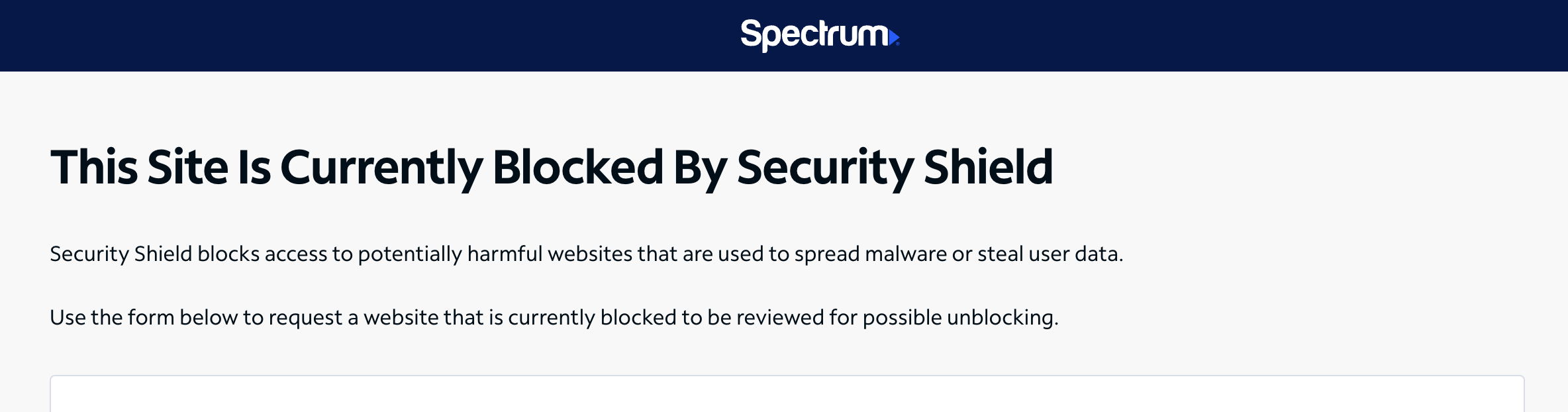
So anyone who has security shield enabled may run into this issue. It didn't start happening to me until recently, after I visited the site several times. Works if WiFi is off on my phone or if I use my hotspot, but never on WiFi phone or computer. Same with the other folks in my household
0