Lattency problems while playing videogames like cs2

Hello, I saw a post where someone had the same issue as me and hew was able to solve it
Is it possible to have a technician come over to my house to try the same thing to fix it?
this is the link to the post
https://community.spectrum.net/discussion/173454/online-gaming-has-frequent-lag-spikes-w-500mbps-spectrum-ethernet
Answers
-
Hello @karasu_shoyo
Welcome to our community! I'm sorry about the internet issues you're experiencing. While we're always happy to get a technician out when needed, we would want to do some troubleshooting with you as the modem isn't showing any issues right now or anything in the logs. Are you using a wired or wireless connection when playing? Also, are you on a PC or console?
2 -
I don't really have problems with the speed just lattency a lot on videogames
I use wired connection on PC0 -
I'm trying to play at the moment but is just impossible
Will atach an Image so you can see the lattency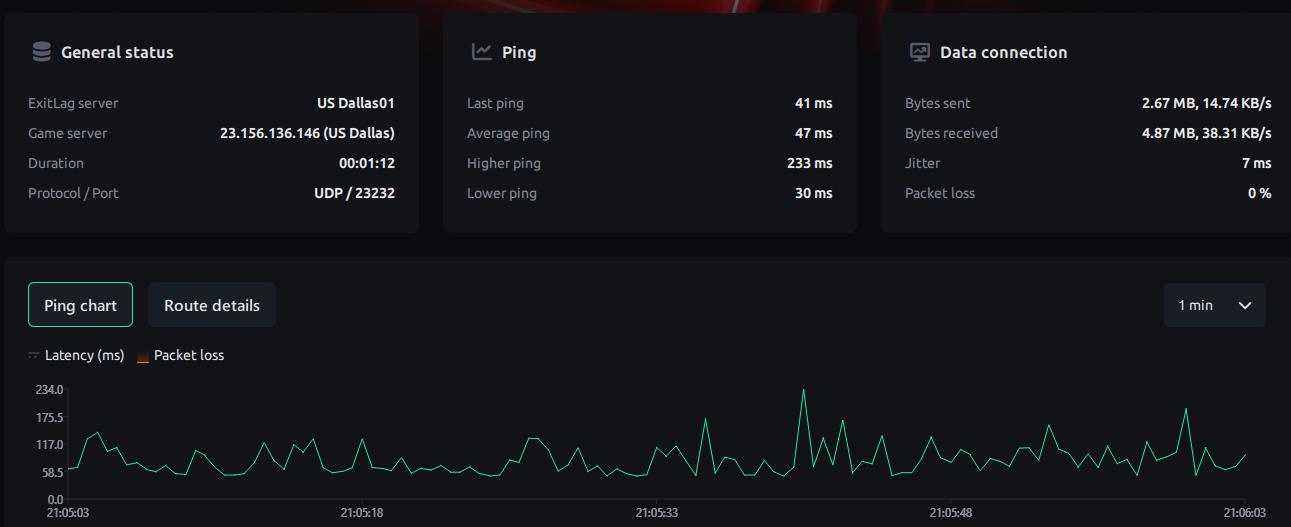 0
0 -
Thank you for the additional information. Have you attempted to reset all of your internet equipment yet? This can be done by unplugging the cable line, power line, and removing the battery backup if you have one for both the modem and the router for a solid 3-5 minutes. Are you able to try this and let us know? -Lyn
2 -
What Lyn said!
P.S.:
- The graphical plot is out of whack as the baseline of 58.5 doesn't line up with the nominal average of 47 ☹️
- UDP port 23232 ⁉️ ☹️
- 🔗 🔍 👀 ☘️
1 -
Yes, I've tried everything for almost 2 years now
I bought a new router as well so I could use SQM, it does help a little bit but still is really bad sometimes, most of the times is at night the the latency gets so bad and at that time is that I do have time to play videogames 😔
1 -
Don't really know what you mean but I will read the link that you sent me when I get home to see if that helps
Thanks a lot!
1 -
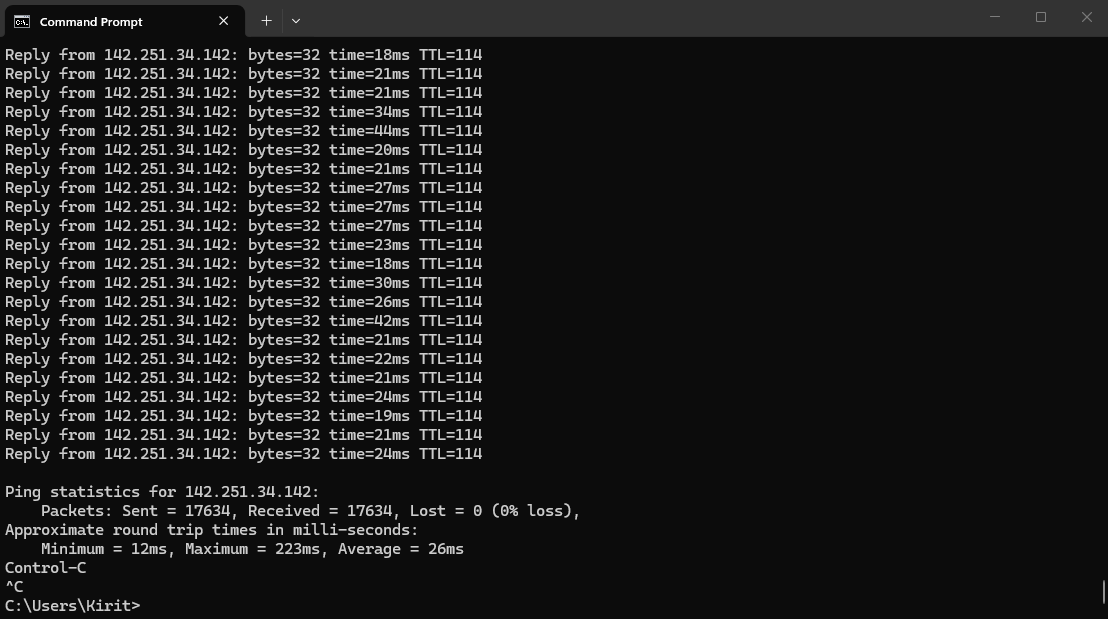
Don't bother since i now realize that you're using EXITLAG. My bad. I'm a moron. Feel free to run a simple ping test to your chosen EXITLAG server and let that run for maybe several dozen cycles or more, and if that's all good, then i think your beef with CS2 may be on EXITLAG.
1 -
Does EXITLAG use the port forward thing? I just did it on my router settings to try and see if that helps
I just install EXITLAG like 2 days ago to see if it helps with the lag because I don't see any other options so I don't think the app is the problem.
Been having lattency problems for like 2 years and I think is the location because I used to live in other apartment where I had spectrum as well and I didn't have any problems with lag, the apartment is literlly 5 mins away from where I live now the only difference is that I was living on the 3rd floor before now I live on the first floor and the signal on my phone is really bad here so I was thinking that maybe there is something making an interference but I'm not sure.
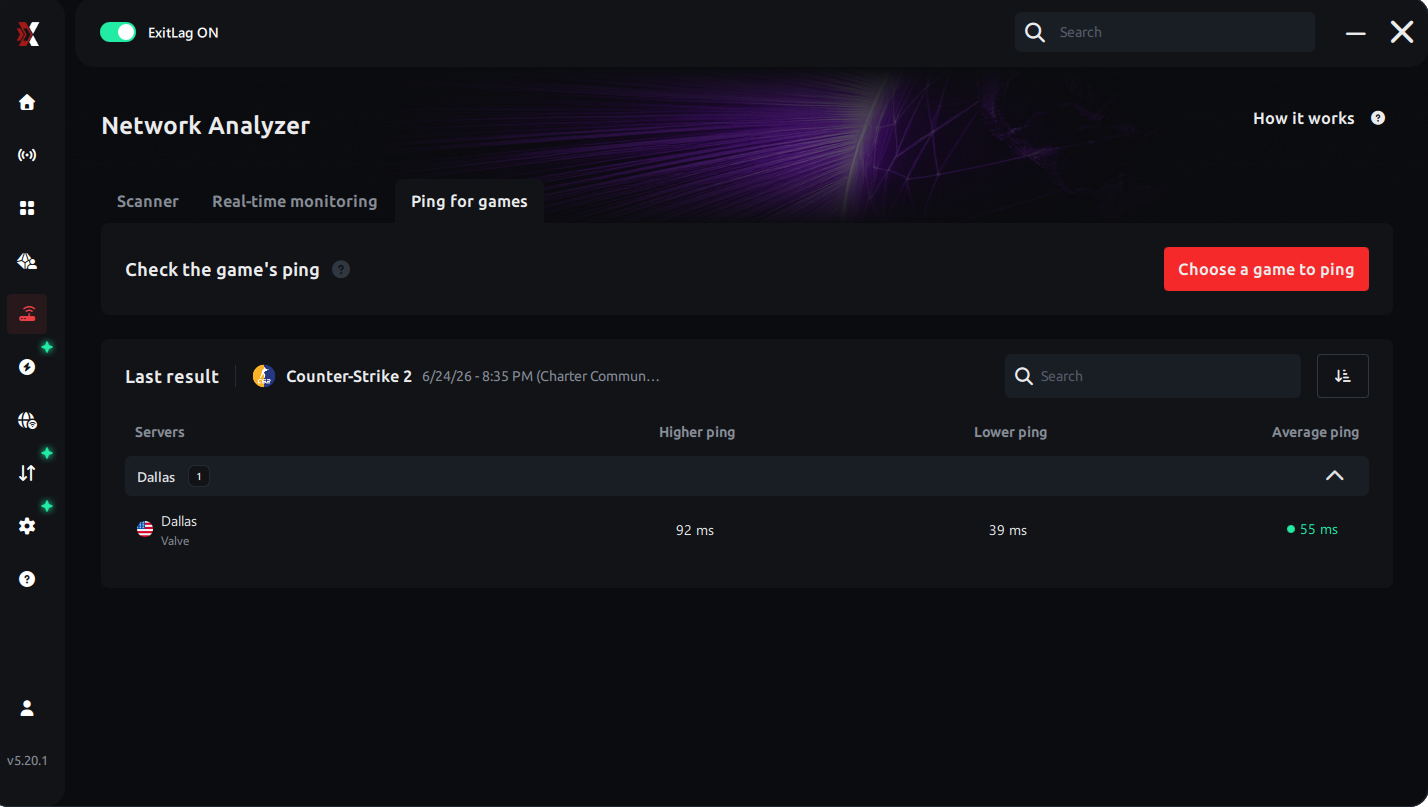
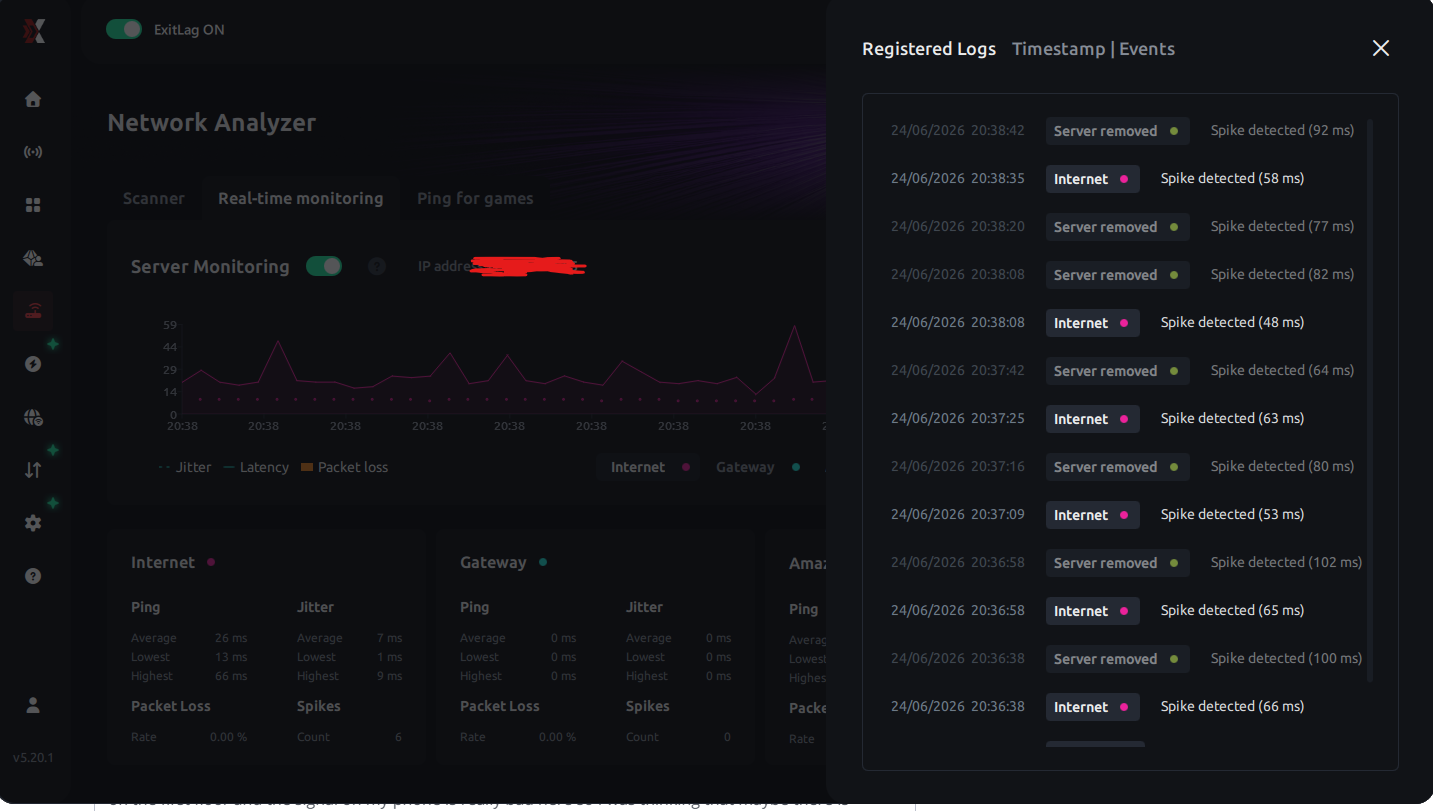
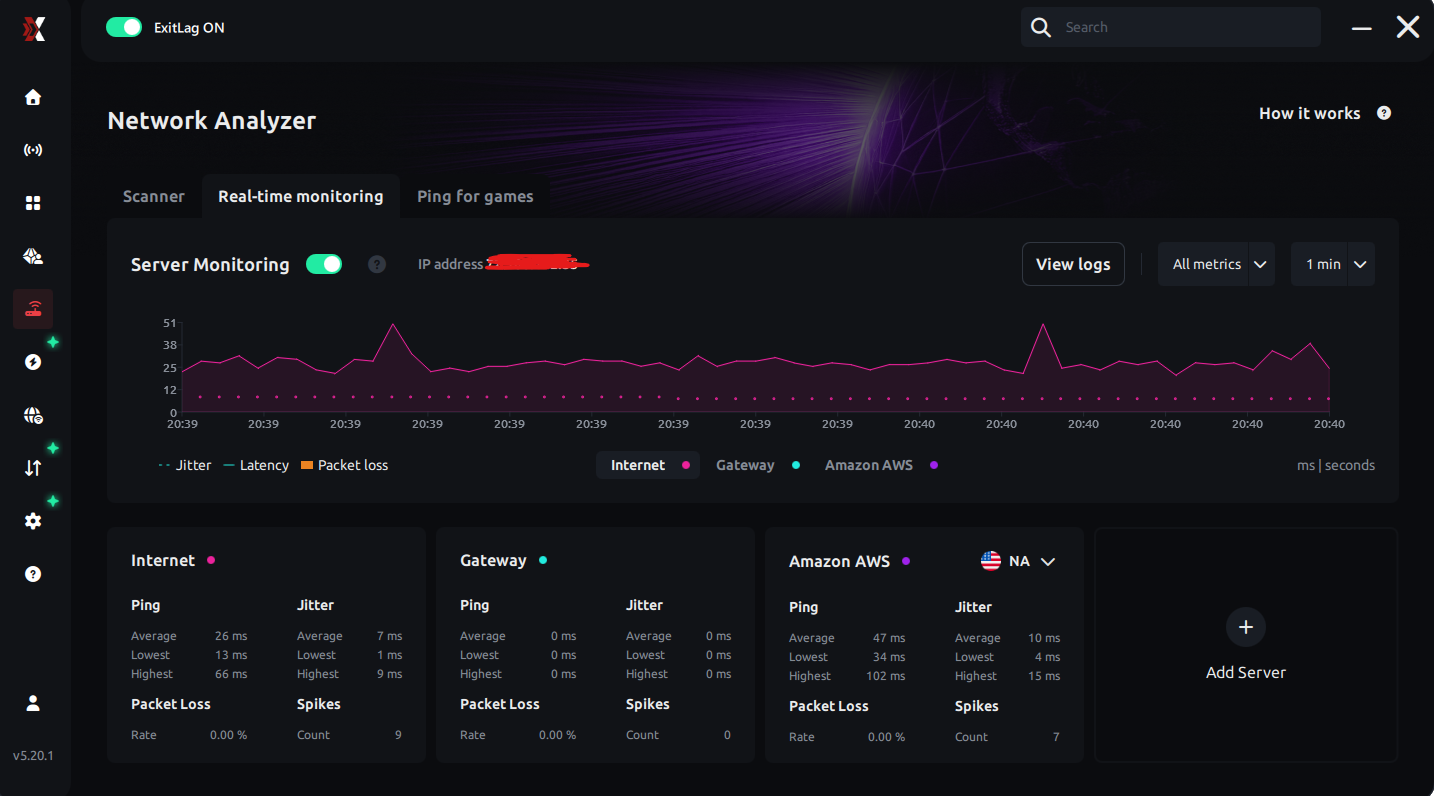
Is that good enough for the test? let me know if you need anything else
I did try to play with exitlag off yesterday as well but I still had lag and like I said before it's been almost 2 years that I've been having this problem on this apartment.1 -
- Port forwarding is something that you do. If you're asking if ExitLag has any affect on which protocols and ports are at play, clearly not as far as i can tell.
- With reference to the discussion that you referred to in your opener, that user demonstrated actual packet loss [❗️] with none other than www.google.com [‼️] with the machine Ethernetted directly to the modem WAN port‼️
- By "simple ping test," i meant this:
🔗 https://learn.microsoft.com/en-us/windows-server/administration/windows-commands/ping 🔍👀 - You may be able to gage how up to snuff your hardware as well as your fine tuning thereof are as follows:
🔗 🔍👀
🔗 🔍 👀
0 -
Oh sorry you told me to not bother so I thought EXITLAG was doing the port forwarding
I did activate the port forwarding and I think is better than before but I still get some lag at late hours, I did the ping test with google.com while playing cs2 with EXITLAG on don't know if I should have used other link instead of google.com tho
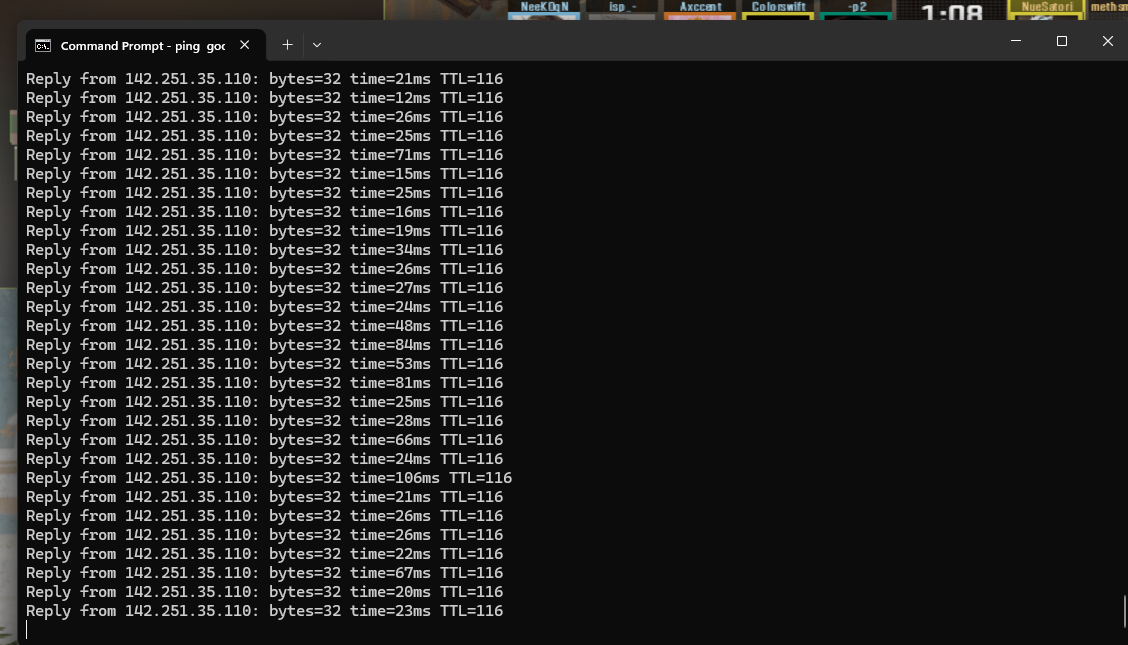
I do get spikes from time to time of ms wich is really bad for cs2, don't know if there is any solution for that
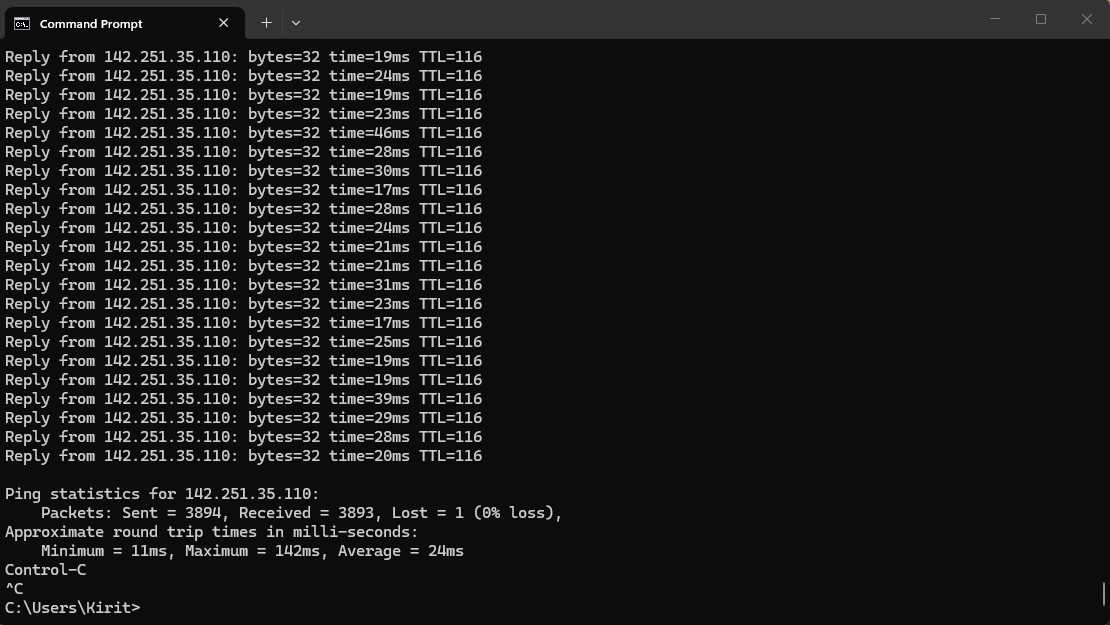
it only says that I get 1 lost but still the spikes on ms is kind bad, what do you think I could do here?
Thanks a lot for the help!0 -
I'm playing at the moment and is 11:30PM and the lag is worse that any other time
getting spikes every 3 to 5 mins :S
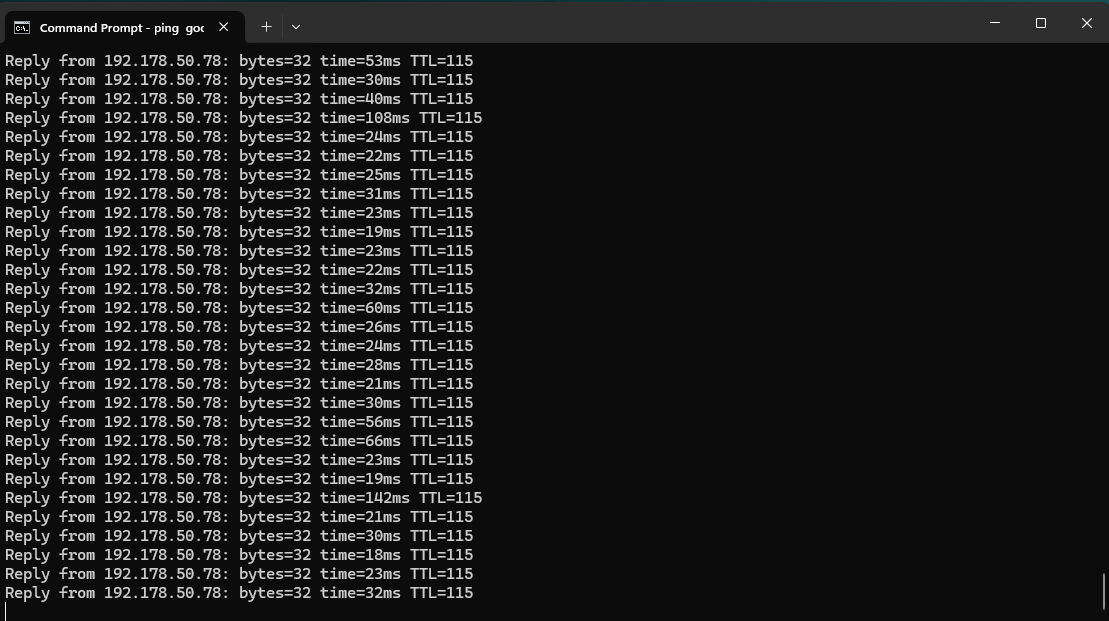 0
0 -
Hey @karasu_shoyo, was that with exitlag on? If so, please try turning it off and run the test again. The longer you can let it run the better. As someone who plays CS2 and other online games I understand lower ping is always better, but a single packet going up to ~100ms wouldn't cause noticeable issues in game. Are you getting disconnected from games, rubberbanding, or you just notice your ping increasing?
2 -
Edit: What William said!
P.S.: "Don't bother" was my mistake. My bad. I'm a moron. 😵💫 Over and out. ☘️
1 -
I will try with EXITLAG off today and will let you know how it goes and the problem is not really ping increasing but rather ms at least that's what the game CS2 shows to me. I know a single packet going up is not a big deal but for a game like CS2 and at high levels where I play like faceit LVL10 it is kind of a big deal xd and like I said is every 3 to 5 mins when the lag is worse.
0 -
is not a problem at all haha
Thanks a lot for the help! really appreaciate it1 -
I just play for like 8 hours with EXITLAG off and still the same problem, throghout the day is good no problems almost at all but from 7:30 PM onwars I do get a lot of spikes of ping sometimes almos every 10 seconds
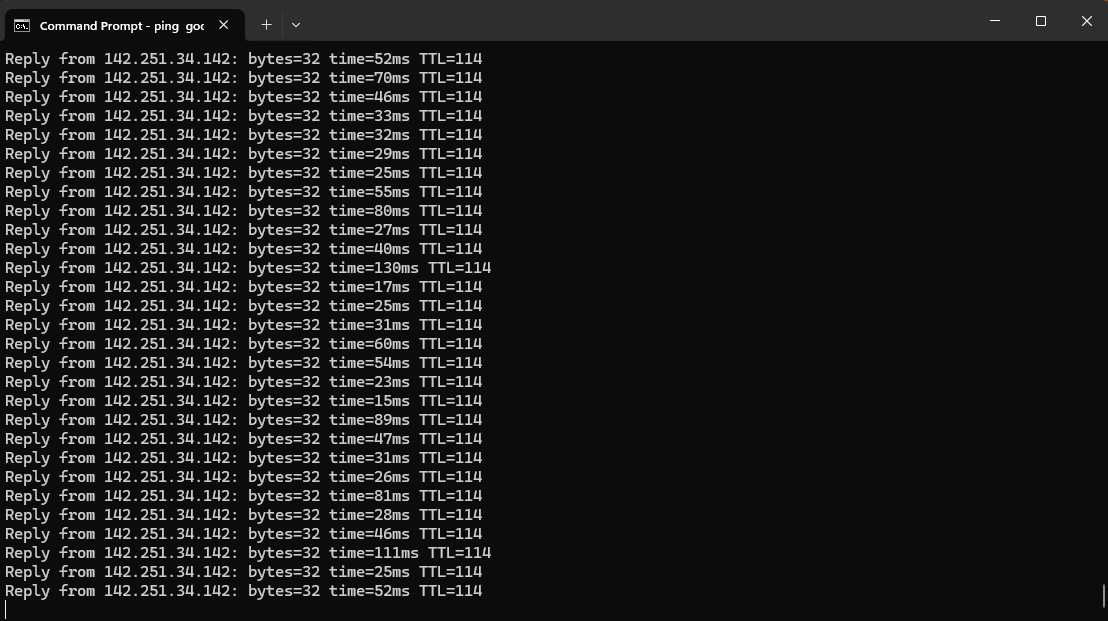
like I show you here, and the more late it gets the worse it is
at 7:30 the spikes is like 1 every 5 to 10 mins but at 9:30/10:00 is way too bad every 10 to 15 secs
0 -
-
I guess there is nothing to do to fix this problem?
0 -
Sorry for the delay @karasu_shoyo. Lets go ahead and set up that appointment with a technician. I scheduled the next opening Sunday, July 5. If that doesn't work for you please let us know your availability, or you can reschedule it through the My Spectrum app. A reminder will be sent to you prior to the appointment, you may receive a call as well. Someone 18 years or older with government issued ID is required to be present while our technician is on site.
0