Didn't find what you were looking for?
We have advanced search options to make it easier to locate posts, questions and answers on this community.
More information can be found at Advanced Search Options
If you are looking for something specific, please check if someone else has already asked or answered the same question.
This content may be outdated or inaccurate
All posts are closed and commenting has been disabled
If you have a question or comment, please start a new post (registration is required)
Leave the Archive
Is mobile.charter.net's IMAP e-mail server having problems right now?

Hello,
I'm getting this error from my POP Peeper in my old updated, 64-bit W10 Pro. PC:
"cable [1000: IMAP] ['mobile.charter.net' (993) SSL: 1] [ClientSend: '' (0) SSL: 0] [oauth: 0] [consec: 4] [enabled: 1]
- SSL connection failed - certificate failed: unable to get local issuer certificate [2] Add exception: pp://AddSslException?mobile.charter.net"
Did mobile.charter.net's SSL expire or something? Thank you for reading and hopefully answering soon. :)
Comments
-
I am getting a similar error trying to connect to email through an android app. No problem accessing email from desktop.
cant safely connect to server. (java.security.cert.certpathvalidatorexception: trust anchor for certification path not found)
1 -
James_L: Webmail was fine in my PC's Firefox web browser, but not IMAP e-mail clients. Can you please try on your end with non-web browser email client? I used the settings shown in web page.
mvn23: Thanks for comfirming.
0 -
Thank you for the information, are you currently still having this issue with our email?
1 -
Yes, I am still having the same problem from my PC's IMAP e-mail client app (not web browser's web site client).
0 -
I am having difficulties with my PC's IMAP e-mail client as well - it started yesterday. "The certificate for mobile.charter.net does not come from a trusted source." It gives this error for both the incoming and outgoing servers.
0 -
Edward_T: I never had this problem before yesterday though. Other users are having the same problem as you can see in this forum thread.
0 -
I do understand. We need to rule out an issue with the email program you are using. If you can test it with another one to see if there is a difference then it would help verify that it is not the email program.
1 -
Interesting. It works in both updated 64-bit Thunderbird v141.11.1esr and SeaMonkey v2.53.23 e-mail clients in the same PC. I even deleted and recreated my old Spectrum account in POP Peeper, but still got the same errors. I asked POP Peeper's support about this in my forum thread. They might need more details about this issue.
What about other users who also have similar problems? Daikomyo, what are you using as your e-mail client?
0 -
That is good to hear that it is working. Some email clients have extra security that causes this. There is likely a setting that can be turned off or lowered to fix this.
1 -
I am using Thunderbird and getting the same certificate fail for mobile.charter.net
1 -
abaworld: Which version and OS?
0 -
Hello @abaworld;
I would suggest you make sure you are using the correct mail settings. We had many other servers that is no longer being used. You can look at the current settings on the following site. Thunderbird also has a setting that can put in an exception for the server. The instructions on how to do this is found below.
- Go to Settings > Privacy & Security.
- Scroll down to the Certificates section and click Manage Certificates.
- Go to the Servers tab and click Add Exception.
- Type your mail server address and port (e.g.,
yourdomain.com:993) and click Get Certificate.
- Click Confirm Security Exception.
0 -
Tried this using mobile.charter.net:993, got: No Information Available - no ability to confirm
1 -
0
-
and Thank you for quick response!
0 -
Found problem
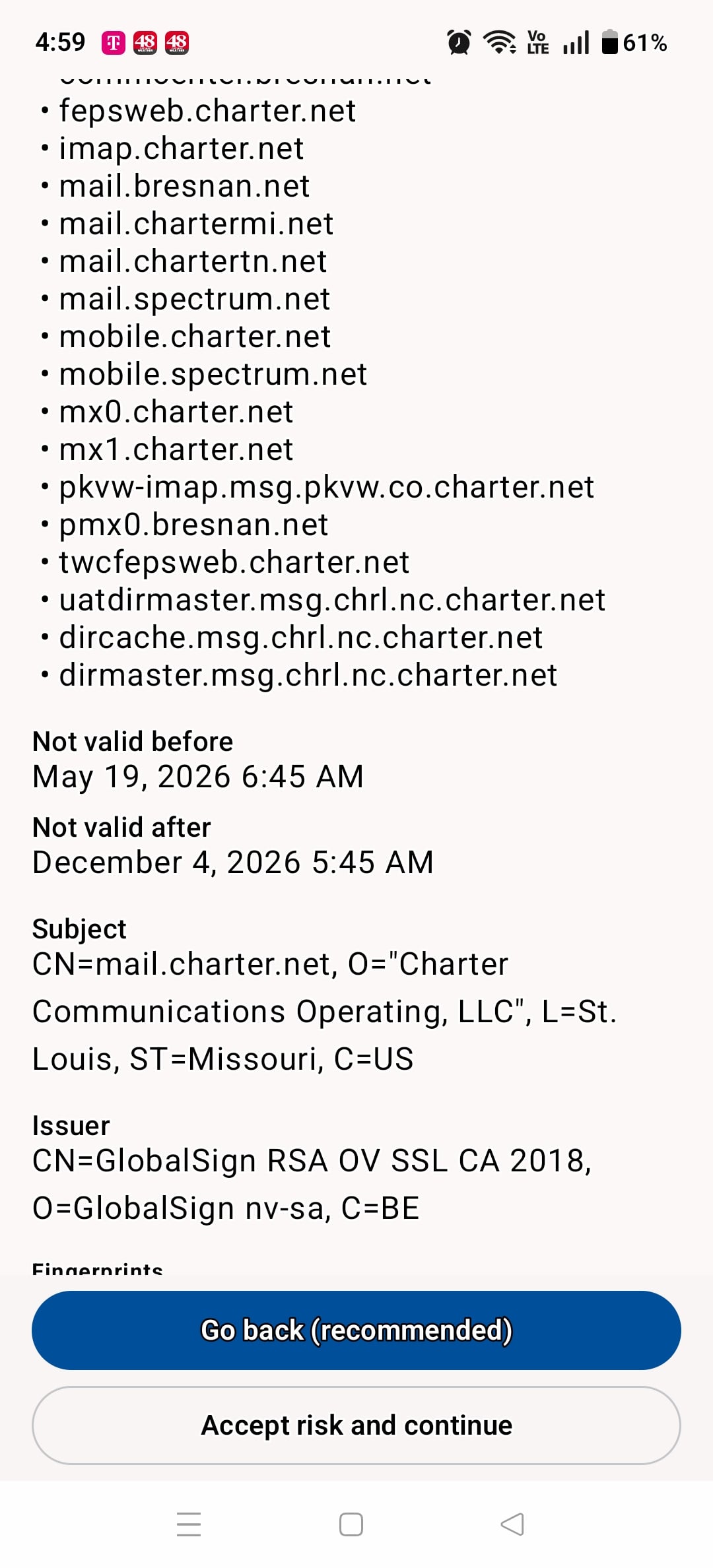
See before date on certificate it is not currently active this problem started this morning so someone put an invalid certificate on the server facing the internet more than likely just accept the certificate it will be valid after the 19th of June.
1 -
There should be no reason why it is not find the server. I would recommend you reach out to Thunderbird support for suggestions.
0 -
I cannot get my Spectrum email on three different android devices using Outlook. The most recent emails I received are from 6:45 am CST today. I can still get my email with Outlook on my computer and on the Spectrum homepage. This problem is with three different Spectrum email addresses on two separate accounts.
2 -
Oops got my months mixed up
1 -
I also tried adding charter.net email addresses into Outlook - many attempts failed
1 -
AntDude sorry just saw your question. Thunderbird 151.0.1 64bit, Windows 11 latest build
1 -
I am creating a ticket to our engineers to confirm if there is a certificate problem with our servers. This may take time to fix. You can try putting an exception or click on the accept risk to get by the error for now. You can also visit www.spectrum.net to access the webmail till it is fixed.
1 -
I am able to connect to the servers via mobile app when the security settings SSL/TLS are set to accept all certificates on the inbound and outbound servers. The error comes and goes toggling back and forth between accepting all and not. I cleared all data on the app to see if a good certificate would install, no luck.
This is not secure, is there a fix for this?
1 -
As long as you brought it up: 20+ years, never used the webmail option. I can see my main email address and all folders, but I have 2 other email addresses with charter.net - I don't see them. One of them is for my wife and she actually takes life seriously so I don't want to explain to her that she no longer view her emails…
0 -
Hi Ed, your post showed up as I was submitting mine.
Thanks
1 -
I may need more customer examples to get this resolved properly. If anyone else is seeing the problem, can you provide me the following.
Error you are receiving:
Email program you are using:
Does it work in webmail:
Does it affect all emails on your account:
1 -
Spectrum mods: Jeff, in my forum thread, was able to reproduce it on his end. We think this is a Spectrum's side issue since other various e-mail client users and I are having this problem. I hope Spectrum can figure and fix this soon.
0 -
Error you are receiving: java.security.cert.certpathvalidatorexception: trust anchor for certification path not found (Error goes away when accepting all
Email program you are using: Nine on Android, confirmed same error on Aqua Mail as a test
Does it work in webmail: Works on Webmail and on MS Outlook Desktop
Does it affect all emails on your account: Yes
1