Routing issues with Spectrum network resulting in significant packet loss. (Texas area)

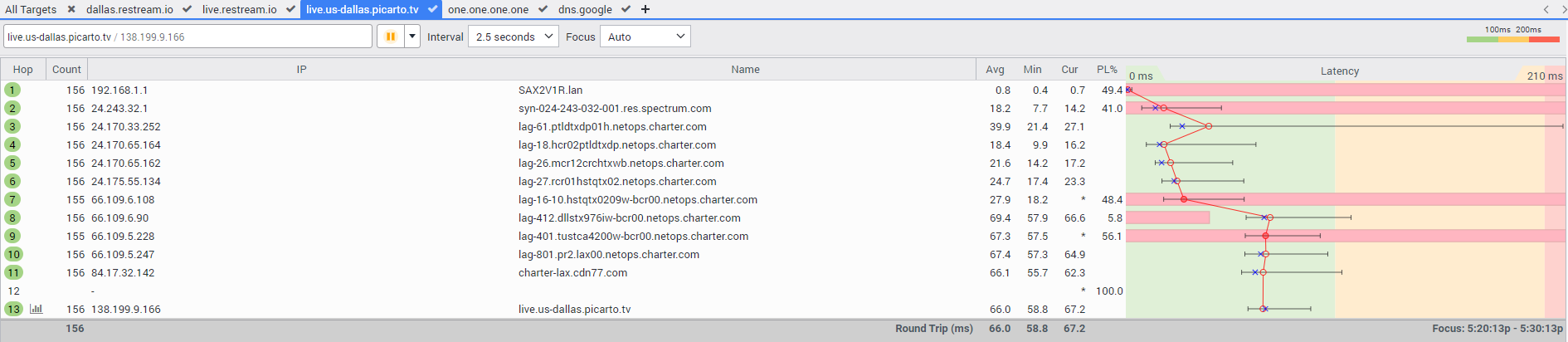
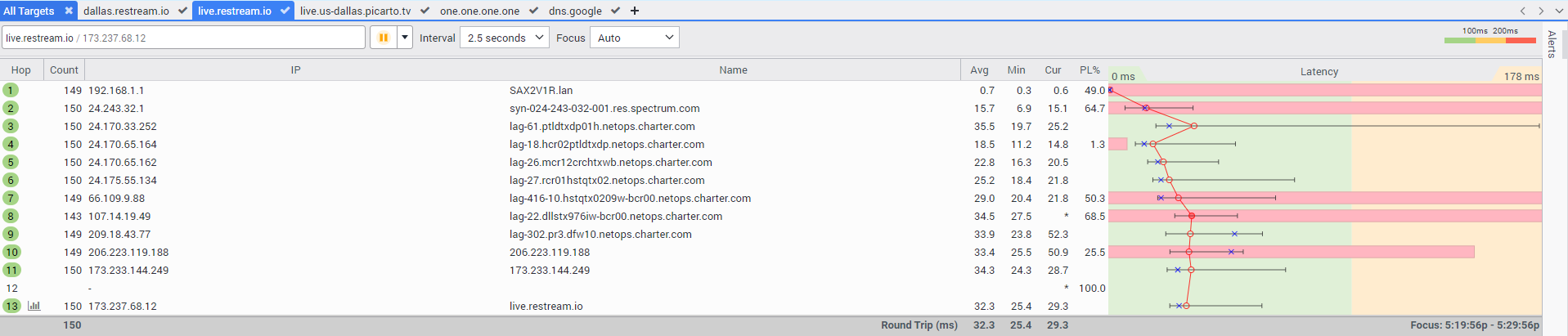
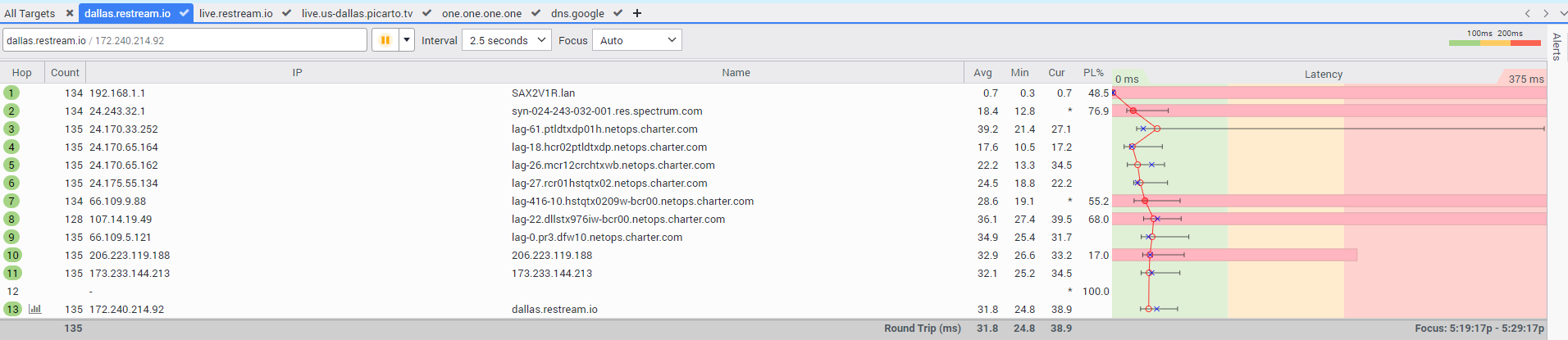
I know enough about networking to understand there is a problem here, but I do not fully know the language to convey it meaningfully. Apologies for what I am about to do here, but this is a summary from Google Gemini after I asked it to arrange my findings into a summary that a technician would find useful:
SUMMARY:
I am experiencing severe outbound packet loss disrupting my live-streaming traffic. I have isolated the issue using concurrent PingPlotter traces. Traces to Anycast DNS (8.8.8.8) are clean, but traces to Dallas-based media ingest servers (Restream and Picarto) show consistent packet loss originating on intermediate edge nodes ending in spectrum.com / charter.com.
Because this loss is localized strictly to these routes and occurs entirely within the Spectrum core network prior to the handoff, this is an internal Spectrum routing or peering capacity issue on the path to these destination ASNs (Autonomous System Numbers). Please escalate this traceroute data to your Network Engineering/NOC team to review the outbound transit paths for these routes.
I have swapped out my old Spectrum router for the latest model and configured that earlier this week. I've already been on the phone with support and escalated it as high up as they are allowed to take me, so now that I've jumped through the hoops and confirmed that the issue is not with my home network or its equipment (negating that Hop 1, the router itself, commonly deprioritizes ping requests so I am ignoring the packet loss there) hopefully this can be looked at.
I'm not going to be a jerk and whine and say I'm a professional streamer and this is my livelihood, because I am not. This is just my only real social outlet and it's upsetting that I cannot play games or draw pictures with my friends without the stream just cutting out abruptly. I have 19Mbps upload and I only broadcast at about 3 to 3.5Mbps so I am not exceeding any kind of limitation. It's been fine for months, if not years with only minor hiccups, but this has been persistent following some gnarly storms we had in the TX gulf coast a few weeks ago.
Comments
-
Hey @AtariPrototypes, welcome to our community!
Your traceroutes all show you are getting 0% packet loss. It's not just your router that can depriotize ping requests, any hop can. When interpreting traceroute results we are looking for a problem like packet loss or high ping that starts at some point and persists on every hop after including the destination server. You can see my write up about this. Do you get your full speeds when running a speed test? Can you elaborate on exactly what issues you encounter when streaming?2 -
I'm a bit confused as to what the red bars and PL% markings mean then, as I know that points noted with an asterisk mean that the connection timed out and had to retry. Those jumps show up as three individual asterisks on a tracert done via Command Prompt too, PingPlotter just lets me continue running them and get a rolling average. The connection does seem to eventually go through.
What happens, and I've confirmed this on two separate systems (one Windows 10, and one Ubuntu) that the stream (via OBS, at ~3.2Kbps and an audio bitrate of 128 - so barely 720p) will hiccup just long enough for the connection to Restream/Picarto to register the broadcast as offline for a split second, because as soon as the "Disconnected from server" dialog box disappears it's immediately replaced by the "Connection reestablished" one. It doesn't stay off, it just blips long enough for everyone to need to refresh their browsers to see it again. Happens every 20 to 40 minutes.If the servers/gateways are deprioritizing ping requests I suppose that's an explanation for it, but I'm not certain why connections to multiple different servers on different businesses would experience near identical issues.
Speedtest results seem fine? I am grandfathered in on the lowest rung Affordable Connectivity Act plan because even the most basic plan has the same upload speed as the next two tiers up. I literally do not do anything online other than stream games or drawings. I don't watch anything, I don't have any subscriptions to Netflix/Hulu/Disney, I don't play any online games etc.The problems started just after the storms we had around Corpus Christi, TX a few weeks ago. Since then, every Friday (the only day I stream) the interruptions happen constantly. Tonight I routed everything through ProtonVPN to avoid Spectrum's infrastructure and there were a few dropped frames (<0.5%) as a result of the artificial bottleneck by the VPN but I had zero issues with disconnects & interruptions.
0 -
They are individual hops which are not consistently replying to your ping requests. Yes, we know it is just ping deprioritization because the following hops (including the final one at the destination) are not showing that same amount of packet loss. This is completely normal and will be seen on most traceroutes even if there are no problems. If you were actually getting 50%+ packet loss the problems would be much worse, if you could even connect at all.
If you run just a normal ping test (In a Windows command prompt enter "ping live.restream.io -t" and leave it running for a few minutes, then use Ctrl+C to end the test) do you get any packet loss? What if you ping a different server like 8.8.8.8? Do you have any problems using the internet outside of streaming? When you said your Speedtest results seem fine, did you mean you consistently get your full upload speed? Have you tried streaming to a single service instead of going through restream?1 -
Just spitballing, but do you know what type of modem you are using (DOCSIS 3.0, 3.1)? Is it Spectrums or your own? If your own, which brand/model? Just would be nice to rule out older tech triggerring something that may be more easily avoided with a newer modem.
Some older protocols use a concotenation scheme that tries to bundle/burst uploads (so it may be sending in static sized bursts), which may cause some weirdness depending on how your data is expected to flow. There were also some chipsets that had some strange latency issues of their own as well.
If part of a segment gets held too long in a queue along the way, it can cause all manner of wierdness—and it gets worse if something like UDP is in play instead of TCP (no flow control, so incomplete segments may get timed out and discarded at the endpoint).
Running Through a VPN can sometimes help mitigate it because it will usually drop MTU, which reduces the max amount of user data in each frame sent (up to 1460 bytes of user data without, could be 1380 or less with VPN). Yes, the extra overhead slows things down (more frames needed for the same amount of user data), but it can also smooth the transmission burst/wait cycles, offsetting some weirdness that may be getting triggered.
0 -
@William_M - The basic ping test both to Restream's auto-location server (live.restream.io) and Google's both seem to be working fine and none of them are returning any issues at all after running for 10 minutes. As far as using the Internet outside of streaming, I don't really have many issues to speak of. However, I also don't actually really use the Internet much at all. So if there was unilateral degraded service I likely wouldn't have noticed it. To test I put on a couple of YouTube videos this morning and they seem to work but the resolutions on them weren't any higher than 1080p, I'm not sure what I could do to really stress test the network.
As for upload/download speeds according to what I'm seeing in the MySpectrum app summary (113 down / 23 up) versus Speedtest.net (approx 96 down / 19 up) I am right there in the range of what I am paying for. Of course, routing through the VPN it does certainly put a dent in those speeds (the upload speed dropped to an average of 6 to 9 Mbps upload for example). But doing that did seem to stabilize the connection while streaming.
I get the same issues with both Restream and Picarto. Picarto isn't on the Restream package I have, so that is one single service that I stream to on a completely different PC (hardware and OS) on the same network. I get the same hiccups and interruptions regardless of which computer I'm on or which service I'm streaming to. I will say that the Picarto hiccups seem to trend toward just lagging and dropping frames without lapsing for a period long enough where the entire stream goes offline; that could just be a difference in the "sensitivity" (for lack of a better term) between how Picarto and Restream's servers treat connection issues.
I've noticed however, that when the stream connection drops it is not specific to my entire home network. The separate device I use to watch the stream chat remains on the network and fully usable. And if I upload something, like one of the art videos to my personal YouTube, that seems to go pretty fast and it doesn't time out or cancel the uploads meaning that uploading single large files works.
It does seem pretty localized to streaming but nothing has changed on my end config-wise in literal years, and it seems strange I'm getting the behavior on two different services. The only commonality shared is that these are "multimedia heavy" applications.
________
@RAIST5150 - According to the tech who tried to help me on the phone a week or so ago, the router that I was sent earlier this week is the latest model. It's ID'd as a Wifi 6 model on the back, the specific make being "SAXIVIS". If DOCSIS 3.1 is the latest standard, and that is reflected in Spectrum's hardware, I assume that's what I'd be using. (The prior router I had was a later revision of the Wifi 5 hardware but I don't know what one specifically because I've already returned it.)
________
ALSO, I should point out that nothing on my home network uses Wifi for streaming, because I know that's just a dumb idea lol. Everything is hard-wired into the back of the router. The only thing that connects via Wifi is my phone and I don't do anything with that.
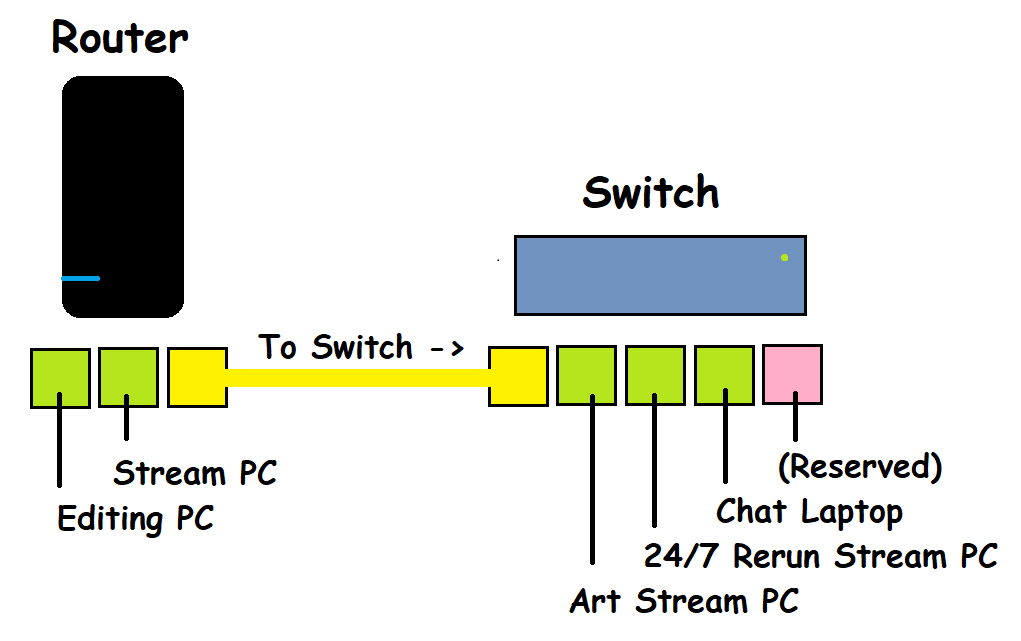
Here is a diagram of my full setup. Of note, the square labeled "24/7 Rerun Stream PC" is offline and not operational so it is not on the network (and never has been). Only one system is ever used at any given time (for example, I am posting this from the "Editing PC", and all of the other devices are either turned off or on hibernate and are off the network). I am seeing the connection hiccups on both the "Stream PC" and "Art Stream PC", which are each plugged into both the router directly or by way of the TP-Link switch I have so it doesn't seem like the switch itself is causing any issues.
 0
0 -
May be a long shot, but there could be some issues on the newer modem's OFDM upstream that were not present on the older modem's QAM upstream. IDK if Spectrum could reprovision it to use just one approach or the other (should still have access to at least 2 fallback QAM channels good for up to somewhere between 20 and 38mbps). It may even be trying to swap between them periodically depending on what all is going on with the signaling.
This may require a bit more detail than those associates may be able to investigate though. Might require escalation to a more advanced team. We haven't been able to shift right to Tier3 support since Time Warner left the group, but if you can get to an "admin" level, they may be able to take a closer look at such stuff or forward to someone who can.
0 -
Have you tried streaming just to Picarto, with nothing else going at that time? Can you try connecting just your computer straight to the modem (bypassing the router,) reboot the modem, and check if the same thing happens?
1 -
Last night I did a stream to Picarto and in my haste I forgot to turn on the VPN on that computer, so it connected to the streaming servers directly. I did not notice any significant hiccups with the connection aside from another <0.5% total frame drop at a speed of 3.2 Mbps. So, that did seem to work.
I should reiterate though, I only ever do one thing at a time on my home network. When one computer is occupying the network by way of streaming, the others are either turned off or in hibernation mode and thus are not competing for resources. They are just located in different rooms of the house, preventing me from doing everything on one system.
0 -
Edit: Try it with the machine Ethernetted directly to the modem WAN port like William suggested and then, if that's good, try it with the router but without the switch connected at all, just for kicks.
1 -
This post is in reference to this now-closed thread:
This thread was closed for inactivity so I cannot go back to make an update post nor edit an existing one, however in case anyone else has a similar issue and does a Google search I want this possible solution to be findable.
After following the advice in the old thread while also doing my usual weekly streams I began to slowly pinpoint the issues I was having. I reconfigured OBS, upgraded my Spectrum hardware, tried with and without a VPN, tried streaming direct to specific services instead of Restream etc. Since this process took a while, the old thread got closed because I guess the moderators assumed it was abandoned.
_____________________________
WHAT WORKED FOR ME IN THIS SPECIFIC SCENARIO — I finally reached out to Restream's support team and stated that I believed the issue was specific to their servers and not Spectrum, Picarto, Twitch, or anyone else. It did not matter if I used the "auto-detect" server or specifying a specific US one (Dallas, San Jose, Chicago etc). They all had consistent behavior with random disconnects lasting just long enough for OBS to detect instability. This could be a larger issue nebulously split between Spectrum and Restream, but I was able to hone it down to happening just with Restream's servers and not really anywhere else so regardless of Spectrum's network that means Restream are playing the majority role here.
The Restream support tech I was escalated to provided me with a working build of a new product they are working on called "Amplifier". This is a command line-esque program that must be run alongside OBS while you are streaming, and in order to use it you also need to reconfigure your OBS Stream settings to use a "Custom" RTMP server (NOT the automatic Restream option built into OBS) and then set your server to "localhost" along with a specific port that Restream can provide to you. (In my specific case I also had to modify my auto-keyframing settings, Restream will let you know what tweaks to your settings you should make.)
This sets OBS to broadcast to "itself" and the specified port pipes it to the Amplifier program which in turn connects in a more direct way to Restream's servers and automatically accounts for latency and adjusts for it on the fly. Also, DO NOT USE A VPN WITH THE AMPLIFIER.
I've run two full streams (3+ hours each) and a shorter test one and the end result was about <0.2% dropped frames and absolutely zero of the disconnects I was having issues with. So I think this problem might finally be solved and I am confident in providing what I think the solution is. Obviously since the Amplifier program is still in production it's not something that's well documented online, and I did not even know about it until Restream support mentioned it to me specifically and provided me a link to the current build. Chances are whoever is reading this will probably not know about it either, so now you do and you can inquire if this could help in your case too.
_________________
Thank you to everyone here who chimed in on the previous thread to help me work through false positives and better understand some of the issues I was seeing (like I said in the old thread I'm unclear on some things so I was asking Google Gemini for clarification). With the discussion I was able to narrow it down and find the smoking gun. 😀
0