Repeated Loss of Sync and T3 timeouts after line repair - possible ongoing area disruption?

I’ve been troubleshooting some intermittent connectivity issues and I’m hoping someone can check whether these modem events line up with a known Spectrum issue or something affecting other customers in the area.
A technician came out on 10/3 and found an old filter/attenuator on my line that was no longer appropriate for the current service. He replaced it, and that made a big improvement to the signal levels. My upstream transmit power dropped from around 46–49 dBmV to about 38–41 dBmV, and the downstream levels/SNR now look very good.
I’m using a brand-new ARRIS S34 DOCSIS 3.1 modem.
Even with the improved signal levels, the modem is still logging repeated SYNC Timing Synchronization failure - Loss of Sync messages, along with occasional No Ranging Response received - T3 time-out errors.
On the morning of 10/4, between about 2:40 AM and 8:42 AM, I counted 27 Loss of Sync events and 4 T3 timeouts. A lot of them seem to be very brief, but they’re long enough to interrupt active connections.
I’ve also been monitoring the connection at the house next door, which is also on Spectrum. During the earlier problems, both houses were seeing packet loss at the same times, which makes me think this may be something beyond either individual modem or drop.
Would someone be able to check my modem history and, if possible, look at neighboring modems or CMTS/node health for correlated sync loss, noise, or other impairment? I’m mainly trying to figure out whether this is part of a known network issue or whether there’s still something local that needs another visit.
I’ve attached a redacted modem event log.
Answers
-
Good morning @srpape. Welcome to our community. I have reviewed the account and at this time all of the signals look good, I also ran a ping to the modem and there is not any packet loss at this time.
0 -
Hello @Katrina_L !
Thanks for checking. Yes, the signals generally look good, but the problem is intermittent, so I’m not surprised that everything looks normal at the moment. I had additional Loss of Sync events at 09:52:40, 09:56:39, and 10:05:39 this morning, so the issue does still appear to be ongoing.
0 -
Just following up with another day of modem logs. The issue is still occurring even though the signal levels look normal when checked. Here's a summary of today so far:
10/05/2026 11:54:05  Critical  No Ranging Response received - T3 time-out
10/05/2026 10:55:44  Critical  No Ranging Response received - T3 time-out
10/05/2026 08:26:32  Critical  No Ranging Response received - T3 time-out
10/05/2026 08:22:14  Critical  No Ranging Response received - T3 time-out
10/05/2026 08:07:50  Critical  No Ranging Response received - T3 time-out
10/05/2026 03:26:40  Critical  SYNC Timing Synchronization failure - Loss of Sync
10/05/2026 03:11:41  Critical  SYNC Timing Synchronization failure - Loss of Sync
10/05/2026 03:02:41  Critical  SYNC Timing Synchronization failure - Loss of Sync
0 -
Hi again,
This is still a consistent issue for me. Just from today:
10/11/2026 11:36:10	Critical	SYNC Timing Synchronization failure - Loss of Sync;CM-MAC=<redacted>;CMTS-MAC=<redacted>;CM-QOS=1.1;CM-VER=3.1;
10/11/2026 11:35:10	Critical	SYNC Timing Synchronization failure - Loss of Sync;CM-MAC=<redacted>;CMTS-MAC=<redacted>;CM-QOS=1.1;CM-VER=3.1;
10/11/2026 10:34:24	Critical	No Ranging Response received - T3 time-out;CM-MAC=<redacted>;CMTS-MAC=<redacted>;CM-QOS=1.1;CM-VER=3.1;
10/11/2026 09:39:17	Critical	SYNC Timing Synchronization failure - Loss of Sync;CM-MAC=<redacted>;CMTS-MAC=<redacted>;CM-QOS=1.1;CM-VER=3.1;
10/11/2026 09:28:17	Critical	SYNC Timing Synchronization failure - Loss of Sync;CM-MAC=<redacted>;CMTS-MAC=<redacted>;CM-QOS=1.1;CM-VER=3.1;
10/11/2026 09:22:21	Critical	No Ranging Response received - T3 time-out;CM-MAC=<redacted>;CMTS-MAC=<redacted>;CM-QOS=1.1;CM-VER=3.1;
10/11/2026 09:22:18	Critical	SYNC Timing Synchronization failure - Loss of Sync;CM-MAC=<redacted>;CMTS-MAC=<redacted>;CM-QOS=1.1;CM-VER=3.1;
10/11/2026 09:21:18	Critical	SYNC Timing Synchronization failure - Loss of Sync;CM-MAC=<redacted>;CMTS-MAC=<redacted>;CM-QOS=1.1;CM-VER=3.1;
10/11/2026 09:08:23	Critical	No Ranging Response received - T3 time-out;CM-MAC=<redacted>;CMTS-MAC=<redacted>;CM-QOS=1.1;CM-VER=3.1;
10/11/2026 09:08:19	Critical	SYNC Timing Synchronization failure - Loss of Sync;CM-MAC=<redacted>;CMTS-MAC=<redacted>;CM-QOS=1.1;CM-VER=3.1;
10/11/2026 09:07:19	Critical	SYNC Timing Synchronization failure - Loss of Sync;CM-MAC=<redacted>;CMTS-MAC=<redacted>;CM-QOS=1.1;CM-VER=3.1;
10/11/2026 08:50:20	Critical	SYNC Timing Synchronization failure - Loss of Sync;CM-MAC=<redacted>;CMTS-MAC=<redacted>;CM-QOS=1.1;CM-VER=3.1;
10/11/2026 08:42:20	Critical	SYNC Timing Synchronization failure - Loss of Sync;CM-MAC=<redacted>;CMTS-MAC=<redacted>;CM-QOS=1.1;CM-VER=3.1;
10/11/2026 08:41:20	Critical	SYNC Timing Synchronization failure - Loss of Sync;CM-MAC=<redacted>;CMTS-MAC=<redacted>;CM-QOS=1.1;CM-VER=3.1;
10/11/2026 06:53:25	Critical	SYNC Timing Synchronization failure - Loss of Sync;CM-MAC=<redacted>;CMTS-MAC=<redacted>;CM-QOS=1.1;CM-VER=3.1;
10/11/2026 06:26:22	Critical	No Ranging Response received - T3 time-out;CM-MAC=<redacted>;CMTS-MAC=<redacted>;CM-QOS=1.1;CM-VER=3.1;
10/11/2026 03:34:28	Critical	No Ranging Response received - T3 time-out;CM-MAC=<redacted>;CMTS-MAC=<redacted>;CM-QOS=1.1;CM-VER=3.1;
10/11/2026 00:41:04	Critical	No Ranging Response received - T3 time-out;CM-MAC=<redacted>;CMTS-MAC=<redacted>;CM-QOS=1.1;CM-VER=3.1;
Signals are still pretty good, though the number of errors continues climbing:
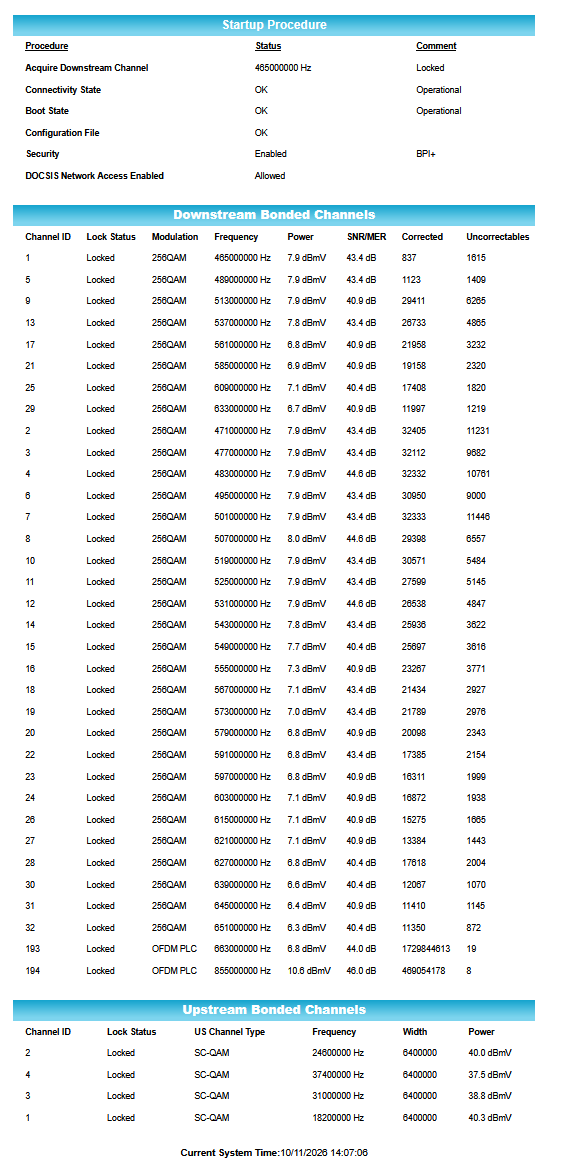
Someone has already been out to my house and said the signal is good, and we're seeing the same problem at the neighbor's. Can anyone help?
-Stephen
0